
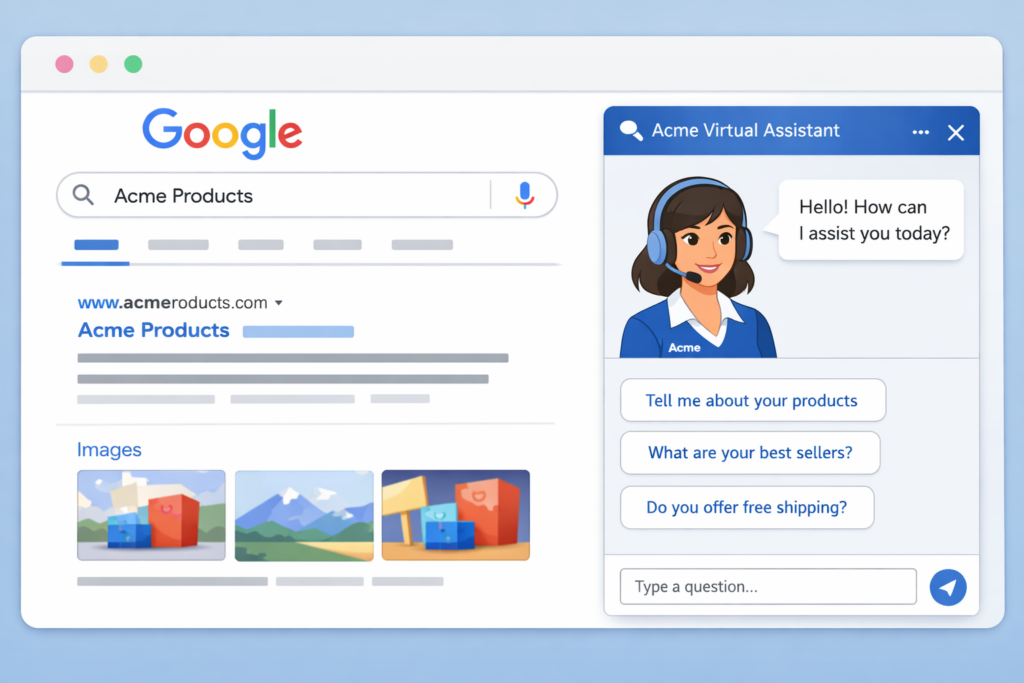
Google just announced brand agents, and if you have any kind of business, you need to understand what this is. A Google Brand Agent is an AI chatbot that represents your business directly inside Google search results. Users can ask it questions about your products, get recommendations, and potentially make purchases without ever visiting your website.
At TJ Digital, we’ve helped dozens of small and medium businesses optimize their presence across AI platforms, and this is one of the biggest shifts we’ve seen yet. 2026 is shaping up to be the year of agentic commerce, and businesses that set up their brand agents early are going to have a real advantage.
Table of Contents
ToggleWhy Google Doesn’t Want People Visiting Your Website
@tjrobertson52 How To Set Up Google Brand Agents – Google’s latest move to keep people OFF your website. Here’s how to check if yours is already live 👀 #GoogleBrandAgents #Ecommerce #MarketingTips #SEO
♬ original sound – TJ Robertson – TJ Robertson
Let’s be honest about the incentives here. Google does not want to send people to your website. It wants to keep them on Google Search. The more time people spend on Google, the more ads they click and the more money Google makes.
I’m sure Google also believes it’ll be a better user experience if users don’t have to hop around from website to website. And that might be true. But the business model is clear.
This isn’t new. We’ve been watching zero-click searches rise for years. Roughly 60% of Google searches resulted in zero clicks in 2024. When Google’s AI overviews appear, clicks on traditional results drop by nearly half. Brand agents take this a step further by letting users interact with your business right on the search results page.
What Is a Google Brand Agent?
A brand agent is an AI chatbot powered by Google’s Gemini model. It shows up when someone searches your business name on Google. Instead of just seeing your website link and some basic info, users see a chat option. They can ask the agent about your products, shipping, sizing, or whatever else they want to know.
The agent pulls from your website content and Google Merchant Center product feed to answer questions. It can show product cards, make recommendations, and carry on a natural conversation.
Right now, brand agents are only available to retailers. But if you ask me, this is coming to service-based businesses soon.
Eligibility Requirements
Not every business can set one up yet. Here are Google’s current requirements:
- Your business must be based in the US. Google has said other markets are coming, but no timeline has been given.
- You need a verified Google Merchant Center account. If you haven’t verified yet, that’s step one.
- You need at least 50 approved products in your feed. Products that are disapproved or pending don’t count.
- You must have a claimed brand profile (knowledge panel) on Google Search. If you haven’t claimed yours, see the section below on how to check.
If you meet all four, the Brand Agent option should appear under the Marketing tab in Merchant Center.
How to Check If Your Brand Agent Is Already Active
Before you set anything up, check if Google has already enabled a default agent for your brand. Just Google your business name and look at the knowledge panel on the right side of the results.
If you see a chat button, your brand agent is already live. Go ahead and chat with it. See if the information is accurate. If it’s not, that’s a problem you’ll want to fix immediately, because customers might already be interacting with it.
If you see a “Claim this brand” button instead of a chat button, your brand hasn’t been claimed yet. Claim it first.
If you don’t see a knowledge panel at all, you’ll need to build more authority in Google before it recognizes your brand.
How to Set Up Your Google Brand Agent
Once you’ve confirmed eligibility, here’s the setup process:
- Log into Google Merchant Center
- In the left menu, go to Marketing and then select Brand Agent
- Click “Claim now” or “Customize” to open the agent configuration
- Enter your welcome message (the first thing users see when they open the chat)
- Add conversation starter prompts (pre-filled questions like “What are your bestsellers?” or “Tell me about your shipping options”)
- Set your header and background colors to match your brand
- Add a support contact (email or phone) so customers can escalate to a real person
- Click Save, then click “Save and turn on customized agent”
Until you complete this setup, Google’s default branded agent will appear. That means your brand might already be represented by an agent you didn’t configure. Worth checking.
What You Can Customize
| Setting | What It Does |
| Welcome message | The greeting users see when they open the chat |
| Conversation starters | Pre-filled prompts that encourage users to ask questions |
| Header color | Matches the chat window to your brand colors |
| Background color | Sets the overall look of the chat interface |
| Support handoff | Contact info for when customers need a real person |
These are fairly basic right now. But Google has said that future updates will let you upload internal documents to train your agent. Think brand voice guidelines, sizing charts, product specs, and FAQ sheets. The agent will use those documents to give more accurate, on-brand responses.
That’s a big deal. Right now, the agent is just pulling from your website and product feed. Once you can feed it your own documentation, you’ll have much more control over the quality of its answers.
What Is Agentic Commerce?
Agentic commerce is the term for what’s happening here. It’s a shopping model where AI agents handle product discovery and purchasing on behalf of consumers. A user tells an AI what they want, and the AI searches, compares, and can even complete the purchase.
This isn’t just Google. OpenAI recently announced partnerships with Shopify and PayPal to bring agentic commerce to ChatGPT. PayPal’s integration means that if your product catalog is connected to PayPal, you could automatically show up in ChatGPT product recommendations.
The common thread across all of these is the same: the transaction happens without the user visiting your website. That’s the zero-click future, and it’s here.
Why Early Adopters Have a Huge Advantage
Here’s the thing most business owners are missing. Most of your competitors haven’t done anything about this yet. They’re waiting for best practices to emerge, waiting for someone to tell them what to do.
That’s the same pattern we see with AI optimization in general. At TJ Digital, we estimate that maybe 2% of small and medium businesses are making a serious investment in AI optimization right now. That number is going to shoot up over the next few years, and the businesses that moved early will have a significant head start.
Setting up your brand agent takes maybe 15 minutes. Optimizing your product feed, claiming your brand profile, and making sure your information is accurate takes a bit longer. But this is table stakes for 2026. If your competitor sets up their brand agent and you don’t, they’re the one who shows up when a customer asks Google about your shared product category.
How to Improve the Quality of Your Agent’s Answers
Since the agent currently pulls from your website and product feed, the quality of its answers depends entirely on the quality of that data. A few things to check:
Your product feed: Make sure titles are descriptive and include the terms people actually use when searching. Fill in every available field, including descriptions, specs, and attributes. Google recently added fields for product Q&As and compatible accessories. Use them.
Your website content: If the information on your website is thin, outdated, or missing key details, your brand agent will reflect that. This is another reason why investing in your website content isn’t going away anytime soon, even in a zero-click world.
Reviews: AI agents, whether Google’s or ChatGPT’s, lean heavily on reviews when making recommendations. Do whatever you can to drive reviews to your most important products.
How This Differs from a Website Chatbot
These are not the same thing.
| Google Brand Agent | Website Chatbot | |
| Where it lives | Google Search results | Your website |
| Who it reaches | Anyone searching Google | Only people who already found your site |
| AI capability | Powered by Gemini, handles complex multi-turn conversations | Often rule-based, limited to pre-set flows |
| Data control | Google controls the interface; you provide the data | You control everything |
| Setup cost | Free (included in Merchant Center) | Usually requires a paid tool or service |
The brand agent has broader reach but less control. A website chatbot gives you full control but only reaches people who are already on your site. For most businesses, you’ll want both.
What You Should Do About This
The shift to agentic commerce means your brand presence across AI platforms matters more than ever. A good website alone won’t cut it anymore. You need to make sure AI agents can find your business and accurately represent it.
That means keeping your product data clean, your brand profile claimed, your content up to date, and your information consistent across every platform. If you’ve been following what we talk about at TJ Digital, this should sound familiar. It’s the same foundation that helps you show up in AI search results, ChatGPT, and Google’s AI mode.
The businesses that take this seriously now will be the ones customers find first. The ones that wait will be playing catch-up.
If you have questions about any of this, reach out through our contact page.