
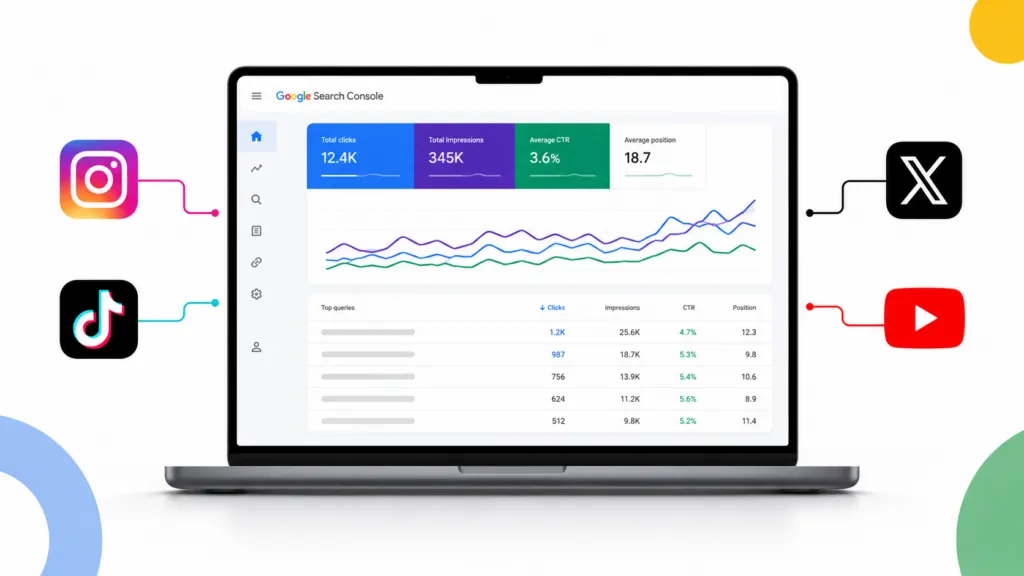
Google Search Console now shows you how your social media posts perform in Google Search. On July 7, 2026, Google added a new property type called platform properties, which lets you connect your Instagram, TikTok, X, and YouTube accounts. You’ll see the exact terms people typed into Google before your posts appeared, where those posts ranked, and how many people clicked.
At TJ Digital, we’ve been optimizing social posts for search for years. We’ve been doing it completely blind the whole time. This is the first time anyone gets to see the actual data.
I’ve been doing SEO for 17 years, and Search Console has always been the best data source there is. Now we finally have it for social.
Table of Contents
ToggleWhy Does Social Media SEO Matter?
I’ll tell you why.
The traffic you get from Google is the highest value traffic you can get. It’s someone actively searching for the thing you’re talking about right now. For a brand, that’s often a person searching for the exact product or service you sell.
You can probably get a lot more traffic from search than you think. You just haven’t been focusing on SEO for your social posts. Here’s the thing, neither have your competitors.
That means there’s almost no competition. We optimize our own social posts and our clients’ social posts for search, and we often pull a large share of our traffic from search even on brand new channels.
@tjrobertson52 How to track social media posts in Google Search Console. New this week, and barely anyone’s using it. #SEO #SocialMedia #GEO
♬ original sound – TJ Robertson – TJ Robertson
What Are Platform Properties in Google Search Console?
A platform property is a Search Console property for a social account instead of a website. Google announced it on July 7, 2026, and it covers four platforms at launch.
- TikTok
- X
- YouTube
You don’t need a website to use one. According to Google’s announcement, each connected account gets a Performance report with clicks, impressions, and queries. It also gets an Insights report showing your top posts and how people find your account.
Google is rolling the feature out gradually, so it may not be in your account yet.
How Do You Connect Instagram, TikTok, X, or YouTube to Search Console?
The setup takes about a minute per account.
- Go to Google Search Console.
- Open the property selector in the top left and choose “Add property.”
- Pick Instagram, TikTok, X, or YouTube from the list of options.
- Follow the prompts to log in and authorize the connection.
- Repeat for every account you manage.
Connect your website domain first if you haven’t already. That data is more valuable than anything you’ll get from social, and Search Console only starts collecting from the day you verify. Our full guide to Search Console for websites walks through that setup.
What Data Do You Get From a Platform Property?
A platform property reports on Google and nothing else. Your native analytics tell you how a post performed inside the app. A platform property tells you how that same post performed in Google.
| What you want to know | Native platform analytics | Search Console platform property |
| Views inside the app | Yes | No |
| Likes, saves, shares | Yes | No |
| Watch time from the home feed | Yes | No |
| Search terms people typed in Google | No | Yes |
| Impressions in Google Search | No | Yes |
| Clicks from Google to your post | No | Yes |
| Average ranking position in Google | No | Yes |
Those two data sets answer completely different questions. Most social teams have only ever had the first column.
Why Impressions Matter More Than Clicks
Clicks are what you ultimately want. Impressions are where the information is.
An impression means your post showed up in the result set for that search, whether or not anyone clicked. So even if you’re ranking too low to earn clicks, an impression proves you are ranking for that term. Google is already telling you it trusts your channel for that query.
A lot of impressions with very few clicks is the best signal in the report. It means you’re close. If you ranked a little bit better, you’d be getting real traffic.
Sort your queries by impressions and take note of the terms at the top. Those are your first optimization targets.
How Do You Optimize a Social Media Post for a Search Term?
You put the term at the front of your title, caption, or tweet. That’s it.
Do that and you’ll be doing social media SEO better than 99% of people. You have two options once you’ve found a high-impression term.
- Optimize the existing post. Rewrite the caption or title so the search term leads. This works when a specific post is already collecting the impressions.
- Make a new post for the term. This works when the impressions are spread across your channel and no single post owns the topic.
Both work because Google has already shown you it will rank your account for that query. You’re just making it obvious to Google that the post answers it.
Do Social Posts Influence AI Recommendations?
This is the real reason to care about any of this. Social media posts influence AI responses. Before a post can influence an AI response, it has to show up in a search engine.
Any data that helps you show up more reliably in search will help you show up more reliably in AI answers. That includes the answers where a model picks one brand over another. We track this for clients every day, and the sources AI models cite are usually the sources already ranking.
Some social platforms get cited by AI models constantly. Others barely register, and the difference varies wildly by industry. Our breakdown of user-generated content for AI search covers which ones actually show up.
What Doesn’t Search Console Track for Social Media?
Platform properties only report on Google. Google’s platform properties documentation is blunt about this. The reports won’t tell you how many times your video appeared on TikTok, and they won’t show likes or watch time.
Ownership also gets checked periodically. If your login expires, the property pauses until you re-verify.
What Else Do People Ask About Platform Properties?
Can you track LinkedIn or Facebook in Search Console?
Not right now. The launch covers Instagram, TikTok, X, and YouTube. Facebook was part of Google’s earlier experiment in December 2025 and did not make the July 2026 launch.
Do you need a website to use platform properties?
No. You can create a platform property for a social account with no website connected at all. Creators who have never owned a domain can use Search Console now.
Does Search Console show your TikTok views or Instagram likes?
No. It only shows how your content performed on Google Search, News, and Discover. Your native analytics still own everything that happens inside the app.
Which search terms should you optimize first?
Open the Performance report for the platform property, sort your queries by impressions, and look for terms with a lot of impressions and almost no clicks. Those are the terms where you’re already ranking and just need to rank higher.
How Do You Start Optimizing Social Posts for Search?
Connect your accounts this week, sort by impressions, and put your best terms at the front of your captions. That alone puts you ahead of nearly everyone in your industry.
Contact TJ Digital to have us build the whole system for you, from the content to the search optimization to the AI visibility tracking.