

Claude Haiku 5.5 is worth using if you pay for Claude through the API or keep running out of usage on your plan. If you’re on a subscription and not hitting your limits, Opus 5.5 is still the better default.
Give Haiku the easier jobs you run over and over, like summaries and sorting. Through the API, it does them for a small fraction of what Opus 5.5 would cost.
I’ll be honest, I didn’t think I’d care about this model. Up until now, there has never been a Haiku model worth caring about. Haiku 5.5 changes that.
Claude does most of the hands-on work at my agency, TJ Digital. I also compare new AI models in my videos as they come out.
What Is Claude Haiku 5.5, and Is It Actually Good Now?
Claude Haiku 5.5 is the smallest, fastest and cheapest tier of Claude. It’s a big step up from Haiku 4.5, though it’s still well behind Opus 5.5 on hard work.
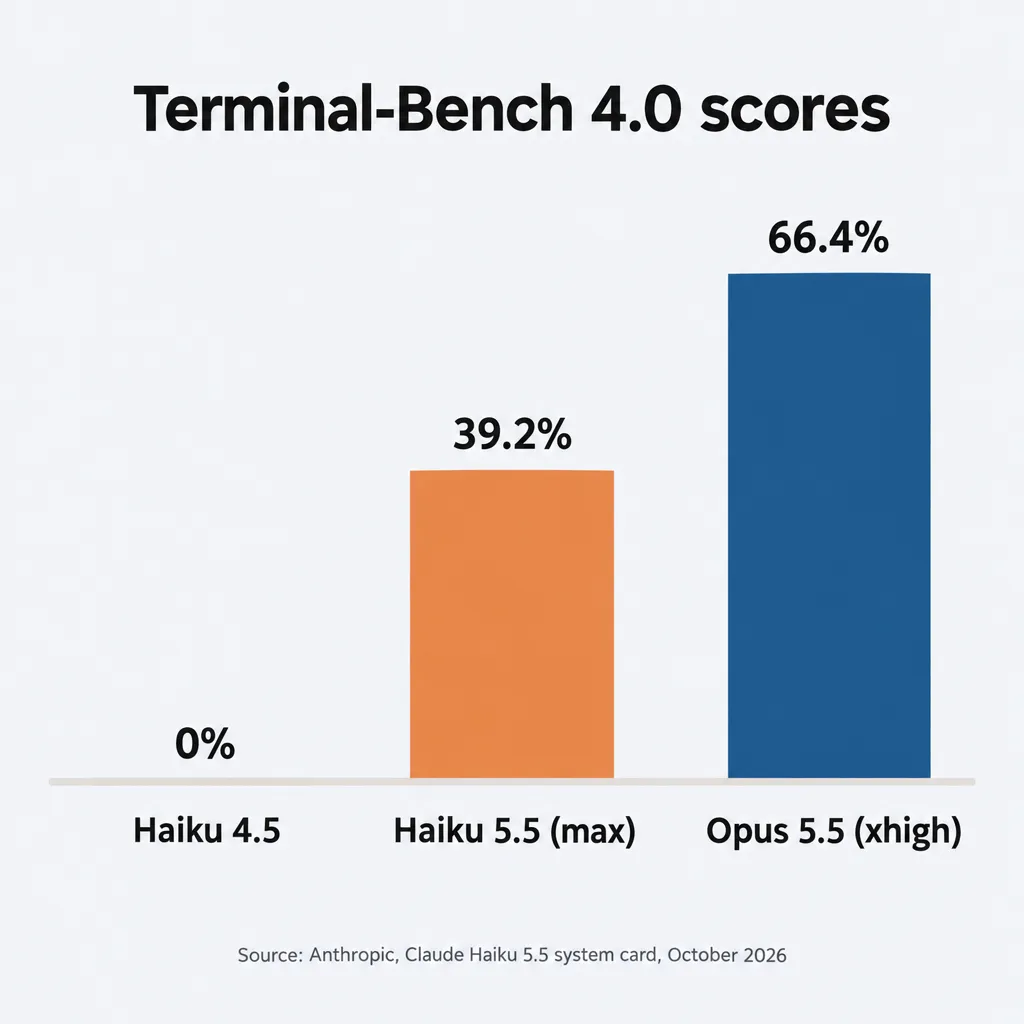
Terminal-Bench 4.0, a coding test where a model works through multi-step tasks in a computer terminal on its own, shows how far Haiku has come and how far it still trails Opus. Haiku 4.5 scored 0%, and Haiku 5.5 scores 39.2% when it’s set to think as long as it can. Opus 5.5 scores 66.4% on its second-highest setting, according to Anthropic’s system card, the technical report it published with Haiku 5.5.
How long the model thinks is a setting called effort, and Haiku 5.5 is the first Haiku to have it. There are five levels: low, medium (the default), high, xhigh and max.
Higher levels make the model think longer. That usually gives better results. It also costs more, because you pay for the model’s thinking as well as its answer.
Anthropic built Haiku 5.5 for jobs you run over and over, where the cost of each run adds up. It’s also built to work as a subagent: a helper that a bigger model like Opus 5.5 hands smaller jobs to. Anthropic lists it as its fastest model.
Anthropic released Haiku 5.5 on October 7, 2026. You can pick it in the Claude apps on every plan (Free included), in Claude Code, and through the API on Anthropic, Amazon Bedrock, Google Cloud and Microsoft Foundry.
How Much Does Claude Haiku 5.5 Cost?
Claude Haiku 5.5 costs $0.10 per million tokens it reads and $0.50 per million tokens it writes, as long as each request stays at 100,000 tokens or less. Above that line, every price goes up five times.
A token is a small chunk of text, usually part of a word. A request is one trip to the model: it gets everything it needs to read, and it writes one reply.
In a conversation, each request carries the whole conversation so far, because the model re-reads all of it before every reply. The parts it has already seen can be read from a cache (a stored copy) at a steep discount. Those are called cache reads.
Here are Anthropic’s list prices per million tokens, next to Sonnet 5.5 and Opus 5.5, which charge the same at any length:
| Model | Input (read) | Output (written) | Cache read |
| Haiku 5.5, request up to 100,000 tokens | $0.10 | $0.50 | $0.01 |
| Haiku 5.5, request over 100,000 tokens | $0.50 | $2.50 | $0.05 |
| Sonnet 5.5 | $2 | $10 | $0.10 |
| Opus 5.5 | $4 | $20 | $0.20 |
When a request stays at 100,000 tokens or less, Haiku costs one-fortieth of what Opus 5.5 does for each token it reads or writes. Over 100,000, it still costs one-eighth.
What Happens When a Haiku 5.5 Request Goes Over 100,000 Tokens?
When a Haiku 5.5 request goes over 100,000 tokens, every token in it is billed at the higher price, including the first 100,000. Anthropic counts everything the model reads for that reply toward the 100,000: your instructions, any files and the whole conversation so far. Cached parts count too, even though they’re billed at the discount.
Each request is priced separately, so one long request doesn’t change what your short ones cost.
The price jump at 100,000 tokens matters most for cache reads, because in my experience they’re most of the cost of long-running work, like a long Claude Code session. Under 100,000 tokens, cache reads cost $0.01 per million, only 20% of the $0.05 they cost over it. Anthropic also says cache reads make up a large share of the tokens models use.
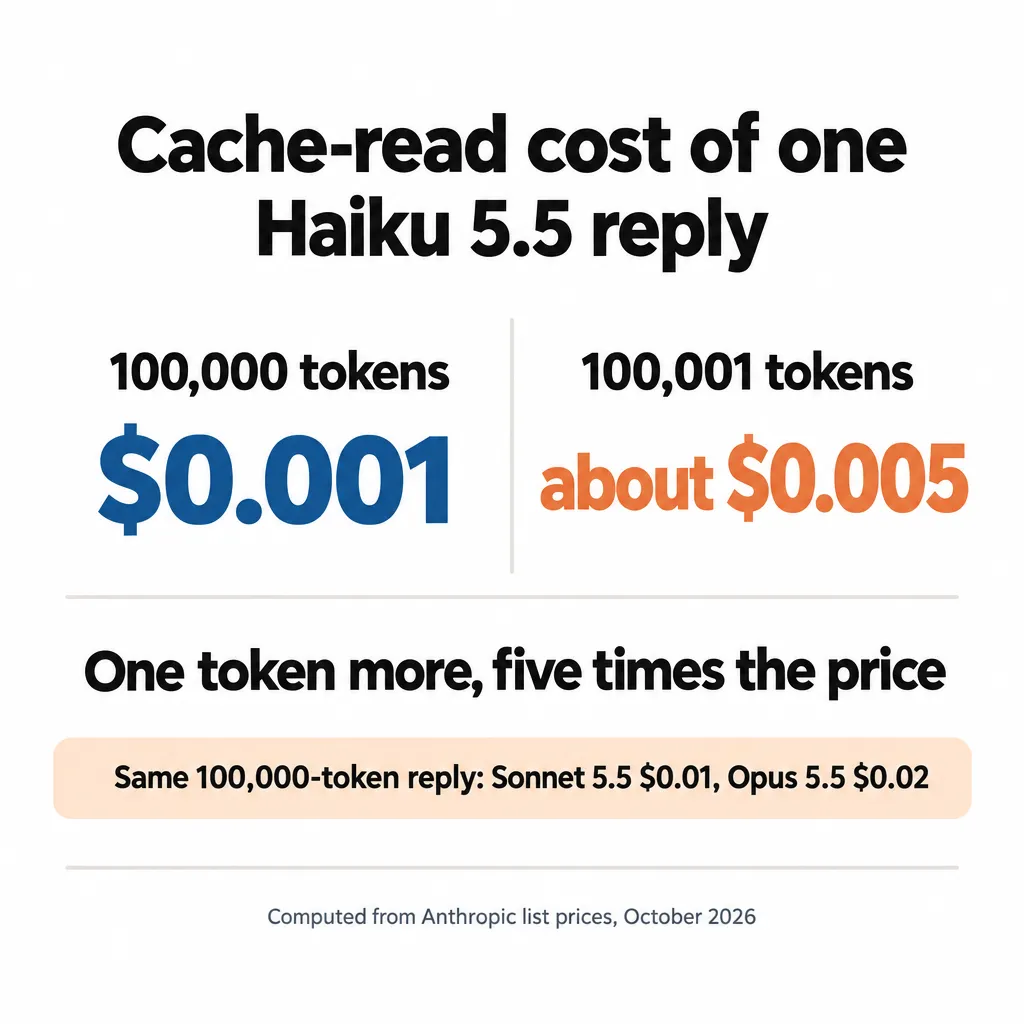
Take a reply where the model re-reads 100,000 tokens of conversation from the cache. On Haiku 5.5, that costs $0.001, a tenth of a cent, compared with $0.01 on Sonnet 5.5 and $0.02 on Opus 5.5.
If the request is one token longer, 100,001 tokens, Haiku charges the higher price on all of it: about $0.005, five times as much. That’s still half of what Sonnet charges. These are fractions of a cent, but a long session pays them on every reply.
How Do You Keep Haiku 5.5 Under 100,000 Tokens?
You keep Haiku 5.5 under 100,000 tokens by keeping its jobs short and by compacting long conversations before they reach the line. Compacting means summarizing the conversation so far and replacing the full history with that summary, so the model has far less to re-read before each reply. The tradeoff is that the model then works from a summary of the early conversation instead of the exact words.
Long coding sessions go over the line often. In a test by Bito, an AI code-review company, about 70% of Haiku’s requests in long build sessions went over 100,000 tokens.
Haiku 5.5 also reaches 100,000 tokens sooner than Haiku 4.5 did. It counts the same text as about 30% more tokens. It also keeps its thinking from earlier replies in the conversation, so every new request re-reads that thinking too.
How you stay under the line depends on where you use Haiku:
- In Claude Code: type `/autocompact 100k` while you’re using Haiku 5.5. Without it, Claude Code doesn’t compact a Haiku session until it reaches about 967,000 tokens, so a long session runs far past the price line. The setting applies to Haiku only, and `/autocompact auto` undoes it.
- In your own tools on the API: use Anthropic’s compaction feature, which is in beta, and set it to trigger below 100,000 tokens. Its default is 150,000, and the lowest it accepts is 50,000.
- For subagents: give each one a single narrow task, like summarizing one report or checking one section of a draft, so it finishes well before 100,000 tokens. Claude Code’s documentation doesn’t say whether the `/autocompact` setting applies to subagents, so short jobs are what keep their cost down.
If you use Haiku 5.5 for long sessions in Claude Code, turn that setting on. Compacting the conversation before it gets past 100,000 tokens is what makes Haiku so cheap it’s practically free.
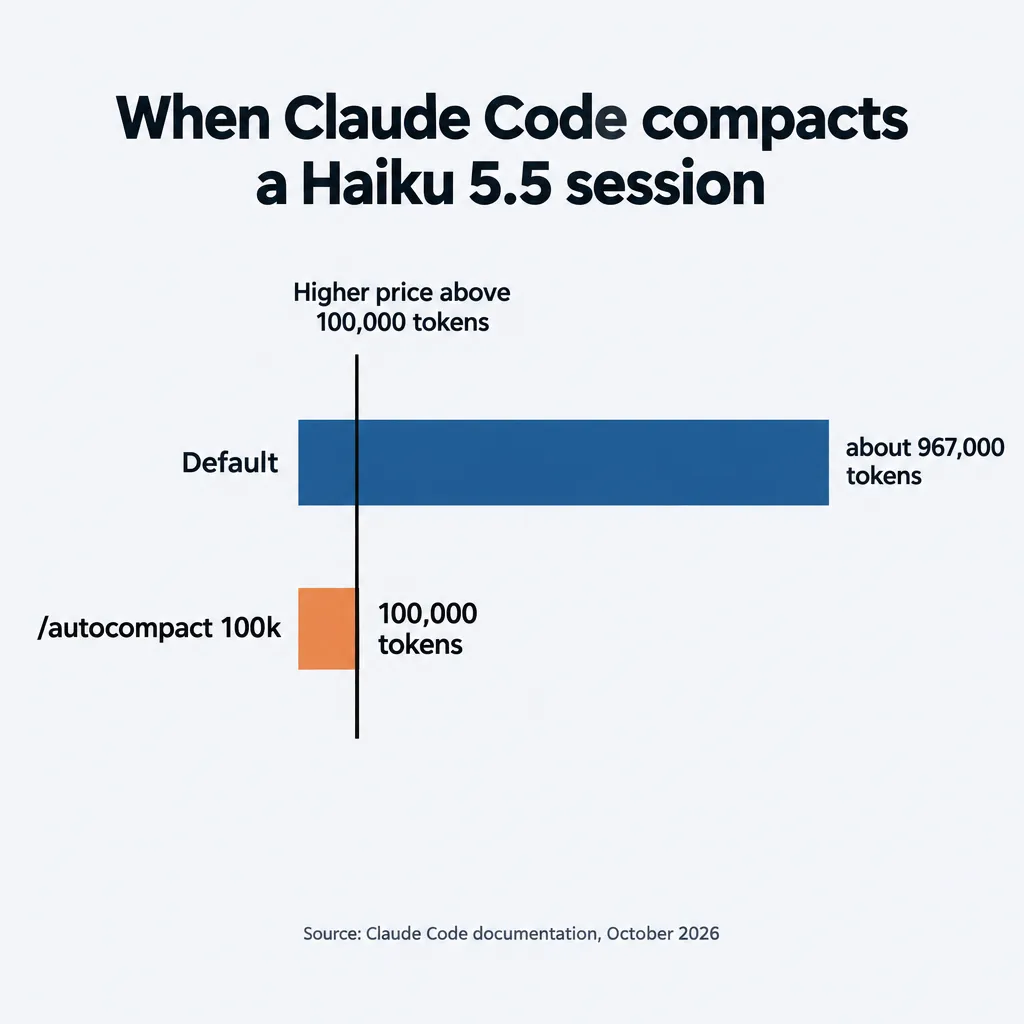
The catch is that 100,000 is the lowest value Claude Code accepts. It compacts when the conversation reaches 100,000 tokens, the same point where the higher price starts, so I wouldn’t count on every single request staying under.
How Does Haiku 5.5 Compare to Other AI Models?
Haiku 5.5 scores well below Opus 5.5 and Sonnet 5.5 and costs a small fraction of what they do.
Artificial Analysis is an independent site that tests AI models. It runs every model through the same 10 tests and combines the results into one score, its Intelligence Index. It also reports cost per task: what it paid, on average, for a model to finish one task in those tests.
Here’s a selection from its leaderboard on October 9, 2026, sorted by score, with each model’s effort setting in parentheses. The full leaderboard lists many more models.
| Model (effort setting) | Intelligence Index score | Cost per task |
| Claude Opus 5.5 (max) | 58 | $5.98 |
| Claude Opus 5.5 (xhigh) | 56 | $3.46 |
| Claude Sonnet 5.5 (max) | 56 | $5.46 |
| GPT-6.1 Sol (medium) | 48 | $0.21 |
| Claude Haiku 5.5 (max) | 43 | $0.21 |
| GPT-6.1 Sol (low) | 42 | $0.13 |
| Claude Opus 5.5 (low) | 42 | $0.55 |
| Grok 4.7 (low) | 42 | $1.25 |
| Claude Haiku 5.5 (xhigh) | 41 | $0.12 |
| Gemini 3.8 Flash (high) | 41 | $1.24 |
| GPT-6 Luna (max) | 38 | $0.07 |
| Claude Haiku 5.5 (high) | 38 | $0.08 |
| Claude Haiku 5.5 (medium, the default) | 34 | $0.05 |
| MiniMax-M3 | 29 | $0.51 |
Haiku’s costs in this table are too low for long work. When Haiku 5.5 launched on October 7, Artificial Analysis said its Haiku costs leave out the higher price over 100,000 tokens, and it still hadn’t added that price on October 9. So every Haiku row is priced as if each request stayed under 100,000 tokens.
Haiku also writes a lot, which makes going over the line more likely. On max, it writes about three times as many tokens per task as Luna does on max. In a conversation, everything it writes is added to what it re-reads on the next request.
On their highest settings, Opus 5.5 is far ahead of Haiku. Opus on max scores 58 to Haiku’s 43.
Against Opus on its lowest setting, Haiku comes close on score for much less money. Opus on low scores 42 for $0.55 per task, and Haiku on xhigh scores 41 for $0.12. On work that stays under 100,000 tokens, that’s within a point for less than a quarter of the price.
Is Haiku 5.5 Better Than Sonnet 5.5?
Sonnet 5.5 is the stronger model: it scores 56 on max to Haiku’s 43. Anthropic itself says Sonnet 5.5 and Opus 5.5 are still the better choices for complex coding, where the model works on its own through many steps. It recommends Haiku for narrowly scoped jobs.
Is Sonnet 5.5 Still Worth Using?
In my view, Sonnet is now the tier that’s not worth using. I didn’t even make a video on Sonnet 5.5. That’s because in nearly every case I run into, Opus 5.5 is just better and cheaper.
Opus costs twice as much per token. But on the top settings, Opus needs one effort level less than Sonnet to reach the same score, so it writes less and ends up cheaper per task. Opus on xhigh scores 56 for $3.46 per task, while Sonnet needs max to score 56, at $5.46.
Opus doesn’t win everywhere, though. At lower settings, the two score about the same at about the same cost: Sonnet on medium scores 41 for $0.48 per task, and Opus on low scores 42 for $0.55. And on Anthropic’s own Terminal-Bench run, Sonnet on max scored 70.6%, about four points ahead of Opus on xhigh.
Sonnet also got cheaper on October 7, when Anthropic halved its cache read price to the $0.10 in the price table. The leaderboard may not include that cut yet, so Sonnet’s real cost per task could be lower than it shows.
On a subscription, you don’t pay by the token, so I’d skip Sonnet and use Opus, the stronger model. If you pay by the token and most of your work is long coding sessions, Sonnet is worth testing against Opus. I go through how I split work across the models in which Claude model to use for each task, and I covered Opus 5.5 itself in my Claude Opus 5.5 review.
How Does Haiku 5.5 Compare to GPT-6.1 Sol, GPT-6 Luna and Gemini Flash?
Of the models in this comparison, OpenAI’s GPT-6.1 Sol and GPT-6 Luna come closest to Haiku 5.5 on score for the money. Gemini 3.8 Flash, Grok 4.7 and MiniMax-M3 cost about ten times as much per task as Haiku for about the same or a lower score.
In my view, Anthropic has had the best models for at least a year now. Sure, GPT-6 Astra is better at a few things, but if you want the smartest model and you’re willing to pay for it, Anthropic’s been the best choice for a while.
What Anthropic has been missing is a good, cost-effective model, and until now, if you wanted one, you had to go to another provider. Haiku 5.5 solves that for Anthropic.
Technically, GPT-6.1 Sol still has a slightly better cost per performance. Sol on medium scores 48 for $0.21 per task, and Haiku on max scores 43 for the same $0.21. Sol on low scores 42 for $0.13, and Haiku on xhigh scores 41 for $0.12.
To me, a gap of one to five points at the same price is negligible. If you’re already working with Claude, you might as well use Haiku 5.5.
For the cheapest jobs, Luna is Haiku’s only competition among these models. Haiku’s default setting costs $0.05 per task. Sol’s cheapest setting costs $0.13, and only Luna goes as low as Haiku.
GPT-6 Luna costs slightly less than Haiku at the same score: 38 points for $0.07 per task, against $0.08 for Haiku on high. Luna’s top setting stops at 38, though, and Haiku on max reaches 43.
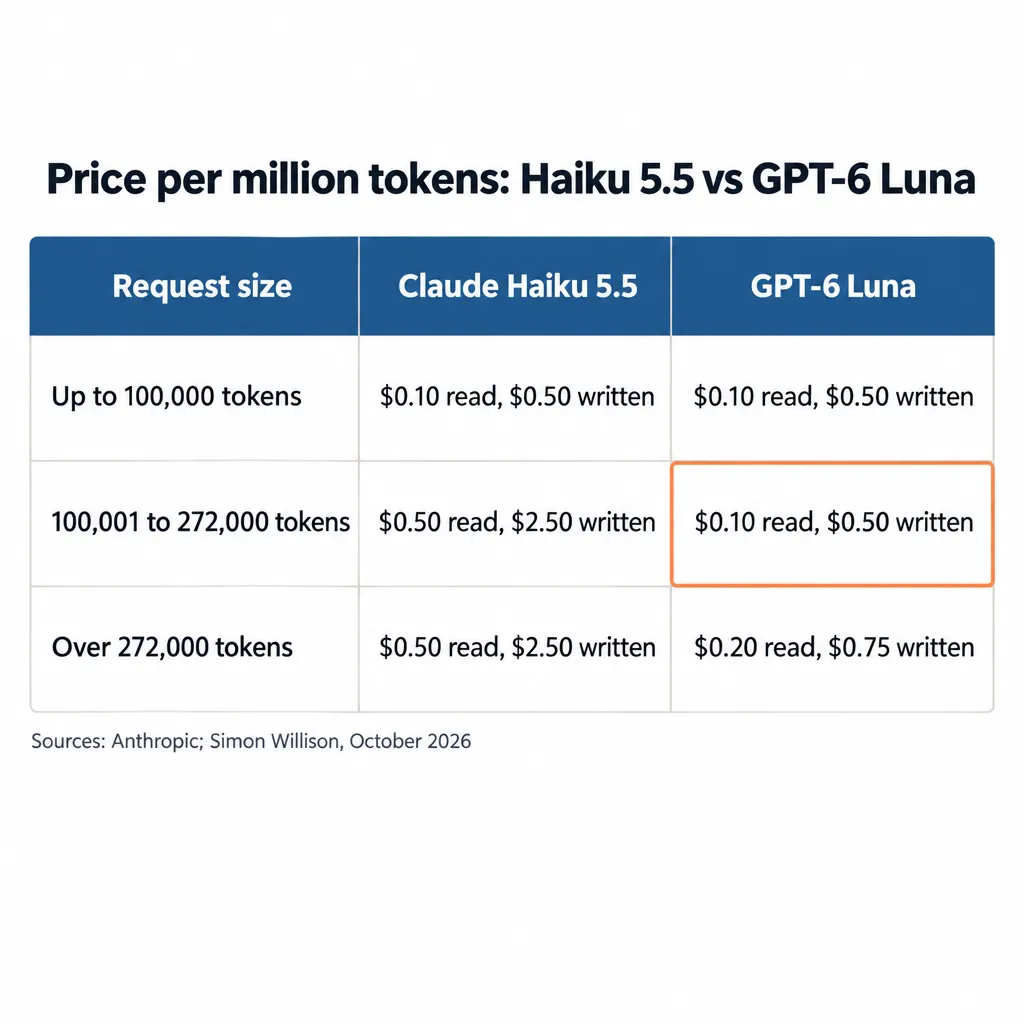
If you’re choosing between Haiku and Luna, what decides it is whether your requests stay under 100,000 tokens. Under that line, the two charge the same: $0.10 per million tokens read and $0.50 per million written.
Over 100,000 tokens, Haiku goes up to $0.50 per million read and $2.50 per million written. Luna keeps its lower price up to 272,000 tokens, and past that it only goes up to $0.20 read and $0.75 written.
As developer Simon Willison put it, “Above 100,000 tokens, Luna looks like a much better deal.” So if you already use Claude and your cheap jobs stay under 100,000 tokens, use Haiku 5.5. If they regularly run longer and you’re open to a second provider, test Luna.
Is Anthropic Losing Money on Haiku 5.5?
Nobody has shown that Anthropic is losing money on Haiku 5.5, but I think it’s plausible. Like all the major labs, Anthropic is trying to keep you inside its platform, and it may be willing to lose money on Haiku to do that.
The price makes that plausible to me: for short requests, Anthropic charges exactly what OpenAI charges for Luna, even though Haiku scores higher. Several Hacker News commenters say the under-100,000 price was set to match Luna’s. Anthropic doesn’t publish what each model costs it to run, so for now it’s a guess.
Who Should Use Claude Haiku 5.5?
Whether Haiku 5.5 is worth it for you depends mostly on how you pay for Claude:
- You’re on a subscription and not hitting your limits. Stay with Opus 5.5. I use Opus 5.5 on a subscription myself, and I don’t think I’ll be using Haiku all that much. As long as you’re on a subscription, Opus 5.5 is already pretty cheap for what you get.
- You pay through the API. Move your short, repetitive jobs from Opus to Haiku. Those jobs stay under 100,000 tokens, where Haiku’s price is lowest.
- You keep running out of usage. Giving Haiku your easier jobs should make your plan last longer. Anthropic hasn’t published how much less of your allowance Haiku uses, but Paweł Józefiak, who writes the Digital Thoughts newsletter, says Haiku feels close to unlimited on his Max plan.
Max and Team plans now come with monthly API credits you can spend on Haiku in tools you build on the API, though they don’t cover Claude Code or raise your plan’s limits. I explain how subscriptions and paying by usage compare in AI model pricing explained.
Which Jobs Should You Give Haiku 5.5?
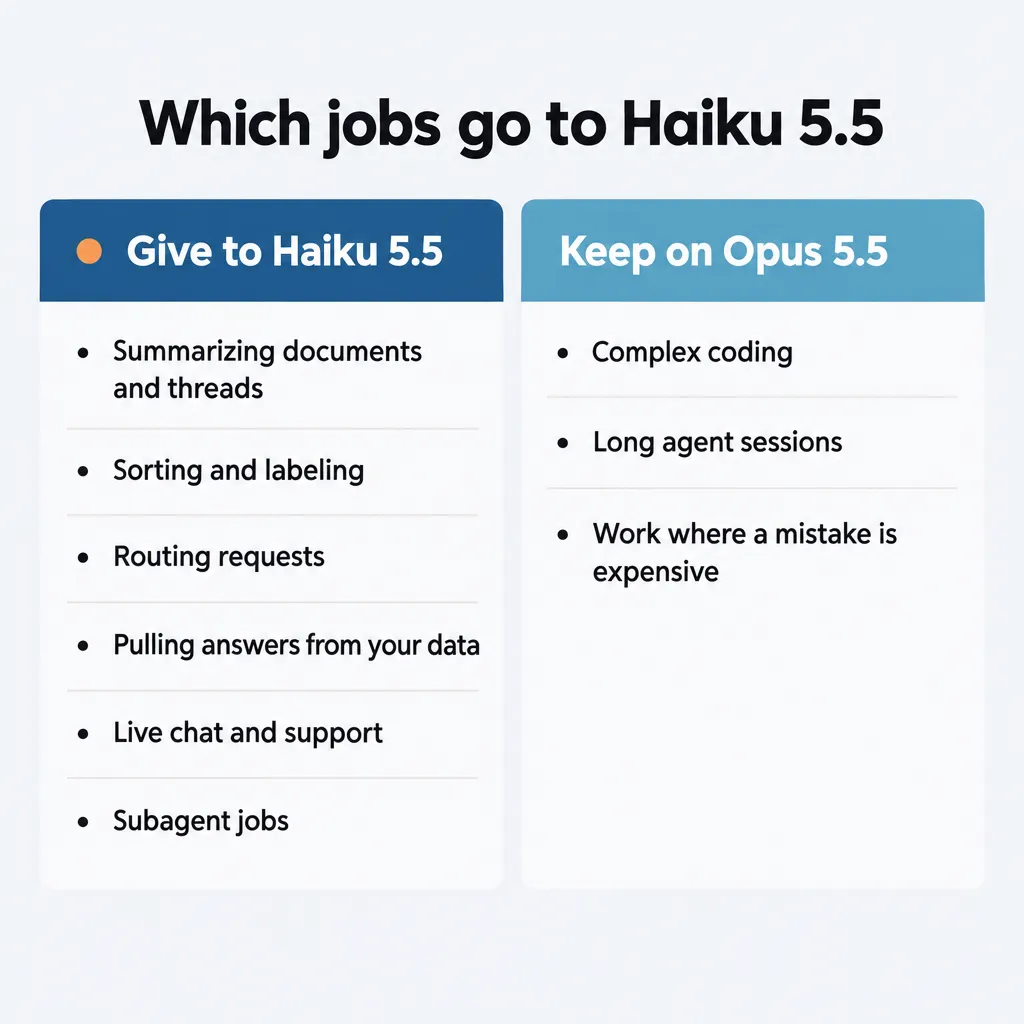
Give Haiku 5.5 your easier or less important tasks, especially short ones you run over and over. Anthropic recommends it for jobs like these:
- Summarizing documents, meeting notes and long threads
- Sorting and labeling things, like support tickets or incoming requests
- Routing each request to the right person, tool or model
- Pulling a specific answer out of your own data, like a figure from a database or a document
- Live chat and customer support, where a fast reply matters
- Subagent jobs that a bigger model hands off
Keep Opus on complex coding, long agent sessions and anything where a mistake would be expensive.
For bigger tasks, keep using Opus or Fable (the tier above Opus) and have it spin up Haiku agents to check the work. Anthropic suggests a related setup, where the bigger model plans the work and hands pieces of it to Haiku agents that run at the same time.
Start Haiku on medium effort, the default, which is where Anthropic’s prompting guide recommends starting for most work. Move a job up to high or xhigh only if medium’s results aren’t good enough. Each step up costs more: on the leaderboard, xhigh costs more than twice what medium does per task.
Low is fine for quick, simple requests like sorting. On longer tasks, though, Anthropic found Haiku is more likely to stop early or skip checking its own work at low.
How Do You Run Haiku 5.5 as a Subagent in Claude Code?
To run Haiku 5.5 as a subagent in Claude Code, update Claude Code, point your subagents at Haiku, and check that it worked:
- Update Claude Code. Haiku 5.5 needs version 2.1.293 or later, which you get with `claude update`.
- Point your subagents at Haiku. Without a setting, subagents run on your main model. Use whichever of these fits:
– For one custom subagent, add `model: haiku` to its definition. Definitions are files in `.claude/agents/` in your project, or in `~/.claude/agents/` for subagents you use everywhere. – For custom subagents that don’t name a model, set the environment variable `CLAUDE_CODE_SUBAGENT_MODEL=haiku`. On its own, this doesn’t move Claude Code’s built-in Explore and Plan subagents, which stay on your main model. – For every subagent, built-in ones included, also set `CLAUDE_CODE_SUBAGENT_MODEL_FORCE=1`. – If you run Claude Code through Amazon Bedrock, Google Cloud, Microsoft Foundry or Claude Platform on AWS, `haiku` still means Haiku 4.5 there. Name Haiku 5.5 with that provider’s own model ID instead.
- Check that it worked. While a subagent is running, `/tasks` shows which model it’s on.
The check matters because subagents set to a smaller model have been reported running on Opus instead. In a GitHub report, one user found that 1,149 of 1,371 subagents set to Haiku 4.5 or Sonnet ran on Opus between September 19 and October 7. The user says that contributed to hitting their weekly limit.
That user’s runs since October 7 have used the right models, but Anthropic hasn’t confirmed a fix, so it’s worth checking your own.
If you have questions about Haiku 5.5 or how we use Claude at TJ Digital, reach out through our contact page or email me at tj@tjrobertson.com.