

Choose Claude’s effort level mostly by how involved you want to be in a task. A higher level makes Claude do more before it checks back with you: it reads more files, uses more tools and takes more steps. It also makes more choices on its own along the way.
Use medium or high while your feedback will help, even for big, important work. Move up to extra high once Claude has what it needs to decide well without you, such as written instructions for the task and access to your tools and files. Save max for rare cases, because it can burn through your usage for little extra quality.
My first thought was that the harder and more important a task is, the higher the effort level should be. Learning how effort actually works changed how I choose, and it has greatly improved the output I get from Claude. Better output matters a lot at TJ Digital, my SEO and AI search agency, because Claude does most of our hands-on work.
What Do the Claude Effort Levels Do?
Each effort level gives Claude more room than the one below it to think, check its work and take steps before it answers. In Claude Code and the API, extra high is called xhigh.
Anthropic describes how much Claude thinks and how much of your usage it spends at each level in its Help Center and in its API docs on effort and thinking:
| Level | How much Claude thinks | How much of your usage it spends |
| Low | Keeps thinking to a minimum and skips it on simple tasks where speed matters most | The least, with some loss in capability |
| Medium | Thinks a moderate amount and may skip thinking on simple requests | Moderate savings compared with higher levels |
| High | Thinks on most requests that benefit from it | As much as the task needs for excellent results |
| Extra high (xhigh) | Thinks more often and in more depth than at high | More than high, without the full cost of max |
| Max | Thinks the most often, with no limit on how long | No set limit: “no constraints on token spending” |
On Opus 5.5, medium is the default in Claude Code and the API. The Claude apps mark a recommended level as “Default” in the menu for each model. You can change the level at any point in a conversation, and the change applies from Claude’s next response.
What’s the Difference Between Effort and the Model in Claude?
The model sets how capable Claude is, and the effort level sets how much work Claude puts into a task. Once you’ve picked a good model, effort is the setting that changes from one task to the next.
These days I use Opus 5.5 for essentially every task, and unless you have a good reason not to, I’d suggest doing the same. I think it’s the best model for almost all work right now, and I explain why in my Claude Opus 5.5 review.
Does a Higher Effort Level Always Use More Tokens?
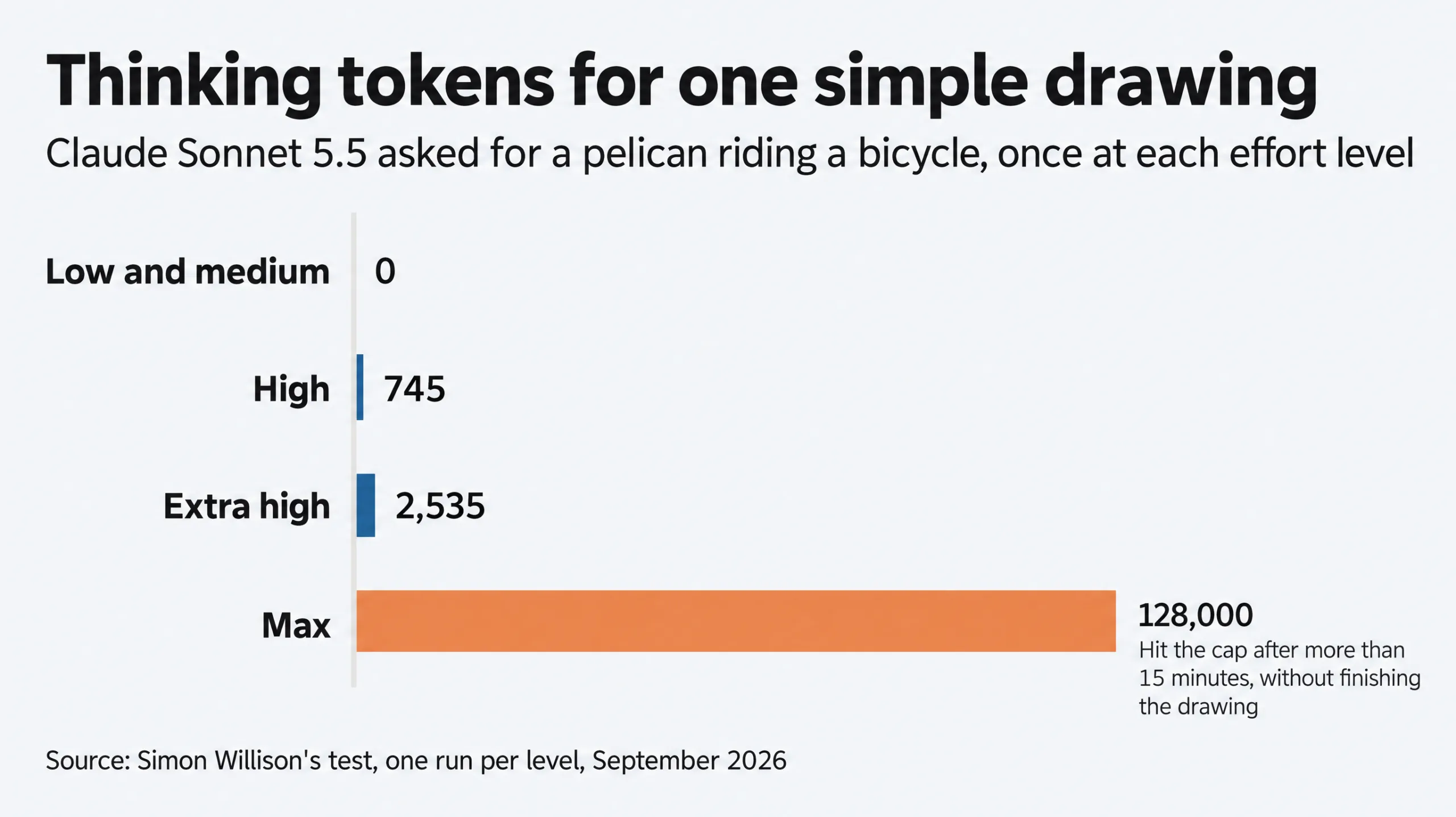
A higher effort level usually uses more tokens, and the top levels can spend far more, even on simple work. Developer Simon Willison asked Sonnet 5.5 for one simple drawing, a pelican riding a bicycle, once at each level. Low and medium used no thinking tokens at all, high used 745 and extra high used 2,535.
At max, Claude kept thinking until it reached the 128,000-token cap on how long a single response can be, then stopped without finishing the drawing. That attempt ran for more than 15 minutes.
Anthropic’s Help Center is direct about what this does to your plan: higher effort means “more thorough responses, but they take longer and use more tokens, so you’ll reach your usage limits faster.”
That said, a higher level only tells Claude how much work you’re willing to have it do. Claude still decides how much of that a task needs. Anthropic’s effort docs call effort “a behavioral signal, not a strict token budget.”
Why Does a Higher Effort Level Make Claude Act More on Its Own?
A higher effort level makes Claude do more work before it checks back with you, so it also makes more decisions without you. For your most important and most difficult tasks, that isn’t always what you want. Sometimes you want to be kept in the loop.
Lydia Hallie, on Anthropic’s Claude Code team, writes that effort “controls how much work Claude does on your request overall including the number of files read, tools used, and how many steps it takes before it checks back in with you.” Anthropic’s Claude Code docs add that in tests on Opus 5.5 and Fable 5.1, Claude at a higher level “made more choices on its own.”
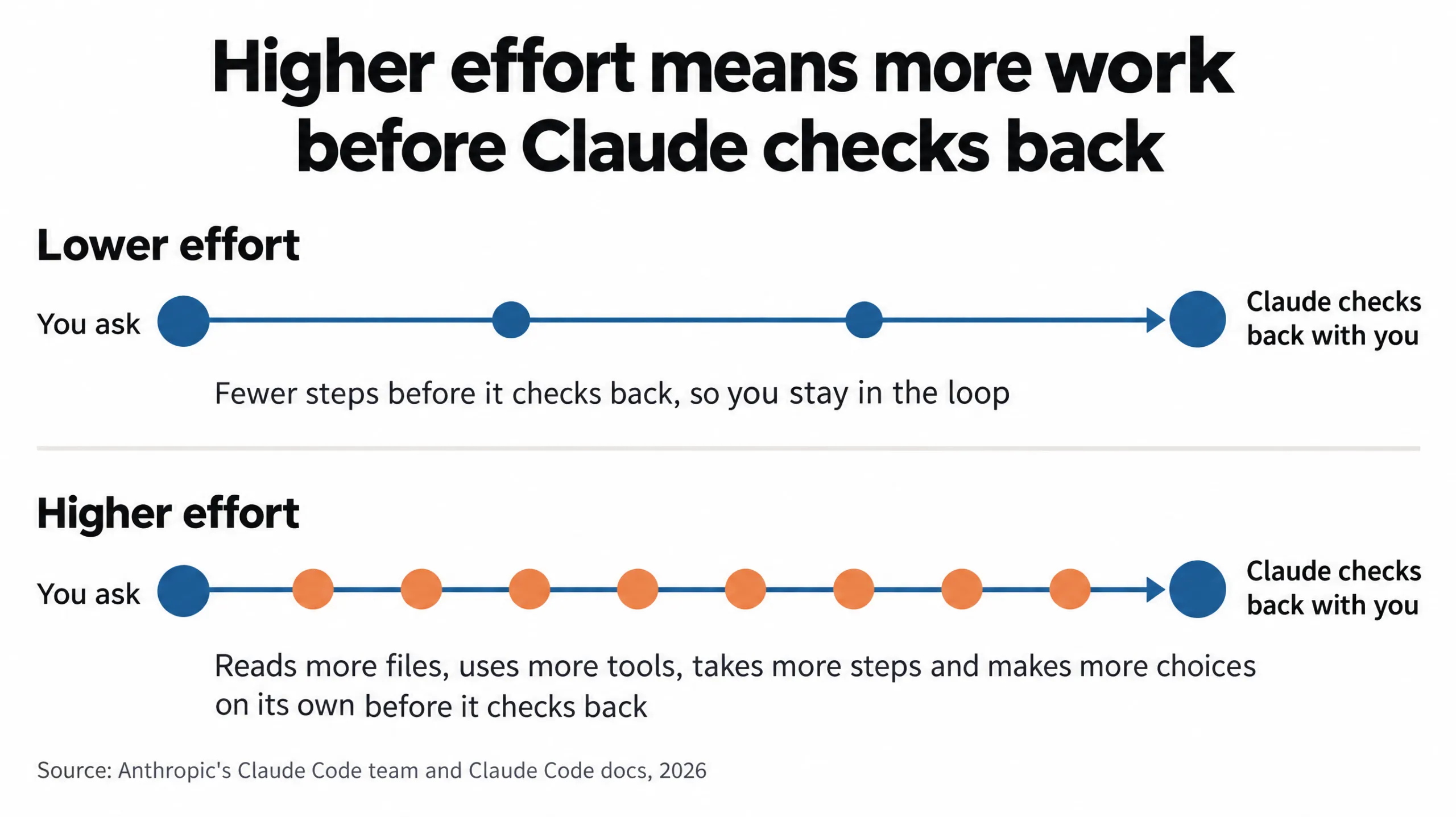
In a September 2026 post on the Claude Code blog, Thariq Shihipar wrote that higher effort levels “will get more work done but Claude will also make more assumptions on my behalf.” The less clear the task, the more of those assumptions Claude has to make without you.
When Should I Use Each Effort Level?
Medium and high fit most work, extra high fits work Claude can do without you, and low and max fit narrower cases:
| Level | Use it when | My take |
| Low | You want quick back-and-forth and will check each answer, like brainstorming or a first sketch | I generally stay away from it |
| Medium | Day-to-day work with a clear scope | Medium or high is where I keep work while my feedback will help, even big, important work |
| High | Work where Claude needs to check its answer before giving it to you, like fixing a bug in existing code | Same as medium |
| Extra high | Long-running work Claude can do without you, once it has the instructions and access it needs | Our default for Tavi, the AI system we built, when it works on its own |
| Max | Hard problems you want Claude to work through without you, like finding security vulnerabilities | I’d avoid it unless you’re ready to burn some tokens |
When Should I Use Medium or High Effort?
Use medium or high effort when your feedback will help Claude get the task right. That’s usually the case when what you want is still a bit unclear, or when Claude might be missing context you’d have to give it.
When Should I Use Extra High Effort?
Move up to extra high once Claude has everything it needs to make good decisions without you. For most work, that means writing down your instructions and background, and connecting Claude to the tools and files the task involves.
Instructions for a kind of task usually go in skills, which are written guides Claude follows for that task. Background about your business, like what you sell and how you work, goes in a knowledge base, a set of reference documents Claude can read from.
Tavi, the AI system we built at TJ Digital, does a lot of work on its own, and for that work we use extra high on Opus 5.5 by default. Anthropic suggests starting at medium on Opus 5.5. Our default for Tavi is two levels above that.
We go that far because Tavi works from our skills and from a Brand Ambassador for each client, a knowledge base about that client’s business. Together they give Tavi what it needs to make decisions on its own. People still review everything Tavi produces before it reaches a client, and I explain why in my post on whether it’s safe to let AI agents run without supervision.
When Claude gets something wrong, look at the context before you reach for a higher level. Lydia Hallie suggests asking whether your prompt is too vague, whether Claude is connected to the right tools and whether it has the right skills.
If you work in Claude Code, a skill can set its own effort level, which overrides your session’s level while the skill runs. That lets a well-documented skill run at extra high while the rest of your session stays at medium. I share more on writing skills in Claude skills best practices.
Is Low Effort Good in Claude?
I generally stay away from low effort, although Thariq Shihipar’s post on the Claude Code blog recommends it for “quick responses that are in the loop.” Low is also capable on Opus 5.5. Anthropic’s guide to Opus 5.5 says that even at its lowest effort setting, Opus 5.5 read values off dense charts more accurately than Opus 5 did at its highest.
Should I Use Max Effort?
Max effort is rarely worth it, because it can spend far more of your usage for little improvement. Anthropic’s Claude Code docs warn that max “may show diminishing returns and is prone to overthinking,” so they recommend testing it before you use it widely.
Do Simple Tasks Like Drafting Emails Need Low Effort?
Simple tasks like drafting an email need high effort or above once Claude can see your tasks, your team’s chats and your past emails. Claude has to look through all of that to find what the reply should say. You want to give it a longer leash: enough effort to do that before it writes.
Claude Duet is Anthropic’s new app that checks your connected accounts every few hours and drafts replies for you to review. You can’t set its effort level yourself, because Anthropic says Duet “decides how much effort a job needs.”
In my first three days with Duet, it drafted email replies without checking our Notion tasks or Slack chats. Claude checks fewer sources before acting at lower effort, so my read is that Duet was running at medium or even low.
When you can’t change the level, tell Claude which sources to look through before it drafts anything, like your task list, team chats and past emails. This helps because, according to Anthropic’s guide to Opus 5.5, the model “tends to get to work quickly.”
When a request is loosely worded and the information Claude needs is spread across several connected apps, Claude can start before it has looked at everything relevant. A request like “draft a reply to this email,” with your tasks and chats connected, is that kind of request.
In Anthropic’s tests on tasks that worked across email, documents, spreadsheets and customer records, telling Claude to look through the relevant sources first meant noticeably more tasks were done correctly, at both medium and max effort. The cost was slightly more tool calls and tokens.
Is Ultracode a Higher Effort Level Than Max?
Ultracode is a Claude Code setting rather than an effort level, so it doesn’t sit above max. It appears in Claude Code’s effort menu, which is why it’s easy to mistake for a level.
With Ultracode on, Claude turns each substantial task into a workflow. A workflow hands parts of the job to many copies of Claude that work at the same time, sometimes dozens or hundreds. All of this happens at whatever effort level your session is set to.
Running all those copies takes more of your usage. Anthropic’s workflow docs say each request “uses more tokens and takes longer than the same request without a workflow,” so on a subscription plan, a session with Ultracode on reaches your session or weekly limit sooner.
If you have questions about effort levels or anything else here, reach out through our contact page or email me at tj@tjrobertson.com.