

If you already use AI for work, I think you need an always-on AI agent. If your first thought on hearing about Claude Duet was “oh great, another chat agent, I don’t need that,” I’d urge you to reconsider. Agents like this are the future of how people work.
An always-on agent is a chat agent that keeps working in the background when you’re not in the app. It takes over the task management that fills so much of a workday, like sorting email and keeping projects moving.
That frees your time for the parts of work where people add the most value: reviewing the agent’s work and giving feedback on it, and building relationships with other people.
I’m building TJ Digital, my agency, so that AI does the hands-on work and people focus on judgment and relationships. In October 2026, I estimated that our AI system already does about 80% of the hands-on work.
What Is an Always-On AI Agent?
An always-on AI agent is a chat agent that does work for you on its own and brings you work to review. You still talk to it in a chat, the way you use ChatGPT or Claude now, but it doesn’t wait for your next message.
While you’re busy, it checks your connected accounts, like email, calendar and Slack, and works on tasks in the background. It decides what’s worth your attention and messages you first, so you don’t have to check each app yourself.
Each of the agents available today runs in the cloud, so it keeps working when your laptop and phone are off.
Which Always-On AI Agents Can You Get Right Now?
Five always-on agents launched within about ten weeks of each other: Claude Duet, OpenAI’s dots, Meta’s Muse, Grok Bot and Google’s Gemini agent. Four of them are open to individual subscribers, Duet by waitlist. Gemini agent is only open to a select group of enterprise customers so far.
Google also had an earlier agent for individuals. Gemini Spark, its 24/7 personal agent, has been open to US Google AI Ultra subscribers since May 2026, while Gemini agent is Google’s agent for work accounts.
Microsoft introduced Scout in June, and it’s now called Autopilot and still in private preview. I compared Scout and Spark in Microsoft Scout vs Gemini Spark.
So essentially every major AI platform now has one, and I think the fact that everyone agrees this is the future of AI platforms should tell you something.
Some people see these look-alike launches as companies copying each other. But people want these agents too: on October 21, Mark Zuckerberg told analysts that more than 10 million people in the US and Canada had set up Muse agents in the month and a half since it launched.
Availability and prices as of October 22, 2026:
| Agent | Made by | Launched | Who can get it | Price | What it does |
| Claude Duet | Anthropic | October 21, 2026 (research preview) | US Claude Pro and Max subscribers, by waitlist (not on Team or Enterprise plans yet) | Included with Pro ($20 a month, or $17 a month billed annually) and Max (from $100 a month) | Morning brief, check-ins and background work across your connected apps |
| dots | OpenAI | September 29, 2026 | ChatGPT Pro (outside the European Economic Area, Switzerland and the UK) and Business Premium; Enterprise in beta | First dot (one agent) included with Pro ($100, $200 or $500 a month) and Business Premium; more dots planned, price not announced | Connects to more than 4,000 apps and works 24/7. You can message it in ChatGPT, Slack or Teams, and call it in ChatGPT |
| Muse | Meta | September 8, 2026 | US and Canada | Free with a usage limit; Power $20 a month; Maximum $100 a month (paid plans in limited testing) | Keeps working after you close the app, browses and fills out forms, and checks with you before sending an email or buying something |
| Grok Bot | SpaceXAI | August 11, 2026 (beta) | x.ai’s Premium, Super, Ultra, Teams and Enterprise plans, on macOS, Windows and iOS | Premium $30 a month, Super $100, Ultra $200, each with weekly Grok Bot usage | A team of agents that work inside your apps 24/7, share one cloud computer and come back when they need your approval |
| Gemini agent | October 8, 2026 | Private preview for a select group of enterprise customers, according to press reports; select Workspace Business and Enterprise plans soon | No published price; Google told VentureBeat it comes at no additional charge where Gemini Enterprise is available | One agent for work in Gmail, Drive, Docs, Sheets and Calendar |
How Much Does an Always-On AI Agent Cost?
Most always-on agents are included in a subscription plan you may already pay for. Duet comes with Claude Pro at $20 a month, Grok Bot with x.ai’s Premium plan at $30 a month, and dots with ChatGPT Pro from $100 a month. Muse is free up to a usage limit, and Google hasn’t published a price for Gemini agent.
Most plans also cap how much you can use the agent each week. An agent working in the background can use up some of that weekly allowance while you’re not chatting with it. How each one counts usage:
- Claude Duet shares your Claude plan’s usage limits with everything else you do in Claude. Its background work, like the morning brief and its check-ins, counts against those limits too. Anthropic says checking your accounts nonstop would use up the limits much faster, so Duet checks only every few hours. Even so, you may hit your limits sooner than you would with chat alone.
- Conversations with a dot don’t count toward your ChatGPT usage limits, but tasks the dot hands off to other OpenAI tools do.
- Grok Bot plans include a weekly amount of Grok Bot usage, and anything past that is billed on top, based on how much you use.
- Muse’s $20 and $100 plans raise the free tier’s usage limit.
What Does Claude Duet Do?
Claude Duet is Anthropic’s always-on agent, built to work across the apps you connect to it. According to Anthropic’s announcement and its help article, Duet:
- Sends you a short brief each morning on the most important items across your connected apps, and can start on first steps, like drafting replies for you to review.
- Checks your connected accounts and messages you only when something needs your attention. You choose what you hear about and how often.
- Works on tasks in the background, then tells you when a task is done or needs your review. Finished work, like a research brief, financial model, slide deck or dashboard, lands in its Make tab.
- Can use more than 6,000 connectors and plugins, which link it to apps like Gmail, Slack, QuickBooks, Stripe, HubSpot, Docusign and Shopify.
- Has its own web browser for websites it has no connector for.
- Keeps one ongoing conversation with you, typed or by voice.
- Carries over the memory and connected apps from your Claude account.
- Shows you exactly what it’s about to do and waits for your approval before it sends a message, makes a payment, signs a document or deletes anything.
Duet launched on October 21, 2026, as a research preview, meaning an early version available through a waitlist. It’s available on iOS, Android and the web at claude.ai. It runs on Claude Opus 5.5, and you can’t choose a different model.
Dan Shipper of Every, which publishes a comparison of personal AI agents, tested Duet for two weeks and called it “the first personal agent I’d call a pro tool.” He also found its email drafts weaker than the ones OpenAI’s dot writes.
What Would an Always-On AI Agent Take Off Your Plate?
Mostly, an always-on agent takes over your task management. If you’re using AI for work, you’re probably getting a lot more done than you used to, but getting through more tasks also means more task management.
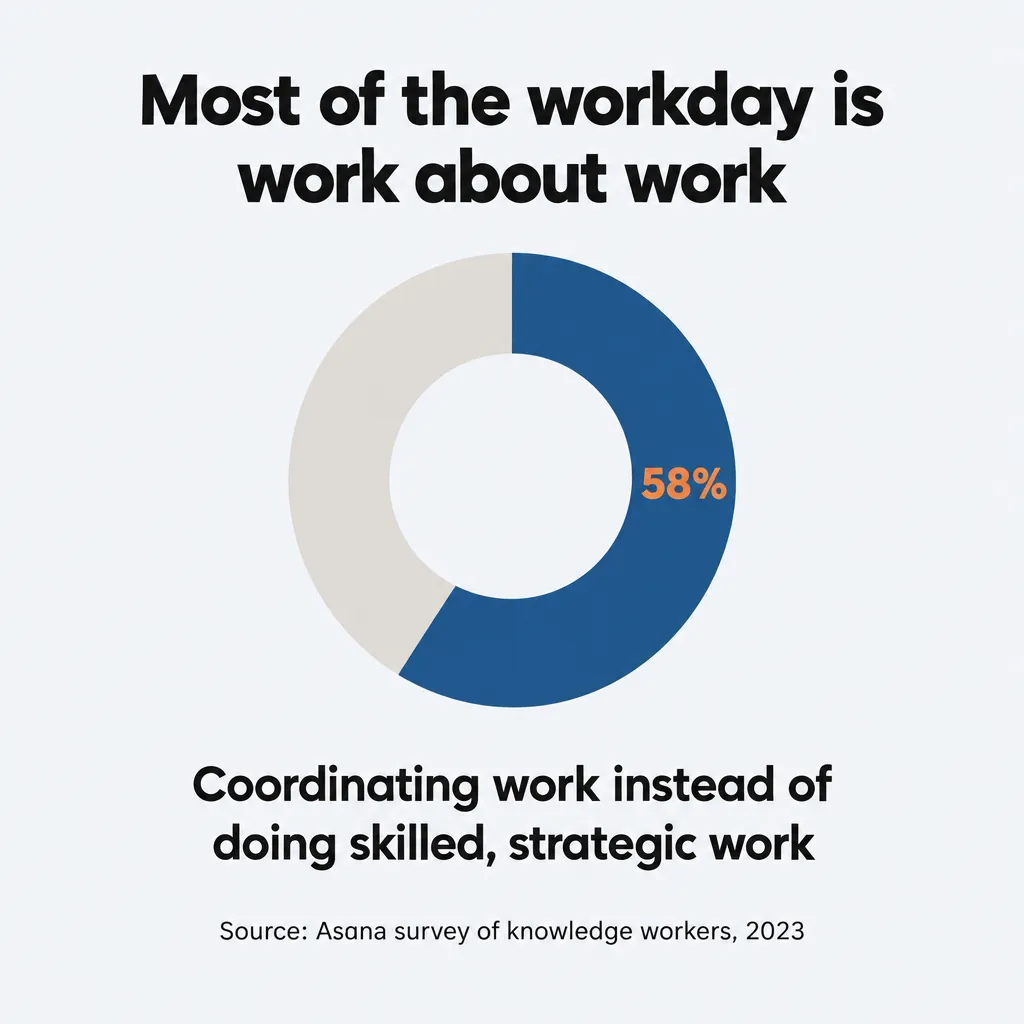
Most of us still spend a lot of time in task management software or in email, just moving things around and passing data back and forth between people. In Asana’s 2023 survey, knowledge workers said 58% of their day went to “work about work”: coordinating work rather than doing the skilled, strategic work they want to be doing.
Switching between tools costs time too. The workers Harvard Business Review studied switched between apps and websites about 1,200 times a day. Across a week, the time they spent getting reoriented after all those switches added up to just under four hours, about 9% of their time at work.
I think we can agree that moving work around isn’t where people add the most value, and that AI already does it a lot better than we do.
Some early users already hand this work to an agent. Dan Shipper says his dot sorts through the Slack requests and emails coming in, so he can quickly decide what needs him without opening his inbox.
What Should You Do With the Time an AI Agent Saves?
Spend the time you get back on giving feedback and building relationships with other people. I think those are where people add the most value at work, and in my experience they’re also the best parts of work.
By feedback, I mean your judgment on the work: approving a draft, choosing between options, or telling the AI what’s wrong with something it made.
Whatever this technology looks like a year from now, it should be maximizing the time we spend on feedback and relationships. And that means AI doing everything else automatically.
What Should Working With an AI Agent Look Like?
To me, the ideal workflow is a super intelligent assistant bringing you just what you need to focus on in that exact moment. I think the best way to work is probably not managing half a dozen applications at once, juggling 17 different tasks at the same time, or trying to track down the context or data you needed for that one task.
The assistant shows you one decision at a time, in whatever interface fits that decision. For example, a reply that needs your approval might show up as the drafted email itself, and a choice between two designs as the two images side by side. It gets the feedback it needs from you before moving on to the next decision. It stores, manages and handles everything else, like saving finished work and keeping your task lists current, without you having to see it.
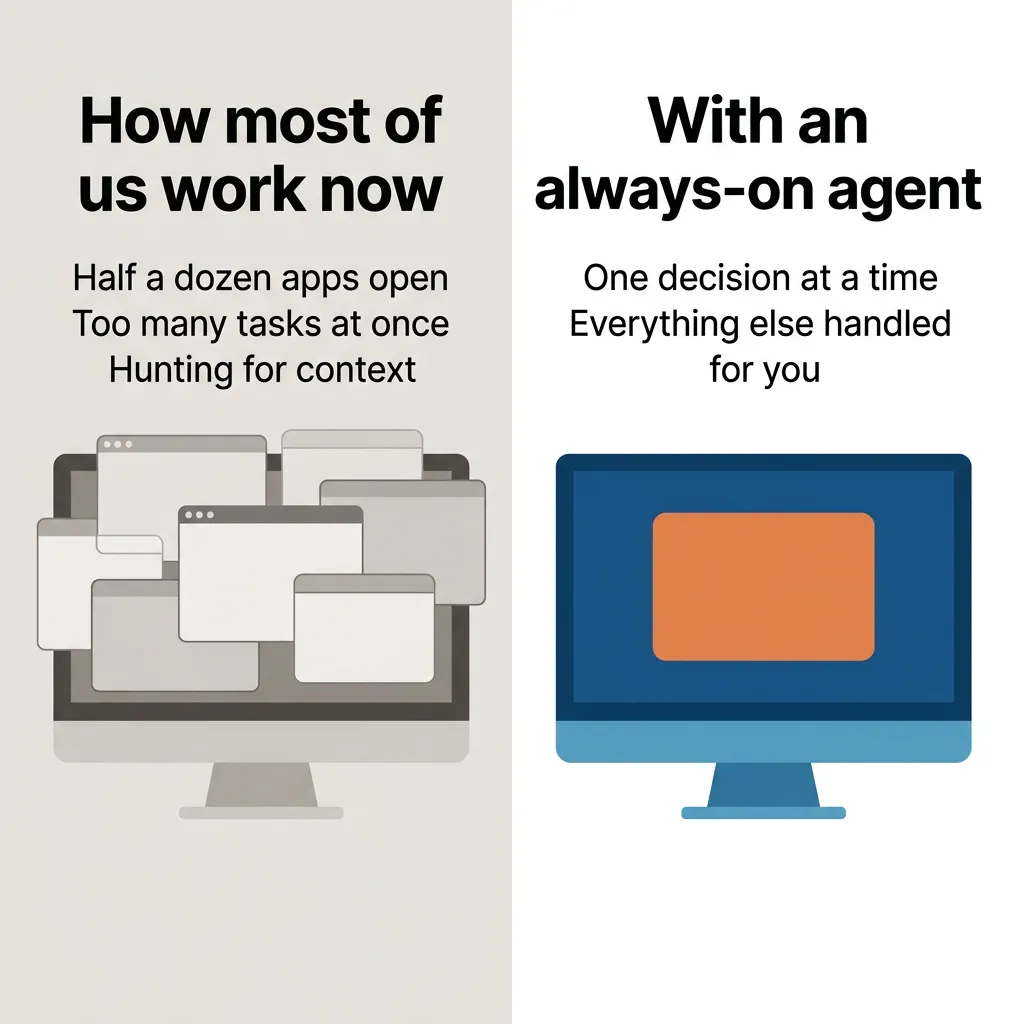
You should never have to repeat yourself or explain how to do a task that’s already been done. You should never have to do anything tedious or mundane. Your part is novel feedback: the judgment calls the AI can’t get from anything you’ve already told it.
I wrote about what this looks like in my own work in how to run your business with AI.
Won’t I Still Have to Approve Everything?
You’ll still approve the important actions an agent takes, like sending a message or making a payment. I think that’s how it should be, because approving work and giving feedback on it is the human part of the job.
The worry is that the agent ends up waiting on you all day. When OpenAI launched dots, one Hacker News commenter wrote that they had little need for agents that run overnight, because “my throughput is limited by my approval.” If every step waits for your answer, the agent can only move as fast as you do.
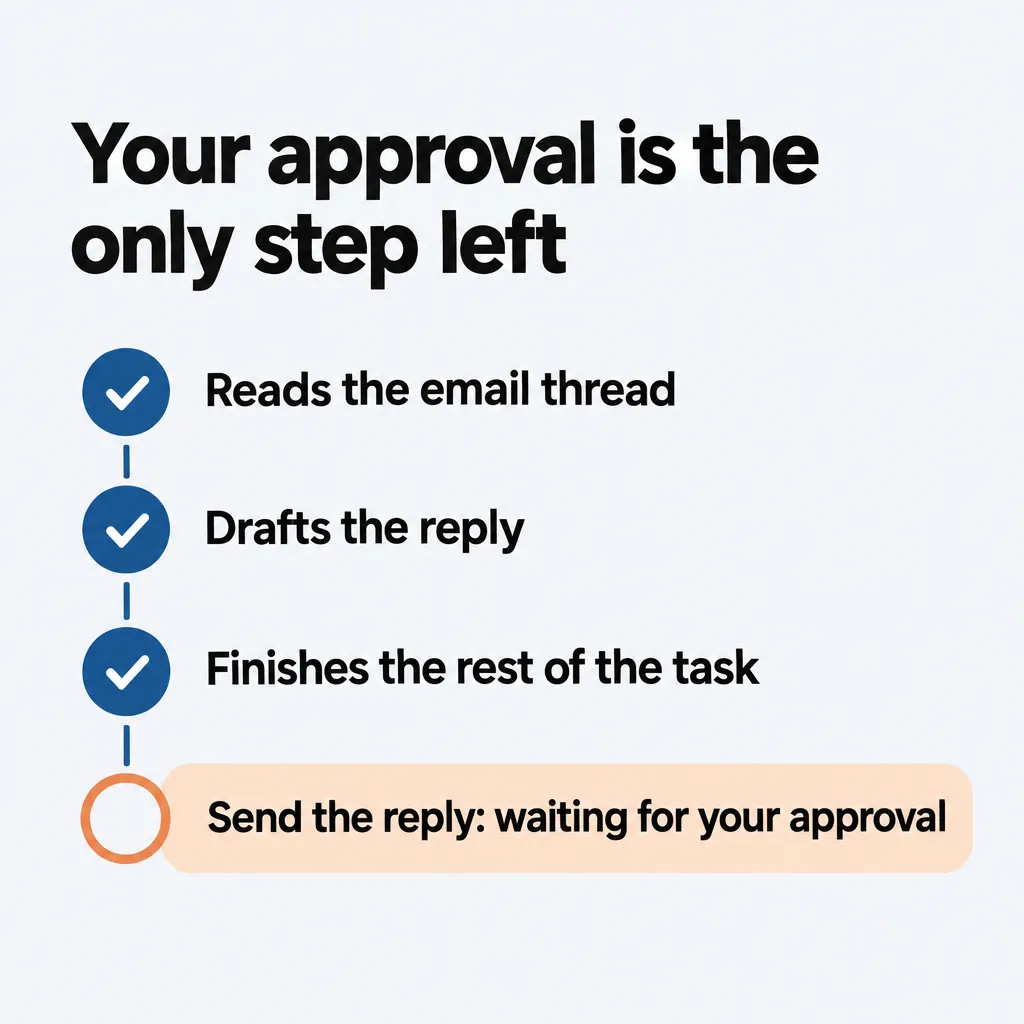
A good agent avoids that by doing all the work it can before it asks, so your approval is the only step left. When it asks, it shows you exactly what it’s about to do, so you can decide quickly. Claude Duet works this way: if you can’t approve something right away, it finishes the rest of the task, then brings that approval back to you later, so the rest of the work isn’t held up.
You can also let an agent do more on its own as you learn to trust it. OpenAI’s dots let you set custom rules for which actions your dot takes without asking, which need your approval and which are blocked.
Is It Safe to Let an Always-On AI Agent Act on Its Own?
An always-on agent can act on its own safely within clear limits. Some of those limits are built in by the company that makes the agent. You set the rest by choosing which accounts and apps you connect it to.
Claude Duet refuses some actions even with your approval, like trading securities or moving money between accounts. Muse has no visibility into your passwords or payment methods. And a dot won’t change a password for you, because OpenAI leaves sensitive tasks like that to you.
The safeguards aren’t perfect. Anthropic’s own help article for Duet says no defense is perfect against prompt injection, meaning instructions hidden in an email or web page that try to trick the agent. And in October, Techdirt reported that Grok Bot posted a tech CEO’s bank details in a company Slack channel.
So connect only the accounts and apps the agent needs for the jobs you give it. Make payments, change passwords and permanently delete things yourself, or approve each one. I go through which actions to handle yourself, and how to set an agent up to work on its own, in is it safe to let AI agents run without supervision.
Should You Get an Always-On AI Agent Now or Wait?
Start using an always-on agent now if you already pay for a plan that includes one:
- Claude Pro or Max, in the US: join the Duet waitlist.
- ChatGPT Pro or Business Premium: your first dot is included. Pro doesn’t offer dots in the European Economic Area, Switzerland or the UK, and on Business Premium, dots aren’t available in every region.
- Premium, Super, Ultra, Teams or Enterprise from x.ai: Grok Bot is included.
Before you connect one to your business, know where today’s versions fall short:
- Duet can’t connect to Microsoft 365 yet. If your business runs on Outlook and Teams, dots may fit better for now, since you can message your dot in Teams.
- Anthropic says this early version of Duet may still misread a thread or misjudge what’s urgent.
- Anthropic also says personal errands, like booking tickets, aren’t one of Duet’s strengths yet.
- Duet checks your accounts only every few hours, so it won’t see an urgent email that arrives between check-ins until the next check-in.
- OpenAI tells dot users to always review consequential work.
Even if you can’t get one yet, pay attention now. Keeping up with AI is dizzying, but it’s worth it. If you can predict what this technology will look like in even 6 or 12 months, you can prepare for it, and you won’t waste your time on work that’s about to be automated.
One way to prepare is to keep your company’s knowledge in files you control, outside any one AI tool, so whichever agent you end up with can work from them. That means plain documents in a folder your business owns, covering things like what you sell, how you price it and step-by-step instructions for the jobs you repeat. I explain why that knowledge shouldn’t live inside any one AI tool in my post on whether your business should use Gemini agent. I cover what goes in that folder in my post what is an AI agent for your business.
How Much of Your Workday Is Novel Feedback?
Think of your average workday right now. How much of it are you actually spending on novel feedback? Maybe 10%? 5%? 1%?
The 10x engineer, one engineer doing the work of ten, used to be a myth. In my view, we’ve already seen it come true, and then the 100x engineer, and maybe even the 1,000x engineer.
I think we’re already seeing the 10x knowledge worker, and we could very soon see a 100x knowledge worker. To me, the chat agent interface feels like how we get there.
If you have questions about any of this, reach out through our contact page or email me at tj@tjrobertson.com.