How Do QR Codes Work? What the Squares Mean and How a Phone Reads Them
By TJ Robertson, Founder and Lead Strategist at TJ Digital
A QR code is a grid of small black and white squares. Each black square stands for a 1 and each white square for a 0. Read in the right order, those 1s and 0s spell out a message, usually a web address.
Your phone finds the code by its three big corner squares. Then it reads the rest of the squares in a set order and turns them back into text. Part of every code is backup data, so the phone can rebuild squares that are scratched, torn or covered by a logo.
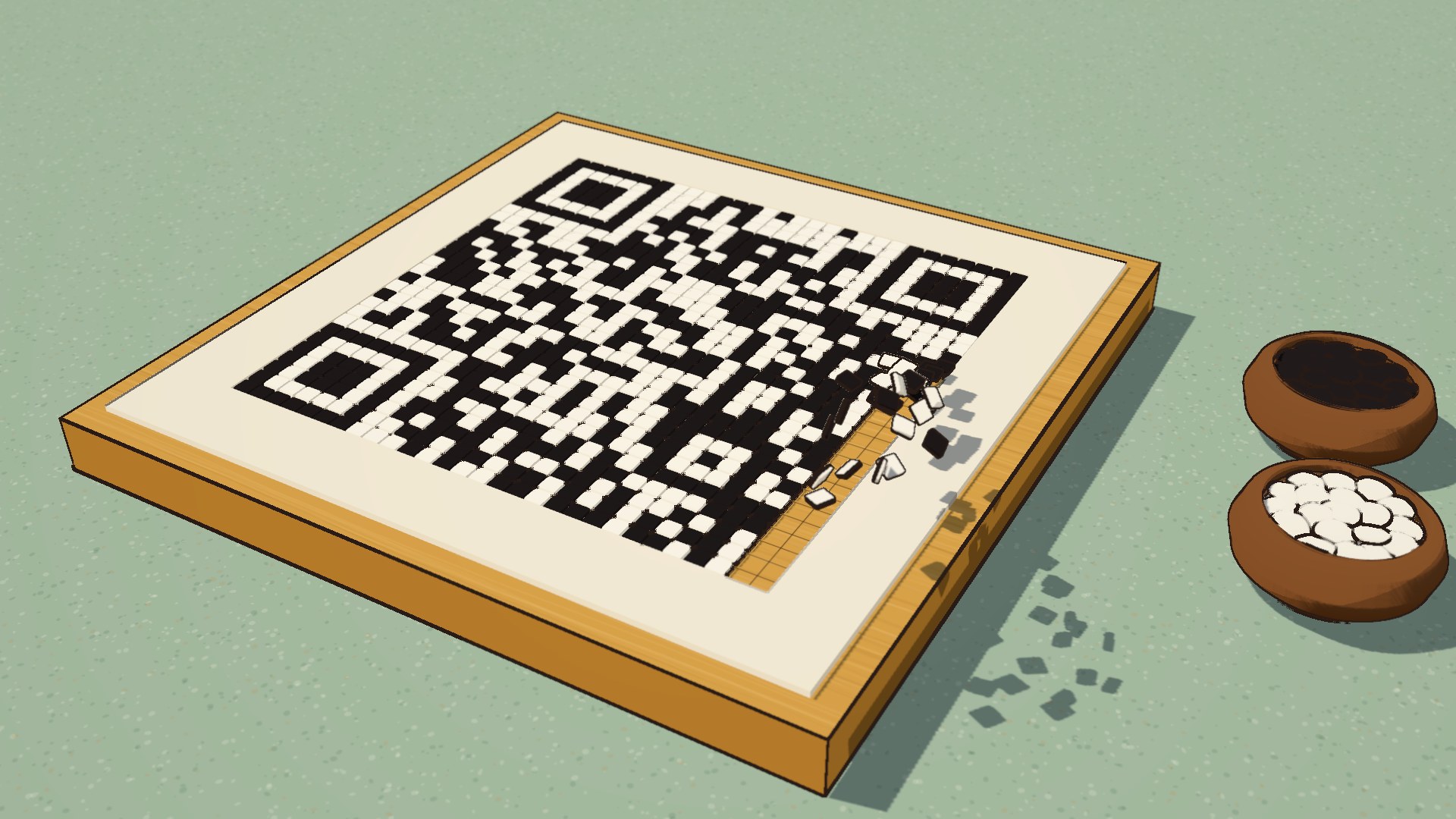
At TJ Digital, we built a QR code square by square for an explainer video, then destroyed 30% of the data in it. It still scanned.
The video was made by Claude Fable 5.2, Anthropic’s AI model, following the video editing instructions we wrote for it. Claude drew every frame in code, without any AI tool that makes pictures or video from a prompt. I wrote more about the difference between AI editing a video and AI generating one in can AI make high-quality videos for my business.
What Is Stored in a QR Code?
When a QR code leads to a website, the squares hold the web address, the same text you’d type into your browser. The website itself lives online.
So reading a QR code doesn’t need the internet. Your phone turns the squares back into text right on the phone, and it only goes online when you open the link. A code that holds plain text, Wi-Fi login details or a contact card works with no signal at all.
A QR code can only hold data. It can’t run anything on your phone. The camera app reads the text and decides what to offer you, like opening a web page, joining a Wi-Fi network or saving a contact.
How Is a QR Code Different From a Barcode?
The barcodes in use when the QR code was designed held only about 20 characters, because a barcode stores data in one direction. The stripes are read along a single line, so making them taller adds nothing. That limit is the problem Denso, the company where the QR code was invented, set out to solve (Denso Wave).
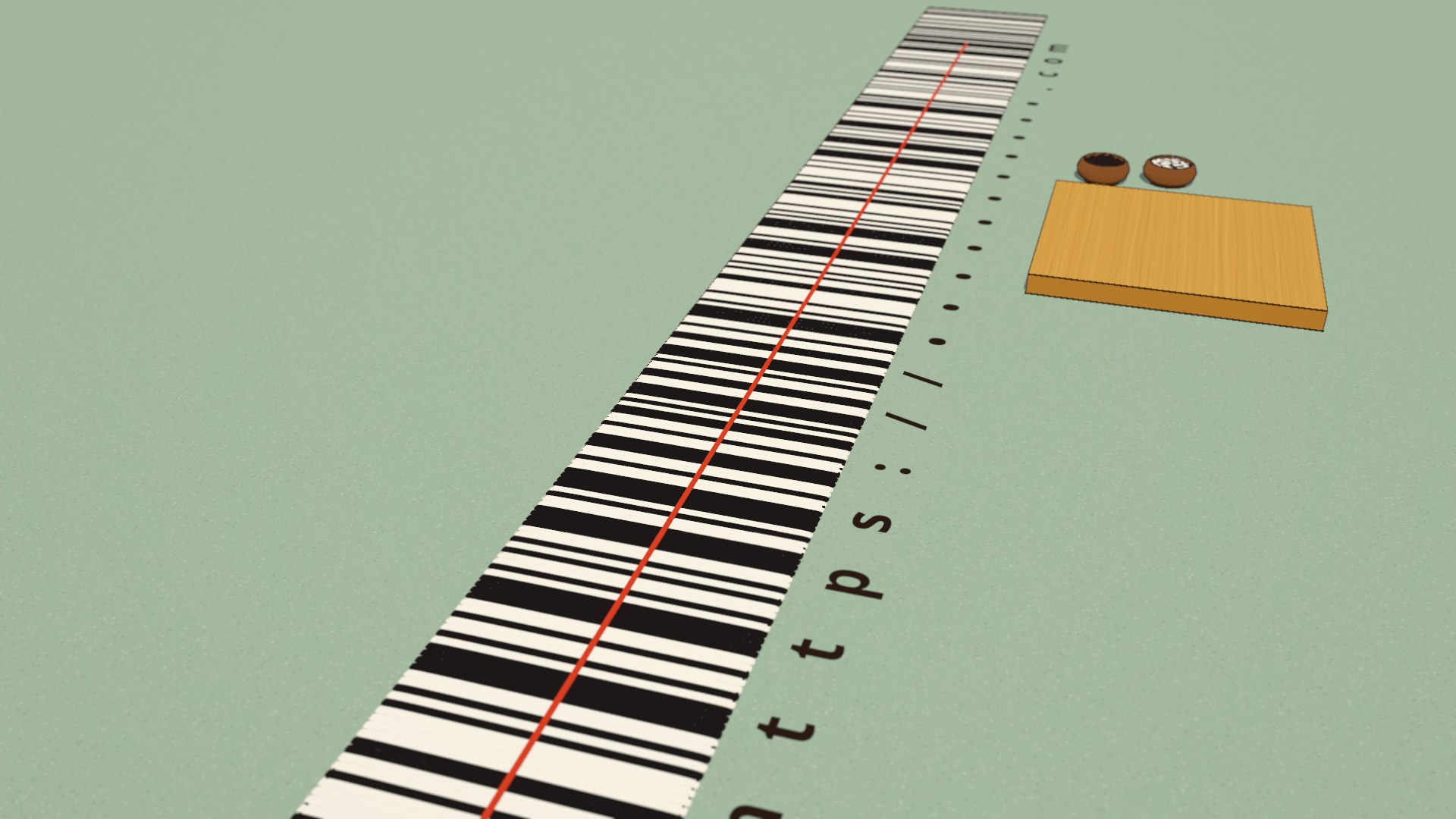
A QR code stores data in two directions. Because it’s a grid, every row and every column carries information, and the same patch of paper holds far more.
How Much Can a QR Code Hold?
How much a QR code holds depends on its size. The smallest is a grid of 21 by 21 squares, and the largest is 177 by 177 (Denso Wave). That largest code holds up to 7,089 digits when it carries the least backup data (Denso Wave), and most codes you scan are much smaller, because a web address only needs a few dozen letters.
What Are the Three Squares in the Corners of a QR Code?
The three big squares in the corners are how your phone finds the code. A camera sees everything in front of it: the table, the menu, your thumb. Before the phone can read a QR code, it has to pick the code out of that picture.
Each corner square is called a finder pattern. It’s a black square ring, a white ring inside it, and a solid black square in the middle. Measured in the code’s small squares, a line through its center crosses one black, one white, three black, one white and one black, from any direction.
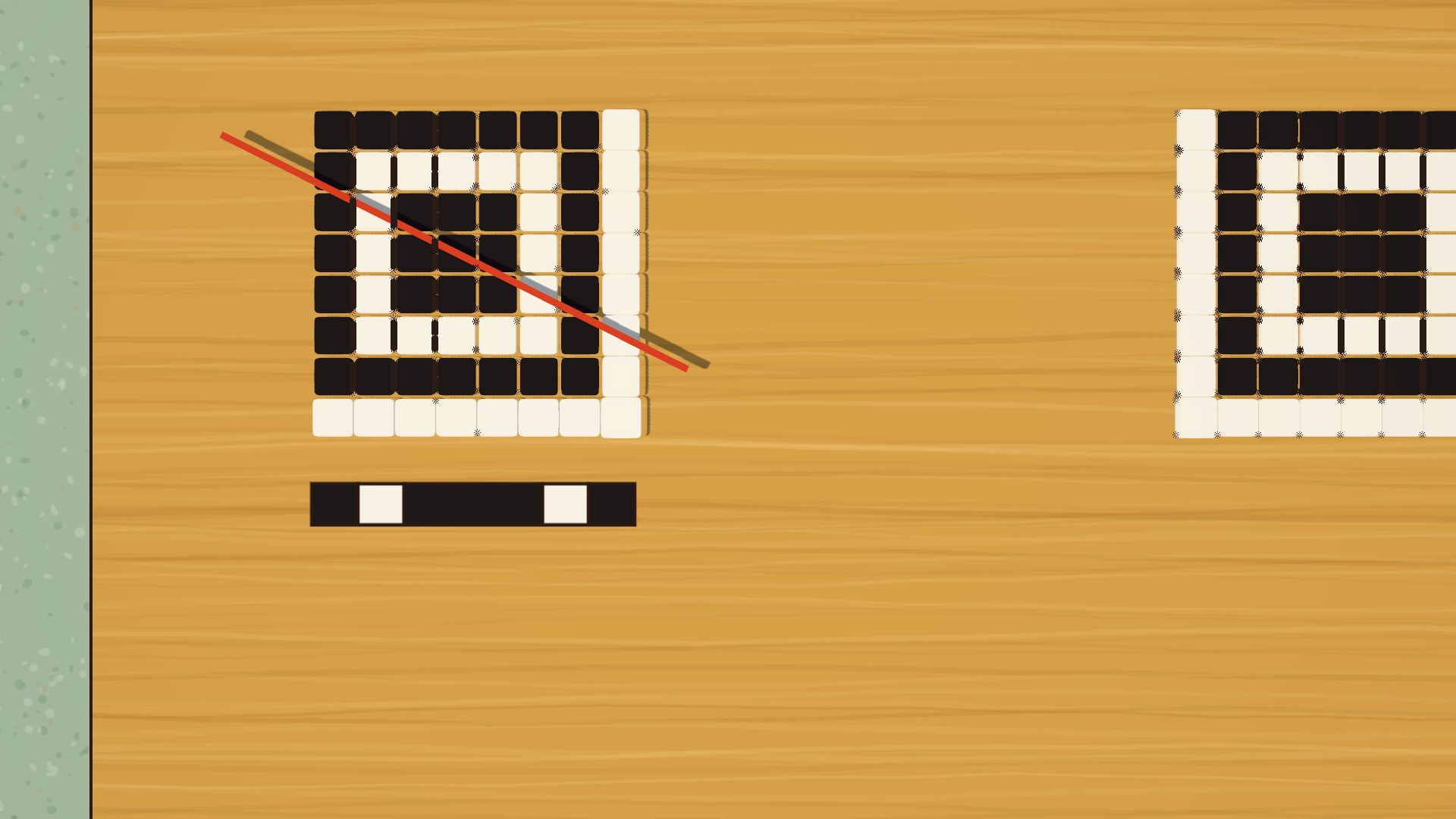
The camera looks for that ratio. Denso says its team searched fliers, magazines and cardboard boxes for the black-and-white pattern that turned up least in print (Denso Wave), so almost nothing else in the picture looks like it.
Why Are There Three Squares and Not Four?
The code has three corner squares so the phone can tell which way up it is. With a big square in every corner, the code would look the same from every side. The corner without one shows which way is up, so the phone can read a code that’s sideways or upside down.
Three squares are still enough to show the phone where the code is, how big it is and how it’s tilted.
What Do the Dotted Lines and the Small Square Do?
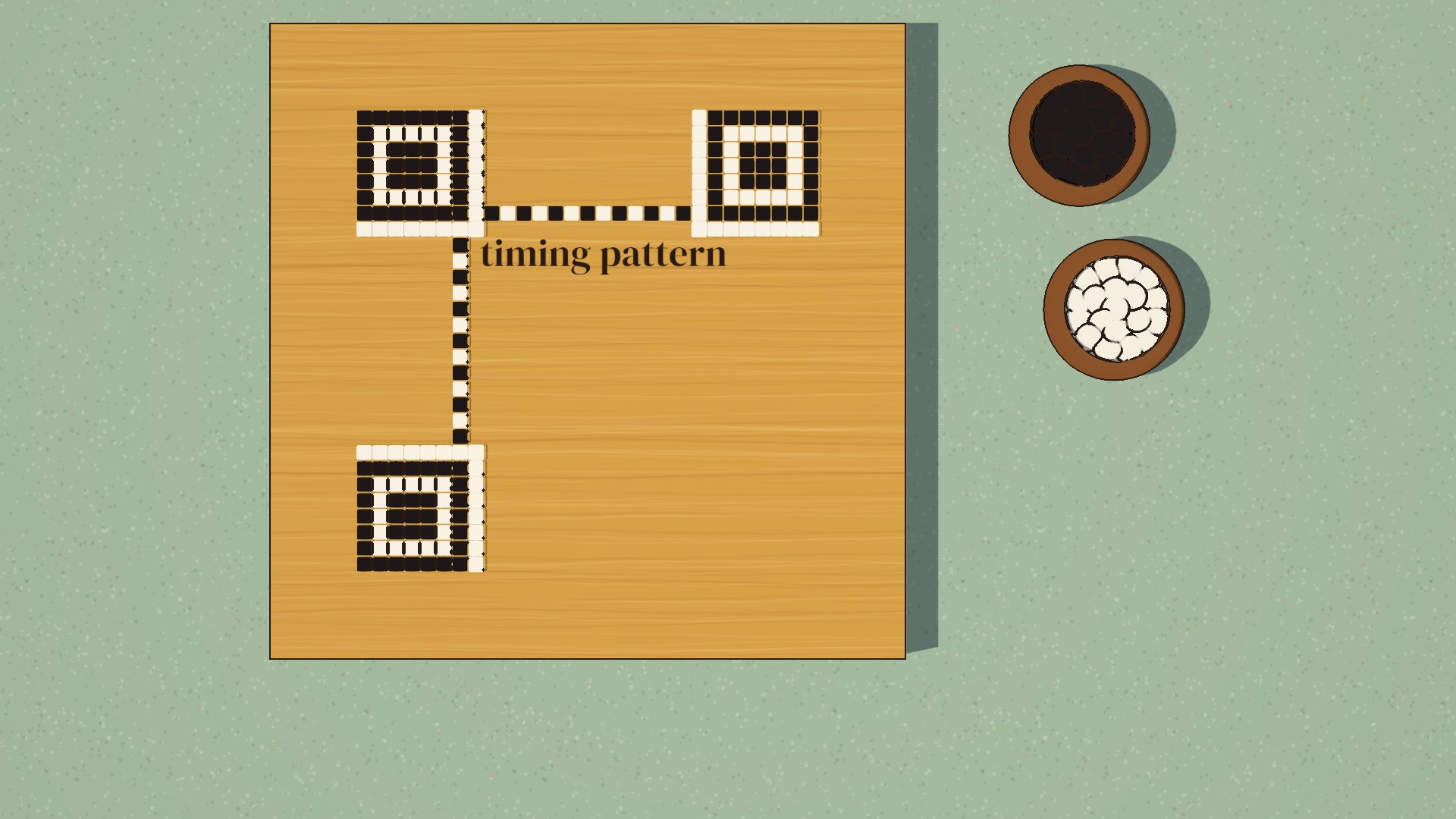
A dotted line of squares, alternating black and white, runs between the corner squares, one along the top and one down the left side. This is the timing pattern. Its evenly spaced squares work like the marks on a ruler, showing the phone where each row and column falls.
Paper bends, and nobody holds a phone perfectly straight, so the grid in the camera’s picture is often warped. The small square near the fourth corner gives the phone an extra landmark to correct for that. It’s called an alignment pattern, and it lets the phone read codes on curved surfaces or scanned at an angle (Denso Wave).
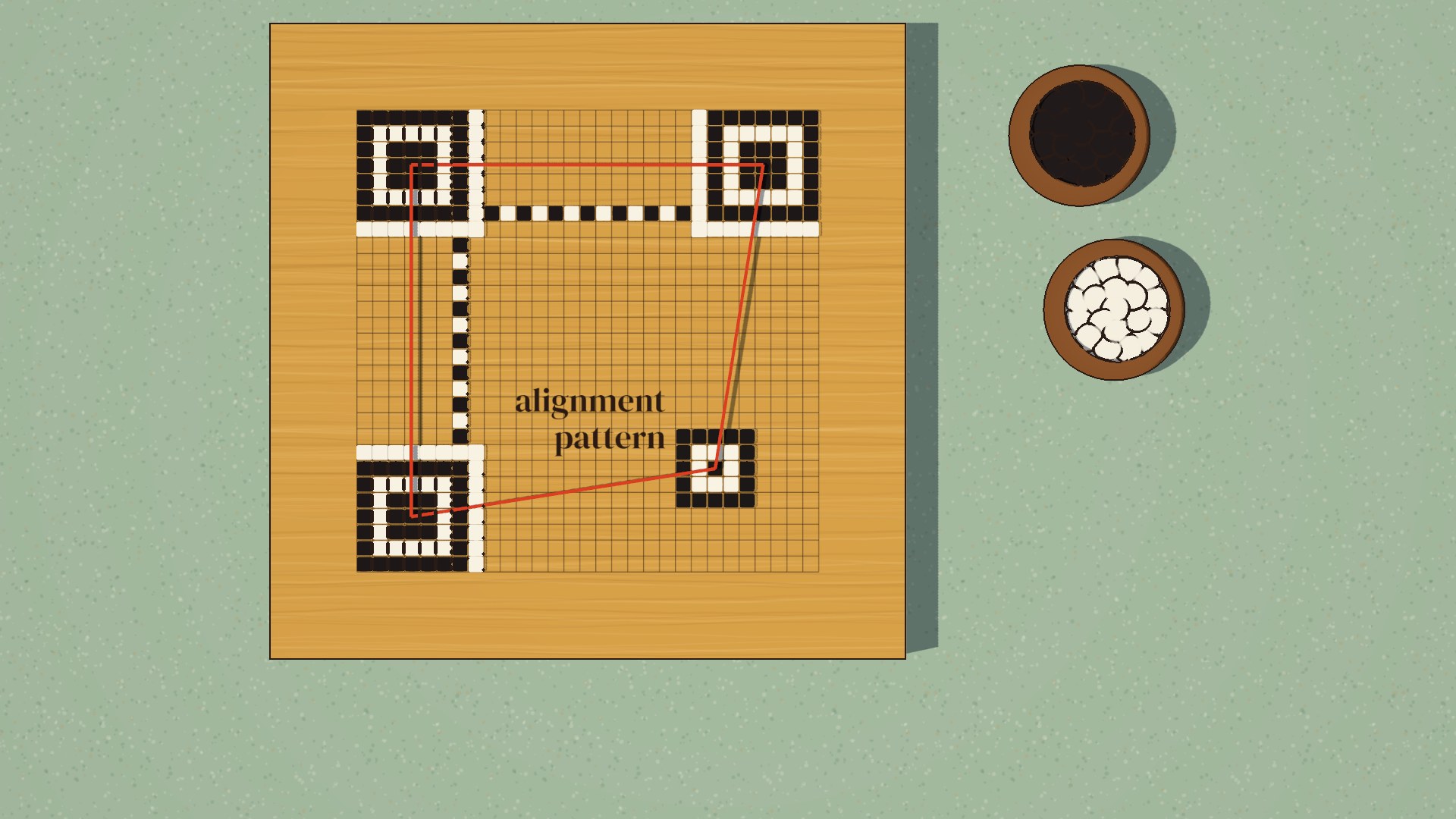
The smallest QR codes don’t have one. Larger codes have more of them, up to 46 in the largest version.
How Does a Phone Turn the Squares Into Letters?
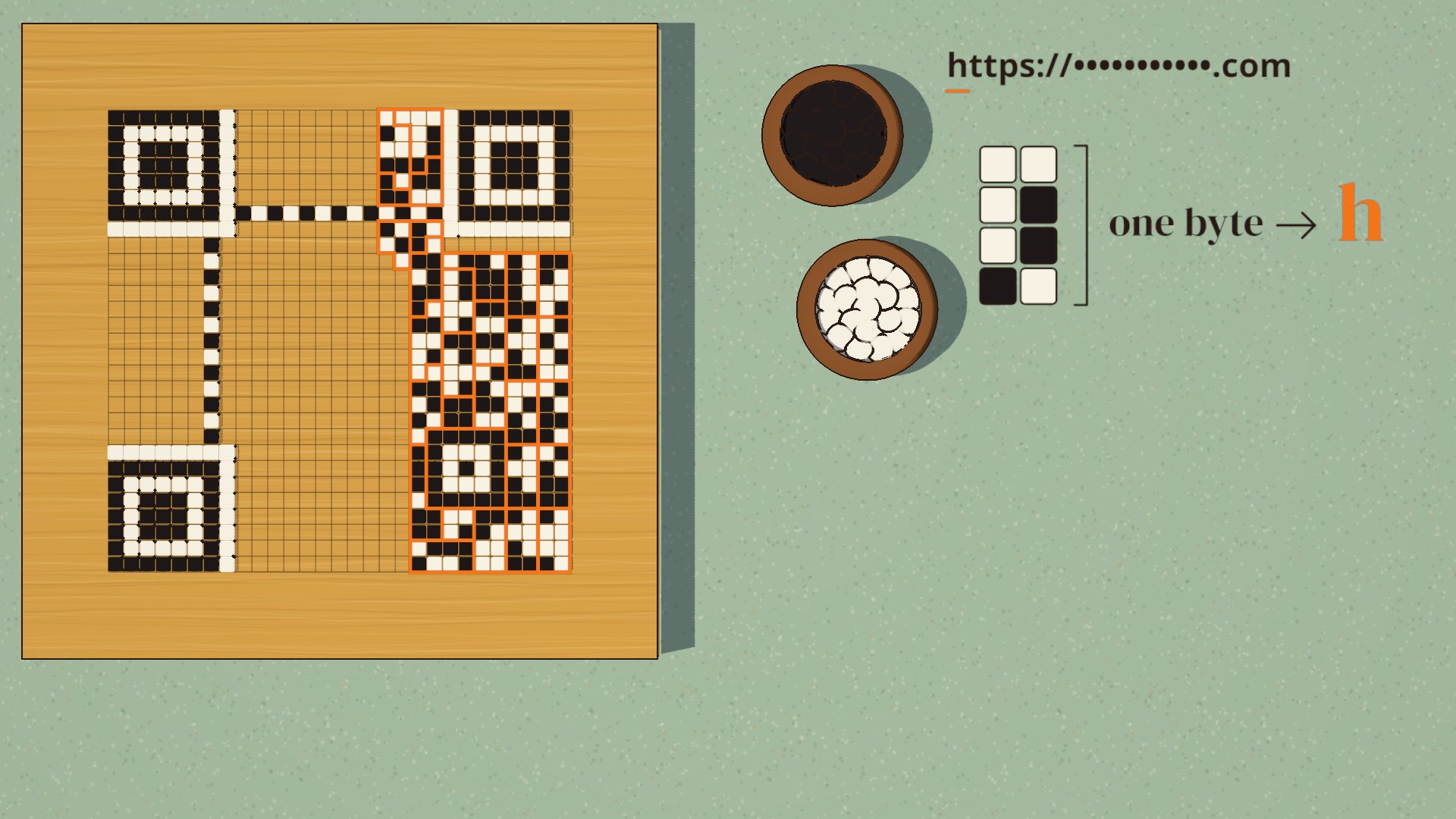
The squares outside those fixed patterns hold the data, starting with the message. Eight squares make one byte, and one byte is enough to store one letter.
The software that makes the code fills these squares in a set order. It starts in the bottom right corner and works in strips two squares wide, going up one strip and down the next. Your phone reads them back in the same order, groups them in eights and turns each byte back into a letter.
Why Does a QR Code Still Scan When It’s Damaged?
Codes get scratched, torn and dirty, and one wrong square can change a letter in the message. So the software that makes the code adds backup bytes after the message. They use the same math that lets a scratched CD keep playing, called Reed-Solomon error correction (Denso Wave).
It works like drawing a line through points. Any two points on a straight line tell you exactly where the line runs. So if you send three points on that line and one gets lost, the other two still tell you where the missing one was.
A QR code uses the same idea with a curve. The curve exists only in the math, worked out from the bytes. The message bytes are points that set the shape of the curve.
The backup bytes are extra points on that same curve. When some bytes are damaged, the surviving points still show where the curve runs, and the phone reads the missing bytes off it.
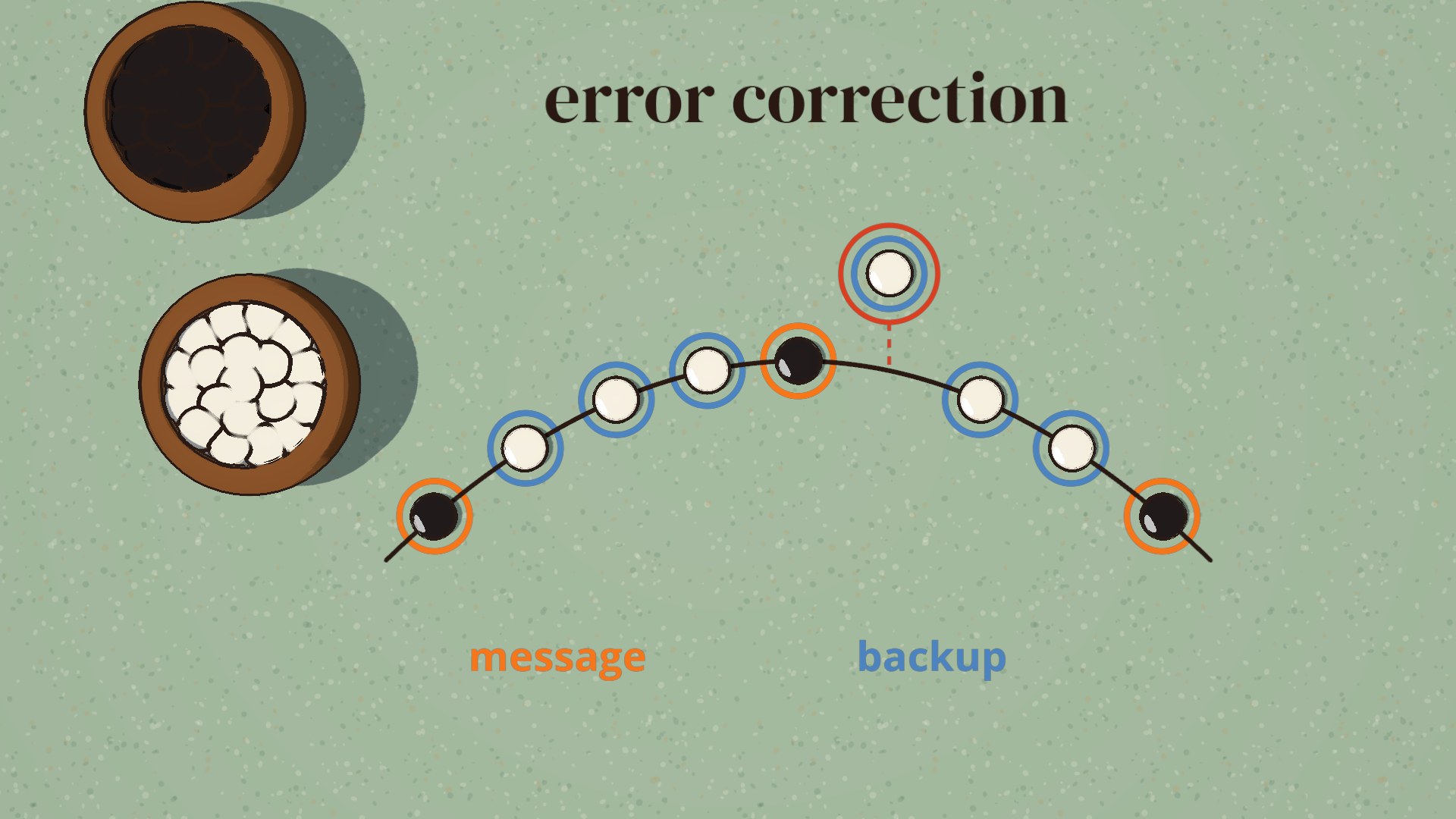
A damaged byte still looks like a real byte, so the phone can’t tell which ones are wrong. It has to find them before it can repair them. Finding and repairing each damaged byte uses up two backup bytes.
How Much Damage Can a QR Code Take?
Whoever makes the code chooses how much backup to add, and there are four levels (Denso Wave):
| Level | Share of the code’s bytes it can restore |
|---|---|
| L | about 7% |
| M | about 15% |
| Q | about 25% |
| H | about 30% |
According to Denso, “Typically, Level M (15%) is most frequently selected.”
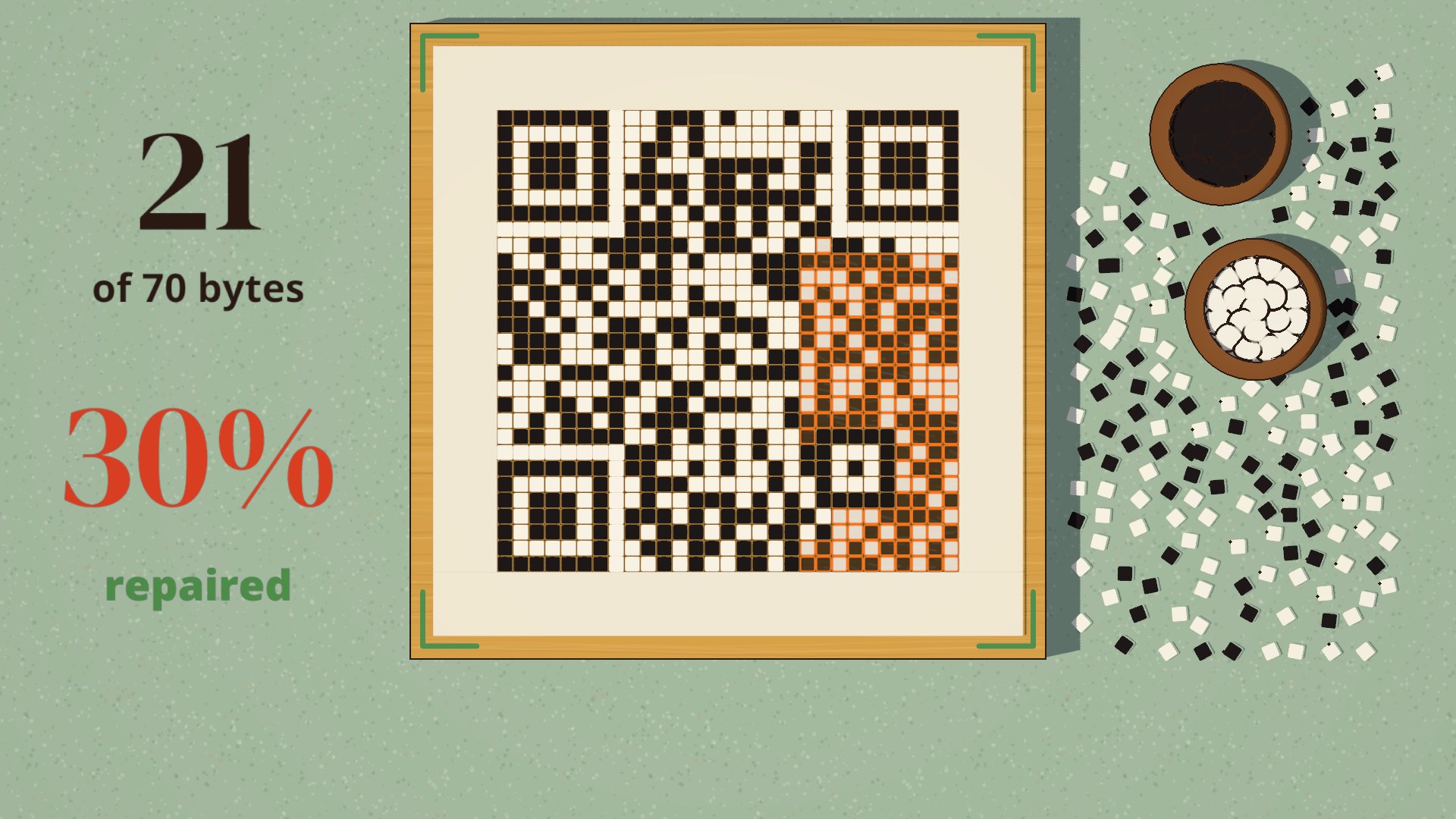
Covering any 30% of a code won’t always work, even at level H. The percentages are a share of the bytes. Backup can’t rebuild a corner square, so covering one can stop the phone from finding the code at all, however much backup the code has.
The code in our video uses level H. It holds 70 bytes: 26 for the message and 44 for backup. We destroyed 21 of the 70, and it still scanned.
Why Does a QR Code With a Logo Still Work?
A logo in the middle is just damage the code was built to survive. As Scott Ruoti, a computer scientist at the University of Tennessee, wrote, “logos are not actually part of the QR code; they cover up some of the QR code’s data” (Nextgov). The backup bytes fill in what’s under the logo.
The corner squares, dotted lines and alignment squares aren’t stored as bytes, so the backup can’t rebuild them. A logo that covers any of them puts the scan at risk. Denso warns that people “must be careful” about putting a design over the code and doesn’t give a safe size (Denso Wave).
Why Does a QR Code Look Random?
Part of the reason a QR code looks random is that the software that makes it flips some of its squares on purpose. Without that, the code could end up with big solid patches of black or white, or a cluster of squares that happens to look like a corner square, and both confuse the camera. The flipping follows a fixed pattern called a mask.
There are eight masks. The software tries all eight, scores each result for those problems and keeps the one with the fewest.
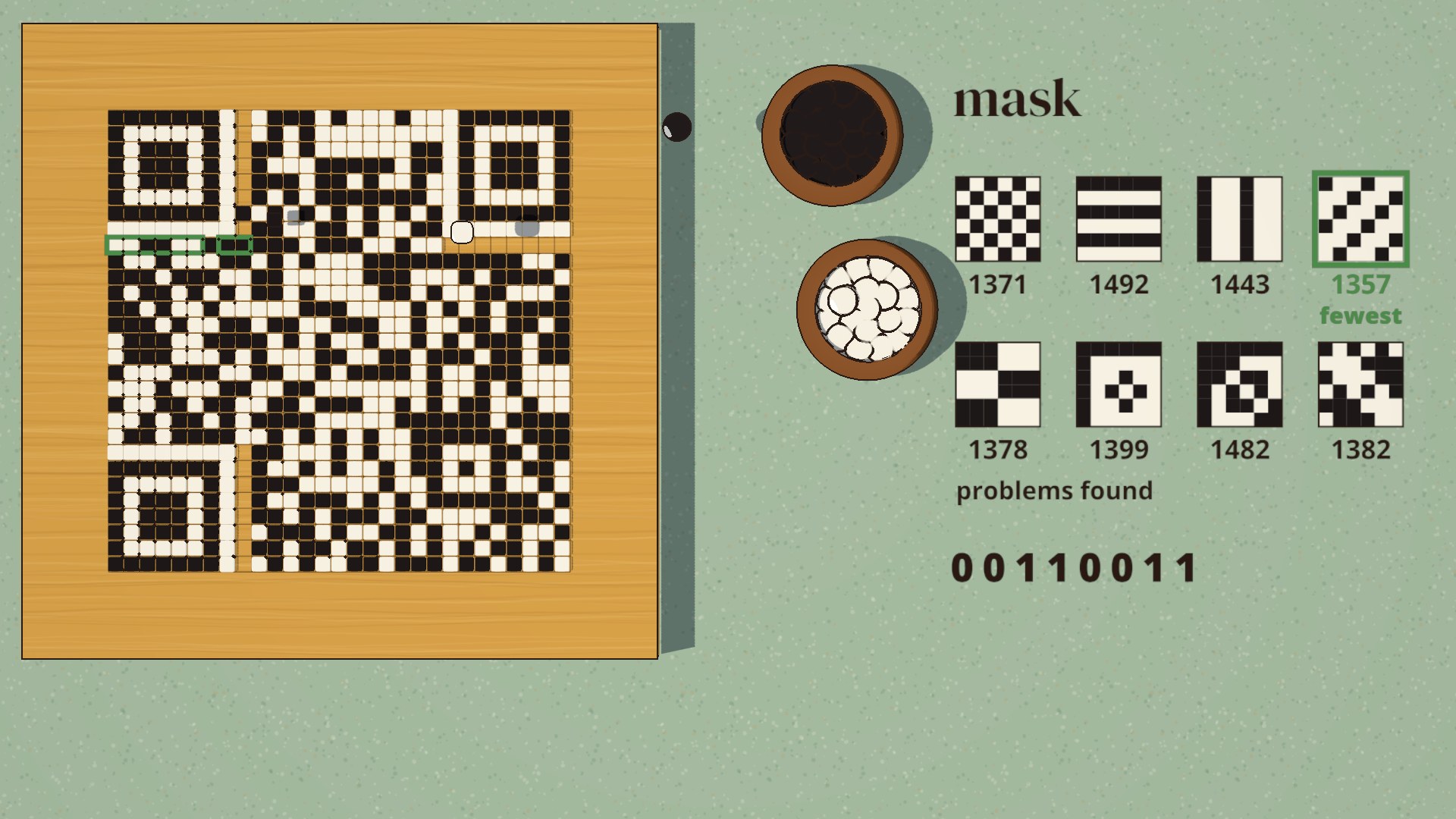
Then 15 squares next to the corner squares record which mask was used and which backup level the code has. They appear twice in the code, because the phone can’t read anything else without them. The phone reads them, undoes the mask and only then reads the message.
Who Invented the QR Code?
A team led by Masahiro Hara at Denso invented the QR code, and Denso released it in 1994. Hara has described the problem in factories at the time: workers had to read about 10 different barcodes to track parts, which slowed production and wore people out (Hara, Synthesiology). QR stands for quick response, because the goal was a code that reads fast.
Hara says the idea for the grid came during a lunchtime game of Go at work, with its black and white stones laid out on a board (The Guardian).
Are QR Codes Safe to Scan?
Scanning a QR code is only as risky as the link it leads to. Your phone shows you the address before it opens anything. As Ruoti wrote, “If the QR code holds a URL, your phone will present you with the URL.”
Scammers count on people tapping without looking. The FTC warns that scammers hide harmful links in QR codes to steal personal information, and that “there are reports of scammers covering up QR codes on parking meters with a QR code of their own” (FTC). The FBI has warned that criminals “tamper with both digital and physical QR codes to replace legitimate codes with malicious codes” (FBI).
Can a QR Code Be Hacked?
A printed code can’t be changed, but someone can cover it with a sticker of their own, which is how the parking meter scam works. Some codes also hold a forwarding link: a short address on another company’s server that sends you on to the final page.
Whoever controls that forwarding link can change where it sends you, even after the code is printed. Security researchers at Palo Alto Networks describe attackers using forwarding links for that reason (Unit 42).
A few habits protect you:
- Read the address your phone shows before you tap it. The FTC suggests looking for misspellings or a switched letter in the address.
- Be wary of a code in an unexpected place, or a sticker on top of another code.
- Don’t scan a QR code in an email or text you weren’t expecting.
- Take extra care when the address is a short web address that doesn’t name the site you’re going to, because it hides where you’ll end up.
Do QR Codes Expire?
A QR code that holds the web address itself never expires. These are usually called static QR codes. The squares don’t change, so the code will scan for as long as it exists, though it can still lead to a dead page if the website takes that page down.
A code that holds a forwarding link can stop working. These are usually called dynamic QR codes, and the forwarding runs on the servers of the website or app used to create the code. If the code owner’s account there is cancelled or lapses, the forwarding stops, and the code leads nowhere even though it still scans.
If you have questions about any of this, or about how we made the video, reach out through our contact page or email me at tj@tjrobertson.com.