How to Get Your Business Verified in ChatGPT
By TJ Robertson, Founder and Lead Strategist at TJ Digital
Short answer:
- Sign in to ChatGPT and open Business Hub from the sidebar.
- Search for your business by name and select it.
- Prove you’re connected to it in one of these ways:
- Enter a code sent to the business phone or business email.
- Add a line of text ChatGPT gives you (a TXT record) to your domain’s DNS settings.
- Connect your Shopify store.
- Wait for OpenAI to approve your claim.
- Pass OpenAI’s identity check, which you need before you can edit your profile or see your data.
OpenAI launched Businesses in ChatGPT on November 10, 2026. ChatGPT is essentially doing what Google did with Google Business Profiles: you claim your business, verify that it’s yours, and manage the information you give ChatGPT about it.
If you have a business, I’d get into this today. Once you’re verified, OpenAI shows you how often ChatGPT mentions your business and how often people click through to your website. This is the first time we’ve gotten data from OpenAI on how a business shows up in ChatGPT’s regular, unpaid answers.
At TJ Digital, we help businesses show up in Google and in AI search tools like ChatGPT, and I’ve seen this verification process firsthand.
What Is Businesses in ChatGPT?
Businesses in ChatGPT is OpenAI’s new program for business listings in ChatGPT, which OpenAI says 1.2 billion people use every week (OpenAI’s announcement). It’s still in beta, and you manage it from Business Hub, a new part of ChatGPT.
Claiming your Google Business Profile is how you control your listing on Google Maps, and for a local business, it’s arguably even more important than a website. Google’s profiles are built for local businesses, though. Businesses in ChatGPT is open to online businesses too.
OpenAI’s terms say it can create and display a listing for your business whether or not you claim it. So claiming is mostly about managing the information in a listing that may already exist.
Can Your Business Claim a Profile in ChatGPT?
The quickest way to find out is to search for your business in Business Hub. If your business is eligible, ChatGPT shows you ways to verify that it’s yours. OpenAI still reviews every claim, and it can turn one down.
You have to own the business or be authorized to represent it (OpenAI’s help article). OpenAI also says not every business can claim a profile, because eligibility depends on things like your industry and location. To start, claiming is only open to businesses with a website.
Whether you’re a local or an online business changes what you can do:
| Your business | What you can do right now |
|---|---|
| Local store or restaurant | Claim an existing U.S. listing. OpenAI says that’s all local businesses can claim for now, so you can’t add a new one. |
| Online business | Claim your listing. If ChatGPT doesn’t list you, you may see an option to add one. |
I’ve only seen the verification for an online business so far, so I can’t tell you yet whether local businesses will face all the hoops Google puts them through, like recording a verification video. Hopefully they won’t.
Outside the U.S., OpenAI doesn’t publish a list of countries where online businesses can claim a profile. If you run a Shopify store, though, Shopify’s help center says business profiles and insights are available globally. OpenAI says it plans to expand to more markets and business categories over time, but it hasn’t given a timeline.
Is Businesses in ChatGPT Free?
Claiming and managing your business in ChatGPT is free for now. VentureBeat reported that it’s free at launch, and OpenAI’s own pages don’t mention a price. Benji Shomair, OpenAI’s vice president of monetization, didn’t rule out a paid model in the future, according to Digiday.
You don’t need an Ads account or a ChatGPT Enterprise agreement to claim your business. Advertising in ChatGPT is a separate product.
What You Need Before You Claim Your Business
- The ChatGPT account you want to manage the business from
- Access to one way of verifying: the business phone number, the business email, your domain’s DNS settings or your Shopify store
- A business name and address that match your official business records
- For the identity check, in case it asks: a government-issued ID, your business registration information (such as a registration or tax number) and proof that you’re authorized to represent the business
What You Agree to in the Businesses in ChatGPT Terms
Using Business Hub means accepting OpenAI’s Businesses in ChatGPT Terms, and whoever owns the business should read them before anyone claims it. A few parts go further than you might expect from a free listing:
- Your basic business information. The basic information you submit for public display, such as your business name, address, contact details, category, opening hours and website, comes with a perpetual and irrevocable license. It lets OpenAI show and handle that information to run Businesses in ChatGPT, and you can’t take it back.
- Control of your listing. Claiming doesn’t give you exclusive control. OpenAI can add to, edit or replace your information using other sources, or decline to show what you submit.
- Phone calls. By using Business Hub, you agree that OpenAI’s AI assistant may call your business on behalf of people using ChatGPT. The terms don’t say more than that, and they include a link to opt out.
- A promise not to sue (section 10). You promise, permanently, not to sue OpenAI, its affiliates, or their people, customers and suppliers over claims related to your business data, the content on your own websites, or content you have, had or claim rights to anywhere else online. You also release those claims, known and unknown, and give up the right to ask a court to order OpenAI to stop. The only exception is a claim that OpenAI broke these terms.
None of this is legal advice. If you have a lawyer, section 10 is the part I’d ask them to read.
How to Find Your Business in ChatGPT Business Hub
Sign in to ChatGPT on the web and open Business Hub from the sidebar, or go straight to chatgpt.com/business-hub. If you can’t find it, ask ChatGPT or google “Businesses in ChatGPT.” Then search for your business by name and select the listing that matches.
ChatGPT asks you to confirm which ChatGPT account will manage the business, so choose it carefully. The person who claims the business is its admin, and the admin is the one who can add teammates and give an agency access later. If you own the business, claim it with your own account.
If you run an online business that ChatGPT doesn’t list yet, you may see an option to add it, which creates a new profile. If you create the new profile through Persona, the identity verification company OpenAI uses, OpenAI’s approval publishes it automatically. There’s no separate publishing step, so only continue when the details are right.
You can delete an unpublished draft profile from the Business tab. Once a profile is published, OpenAI Support can’t delete, unpublish or hide it as part of a business setup or ownership request.
If OpenAI emailed you a claim invitation, open the personal link in that email and sign in with the address it was sent to.
How to Verify You Own Your Business in ChatGPT
After you select your business, ChatGPT asks you to prove you’re connected to it. It shows you one or more verification methods, and you only need one. Which ones you see depends on your business and where it is.
- Business phone. Choose a text message or an automated call, select Get code, and enter the code sent to the number shown. This only works if that number reaches you.
- Business email. Select Get code and enter the code sent to the email address associated with your business.
- Website domain. Add the TXT record ChatGPT gives you to your domain’s DNS settings, then come back and select Verify domain.
- Shopify store. Select Connect Shopify, review the permissions, and sign in to the Shopify store for the business you’re claiming. You can also start from your Shopify admin by installing the ChatGPT Business app and claiming your profile there. Shopify says the app verifies your business automatically through your store.
Once you’ve verified, OpenAI reviews your claim and emails you its decision or a request for more information. You can cancel the claim while it’s under review.
How to Add a TXT Record to Your DNS
A TXT record is a line of text stored in your domain’s DNS settings. Adding one is a common way to prove you own a domain, because only someone who controls the domain can add it.
Your DNS is usually managed wherever your domain is registered or hosted, or on a platform like Cloudflare. As long as you have the login, you can add the record yourself, and it’s very simple.
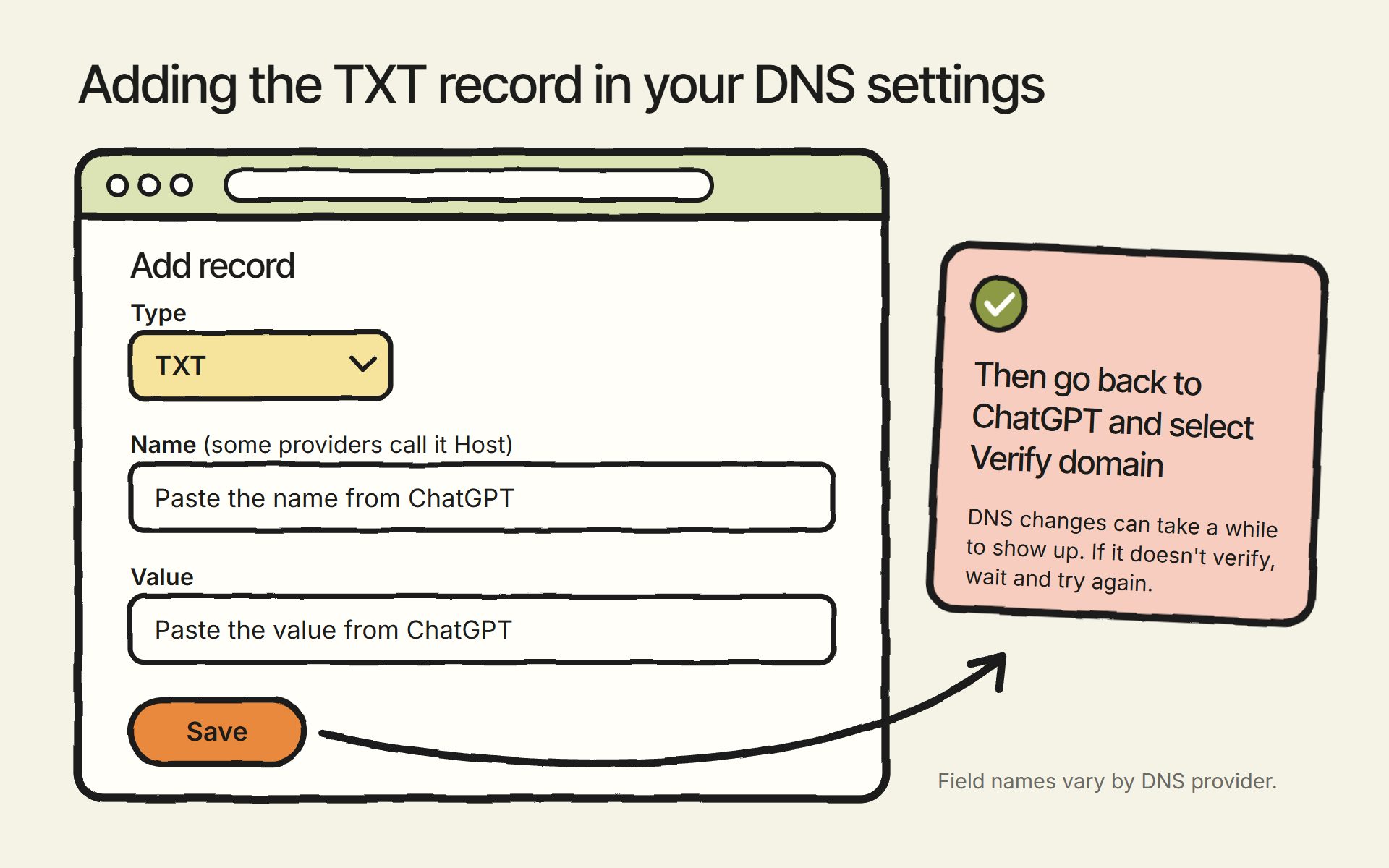
- In ChatGPT, select Website domain and leave the TXT record details open.
- In another tab, log in to your DNS provider and open the page where you manage DNS records. In Cloudflare, that’s the DNS Records page, where you select Add record.
- Choose TXT as the record type. Copy the type, name (some providers call it the host) and value from ChatGPT exactly, then save it.
- Go back to ChatGPT and select Verify domain. DNS changes can take a while to show up, so if it doesn’t verify right away, wait and try again.
If someone else manages your domain, like a web developer, send them the record and ask them to add it. And if you don’t know how to do any of this, just ask ChatGPT to walk you through it for your DNS provider.
How to Complete ChatGPT’s Identity Check
Once OpenAI approves your claim, you have to verify your identity before you can edit your business information, add your products, see your Insights or create a business agent. The check runs through Persona.
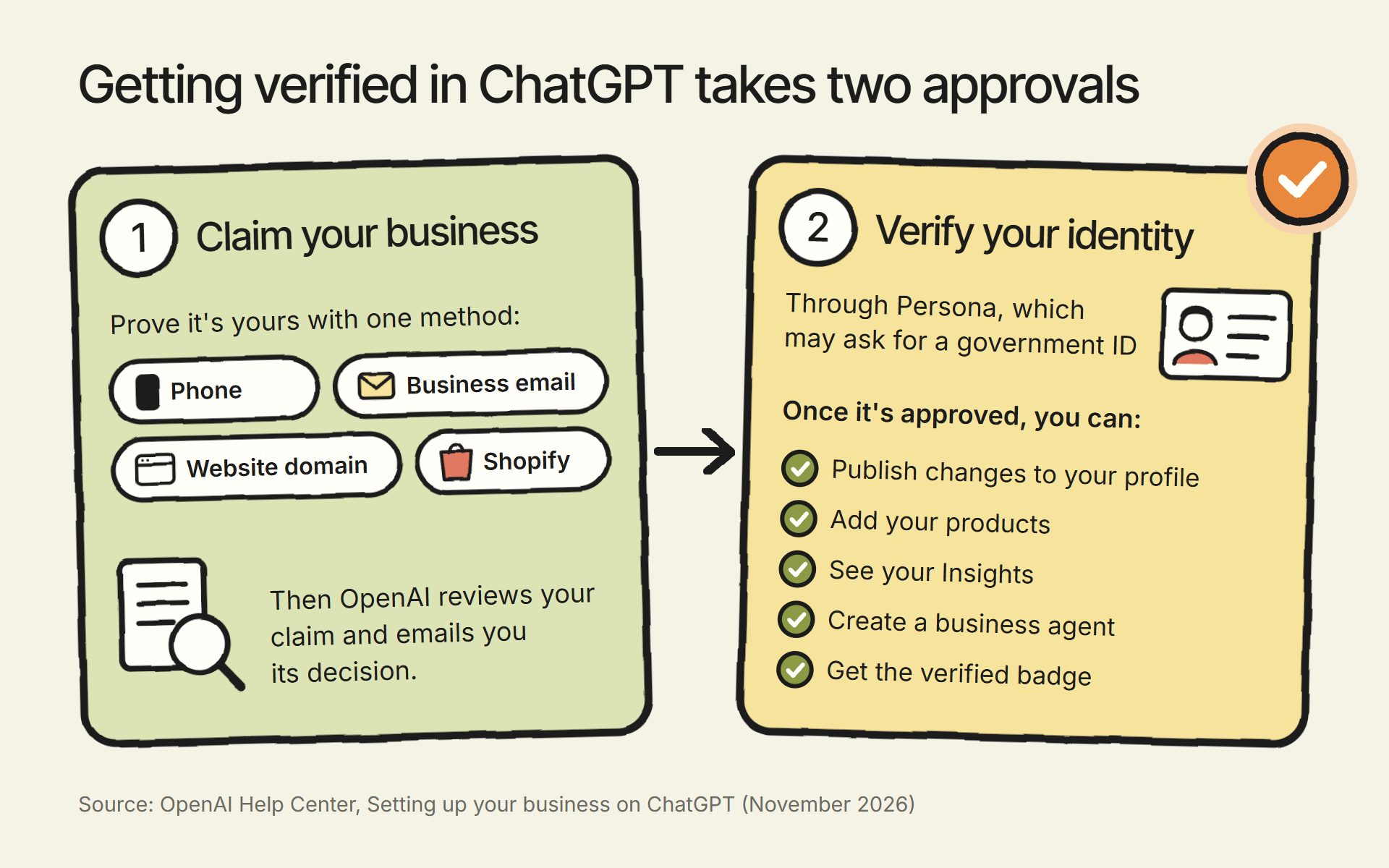
Persona may ask for a government-issued ID, your business registration information and proof that you’re authorized to represent the business. To start, select Verify with Persona, then Continue to Persona, and follow its instructions. If you verified your claim with one of the other methods first, you can complete the Persona check later: open the Business tab, select your profile and choose Complete verification with Persona.
OpenAI reviews what you submit and emails you its decision or a request for more information. Review time varies.
When your Persona verification is approved, your profile gets its verified badge, a blue check. Claiming alone doesn’t give you one.
Why ChatGPT Checks Your Identity
I understand a lot of people are going to be upset about this for privacy reasons. But it potentially solves a problem Google has struggled with for decades: fake businesses. Without this step, anyone could spin up dozens or hundreds of fake businesses just by creating a website.
That’s the main reason Google has such an annoying video verification process, where some businesses have to record a live video to verify their Business Profile. Fake listings are still a huge problem for Google, which removed more than 13 million fake Business Profiles in 2025 alone.
Barry Schwartz of Search Engine Roundtable raised another worry when Businesses in ChatGPT launched: he was “honestly nervous about people hijacking businesses on here.” Under OpenAI’s process, anyone who claims a listing has to pass the identity check before they can publish changes to it.
Having to verify your identity might be annoying, but it’s not nearly as annoying as being outranked by a hundred fake businesses.
What Happens to Your ID After Verification
OpenAI’s pages don’t say what Persona does with what you submit. Persona’s privacy policy says it keeps data the way its customer instructs, and for Business Hub, that customer is OpenAI.
For identity checks, Persona’s policy says it destroys the data taken from your ID and any selfie when verification is complete, or within three years of your last interaction with Persona. That’s subject to how long the customer tells Persona to keep data, and to any law that requires keeping it.
Persona doesn’t publish a single default for identity checks, and OpenAI hasn’t published its setting. Persona says it doesn’t use personal data, including biometric data, to train AI.
What to Do If Your Identity Verification Fails
If your Persona check fails or expires, follow the instructions in OpenAI’s email, and select Try again if you see it. Mismatched details are the first thing I’d look for, because your business name, address and registration or tax number need to match your official business records.
What You Can Do Once Your Business Is Verified
Once your claim and identity check are approved, you can update your profile: your website, business description, product or service category, logo, delivery policy and return policy, plus a cover photo and other optional details. OpenAI reviews your changes before it publishes them, and updates can take time to appear in a listing or a ChatGPT answer.
How to Add Your Products From Shopify or a Product Feed
As with seemingly all AI integrations, Shopify makes adding your products to ChatGPT way easier. Once your store is connected, your current product details, pricing and availability are shared automatically through Shopify’s catalog. I haven’t gone through the Shopify route myself yet, so that part comes from OpenAI’s description.
Everyone else adds products with a product feed, which is a file listing the products you sell. You can upload it as a CSV file that follows OpenAI’s product feed specification, or give ChatGPT a link to the file where it’s hosted. I’ve written up how to set up a product feed for ChatGPT.
If you sell products, you definitely want to do this. If you provide a feed, OpenAI’s terms require you to let its crawlers and agents access your website.
What Is a ChatGPT Business Agent?
ChatGPT is also adding business agents. You provide all the information you want ChatGPT to share with people, and they can ask the agent whatever they want about your business. Customers chat with it in a separate, clearly labeled conversation, apart from their regular ChatGPT chat.
For now, business agents are only available to ecommerce and online service businesses in the U.S. that have a website. Your industry also has to meet OpenAI’s Business Agents Policy. Like the profile, publishing an agent is free at launch.
An agent can explain your products and policies and link to your website. Customers can’t buy, book or check on an order through it, so they do those things on your website. If you want customers to buy without leaving ChatGPT, I’ve covered how to sell products on ChatGPT.
You may find a draft agent already waiting for you. OpenAI may set one up for your business before you decide to use an agent, and Shopify setup can create one too.
If there’s a draft, open it. If not, create an agent if the option is available. Either way, nothing goes live until you select Publish.
What ChatGPT Insights Shows You About Your Business
Insights is the report in Business Hub I’m most excited about. Once your claim and identity check are approved, open your business in Business Hub and select Insights to see activity from the past 28 days:
- Mentions. For an online business, a mention counts when ChatGPT references your website. Your brand name alone doesn’t count. For a local business, a mention counts when ChatGPT shows a result for your location, even if the customer never opens the listing or visits your website.
- Website clicks. How often people click through to your website. OpenAI notes that a click doesn’t confirm a website visit. If you’re wondering how much those clicks are worth, I’ve written about whether ChatGPT traffic matters.
- Discovery topics. Common themes in ChatGPT answers that mentioned or cited your business.
You won’t see what anyone typed. Discovery topics don’t reveal individual prompts, and OpenAI doesn’t share people’s conversations with businesses, including their chats with your business agent.
Some numbers may be blank at first. OpenAI only shows a number once there’s enough activity to report, and a blank can also mean data is still being collected. It doesn’t necessarily mean zero.
Will Claiming Your Business Make ChatGPT Recommend It More?
OpenAI says claiming your business doesn’t change its visibility in ChatGPT and doesn’t guarantee higher placement or sales. Benji Shomair told Digiday that claiming a business “should not have an impact on how frequently it appears.”
Paying for ads doesn’t change that either, because OpenAI says advertising doesn’t influence ChatGPT’s own answers. Getting ChatGPT to recommend your business more is a separate job, and I’ve covered it in how to get recommended by ChatGPT and Google AI.
Can Your Marketing Agency Manage Your Business in ChatGPT?
An agency can manage your business in ChatGPT once you give it access. The admin who claimed the business can add teammates in Business Hub and grant an agency access to the business or its agent. Each person signs in with their own ChatGPT account.
Don’t forward your personal claim invitation to give someone access. Add them as a teammate instead.
Some businesses use ChatGPT through a workspace, a team’s shared space on ChatGPT’s Business, Enterprise or Edu plans, where each member still uses their own account. If you claimed your business from a workspace, the people you invite may need to be members of it. If an agency invitation is blocked, contact OpenAI Support.
If you have questions about claiming your business in ChatGPT, or about how your business shows up in AI search, reach out through our contact page or email me at tj@tjrobertson.com.