
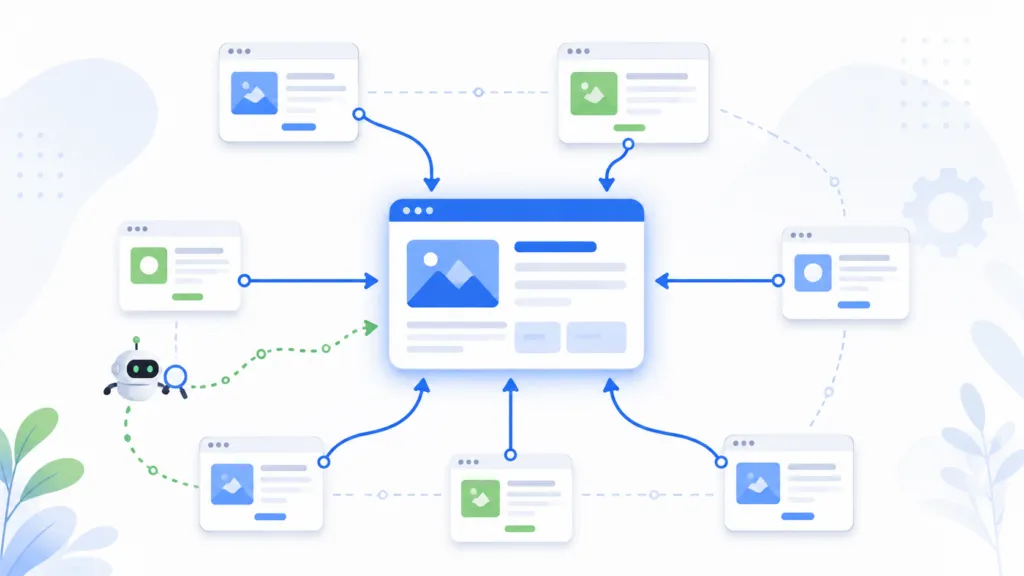
Internal linking is one of the most underrated ranking factors in SEO. At TJ Digital, we optimize internal linking on every client website, and it consistently determines which pages get indexed by Google and how well those pages rank. Google has confirmed that it uses internal links both to discover and prioritize pages on a site.
The best practices start with making sure every important page has at least one crawlable internal link. From there, you want to place your most valuable links in the main content of authoritative pages, use descriptive anchor text, and structure your site so the pages you care about most are the easiest to reach.
This article covers everything from finding and fixing orphan pages to passing blog authority to your money pages. I’ll also cover what we know about internal linking and AI search, including Google AI Mode, ChatGPT, and other large language models.
Table of Contents
ToggleWhy Does Internal Linking Matter for SEO?
Internal linking affects two things. First, it determines whether Google can find and index your pages. Second, it signals to Google which pages on your site are the most important.
Google uses the number of internal links pointing to a page, along with how many clicks it takes to reach that page from other parts of your site, to infer its relative importance. A page buried five clicks deep with only one link pointing to it is going to be treated very differently than a page linked from your homepage and your main navigation.
Here’s the thing. Most businesses have pages on their site that aren’t ranking, and the fix has nothing to do with the content on those pages. The content might be great.
The problem is that the page is isolated from the rest of the site, and Google doesn’t see it as important enough to prioritize.
@tjrobertson52 How should I be internal linking my website? Your blog posts are the biggest opportunity most sites ignore. #SEO #SEOTips #InternalLinking
♬ original sound – TJ Robertson – TJ Robertson
How Do I Find and Fix Orphan Pages?
An orphan page is a page on your website that has no internal links pointing to it. Google may still know the page exists through your sitemap or through an external backlink, but without internal links, it has no context for where that page fits in your site’s structure.
The best way to find orphan pages is to compare two lists. The first list is every URL that should exist on your site, pulled from your CMS, your sitemap, or your content inventory. The second list is every URL that a crawler can actually reach by following links from your homepage.
Any URL on the first list that doesn’t appear on the second list is an orphan candidate.
What Does Google Search Console Tell You About Indexation?
Google Search Console’s Pages report shows every URL Google knows about and whether it’s been indexed. But “not indexed” doesn’t always mean you have a linking problem. Here’s how to read the most common statuses:
| Search Console Status | What It Means | What to Do |
| Discovered, currently not indexed | Google knows the URL but hasn’t crawled it yet | Verify the page has internal links and appears in your sitemap |
| Crawled, currently not indexed | Google fetched the page but chose not to index it | Review the page’s content quality and check for duplication issues |
| Duplicate, different canonical selected | Google thinks another URL is the primary version | Link internally to the preferred version and fix conflicting signals |
| URL marked noindex | An explicit noindex tag is on the page | Remove the tag if the page should be indexed |
The key diagnostic question is whether you have a discovery problem or a quality problem. If Google hasn’t found the page, you need more internal links.
If Google found the page and chose not to index it, more links probably won’t help. You need to improve the content or consolidate it with another page.
Not every orphan page needs a link. Some pages, like old campaign landing pages or internal search results, shouldn’t be in Google’s index at all. For those, a noindex tag is the right call.
Do Footer Links Pass Less Authority Than Content Links?
This is one of the most common questions I get about internal linking. The short answer is that footer links are still useful, but they shouldn’t be your primary strategy for competitive pages.
Google doesn’t publish a specific “footer discount.” You’ll see claims like “footer links pass 20% of the authority of content links,” but that number is made up. Google’s public guidance focuses on crawlability, relevance, and descriptive anchor text rather than assigning fixed percentages to link positions.
That said, there’s a real reason to prioritize content links over footer links. Google holds a patent for what’s called the “reasonable surfer” model, which describes a system where links receive different weights based on how likely a user is to click them. The patent specifically mentions link position (running text, sidebar, footer) as a factor.
A patent doesn’t prove Google uses this exact system today, but it shows they’ve invested in the concept.
Here’s how I think about link placement in practice:
- Main content links are your first choice for reinforcing a page’s topic and sending qualified visitors to it. A sentence about “choosing the right CRM for small teams” can naturally link those words to your CRM product page.
- Navigation links communicate structural importance. They’re right for your major services, product categories, and other pages central to your business.
- Footer links are good for sitewide discovery (contact page, key corporate pages, major categories) but weak as your only signal of importance for a competitive page.
For pages targeting competitive keywords, you want multiple types of support. A place in your site hierarchy, links from relevant hub pages, and contextual links from related blog posts. A footer link can supplement those, but it shouldn’t be doing the heavy lifting.
How Many Internal Links Should a Page Have?
Google’s answer to this question is unusually direct. There is no ideal number.
The old SEO advice about keeping links under 100 per page came from a time when Google had technical crawling limitations. Those limitations are gone. Google now recommends judging whether the number of links has become excessive rather than targeting a specific count.
The math behind the concern is real, though. In Google’s original PageRank formula, the authority passed by a page is divided among its outgoing links. So if a page has 50 links, each one receives less authority than if the page had 10 links.
But Google’s modern ranking systems are far more sophisticated than basic PageRank. The “reasonable surfer” patent I mentioned earlier allows link features like position, anchor text, and topical context to affect weighting, so not all links are treated equally.
The better way to think about it is signal-to-noise. Every link on a page should do at least one of three things:
- Move the user to the logical next step
- Explain a concept that would otherwise interrupt the article
- Reinforce a relevant topic cluster on your site
If a link doesn’t do one of those things, it probably shouldn’t be there. And the worst pattern is automated linking where every keyword occurrence on every page becomes a link. That creates repetitive, unnatural anchor text and a terrible user experience.
How Should I Structure Website Navigation for SEO?
Google doesn’t infer your site’s hierarchy from your URL structure. Whether a page lives at /services/seo/ or /seo/ doesn’t matter nearly as much as the links between your pages.
The strongest structure is a hub-and-spoke model. Your homepage links to your major category or service hub pages. Those hubs link down to subcategories or individual service pages.
Your blog or resource section should link laterally into those commercial pages wherever it makes sense.
The important thing is that your informational content and your commercial content shouldn’t exist as separate silos. Blog posts should link to the service pages that solve the problem the post discusses. And service pages should link back to useful guides, comparisons, or supporting research when that helps the buyer.
What Should Go in the Main Navigation?
Your main navigation should represent your core services or product categories. Keep it focused on the pages that are central to your business and that target your most valuable keywords.
There’s no Google-prescribed limit on how many links you can have in your navigation. But every link you add to the nav appears on every page of your site. That means a 100-link mega menu is sending diluted signals from every page, and it’s usually overwhelming for users too.
For most service businesses, a clean navigation with 5 to 10 main items, plus a structured dropdown for subcategories, is plenty. If pages aren’t in your nav, make sure they’re linked from somewhere else on the site. Google generally won’t find pages that are only accessible through an internal site search.
What Anchor Text Should You Use When Linking Between Pages?
Google’s guidance on anchor text is clear. Link text should be descriptive, concise, and relevant to both the source page and the destination. Generic phrases like “click here,” “read more,” or “learn more” throw away the context that helps both users and Google understand what the linked page is about.
The best practice is to use words that describe the destination page’s topic. If you’re linking to a page about payroll software for small businesses, your anchor text across different pages might look like this:
- “payroll software for small businesses”
- “small-business payroll tools”
- “automate your payroll”
- “our payroll platform”
Those all communicate the same topic while fitting naturally into different sentences. Google’s AI and search systems understand synonyms and meaning, so you don’t need to repeat the exact same phrase every time.
One rule I give my team is to describe the destination page. “Compare our CRM plans” gives Google useful information about the linked page. “Click here to compare” tells Google nothing.
Also, check whether your anchor text makes sense on its own. If someone read just the linked words without the surrounding sentence, could they guess what the page is about? If not, the anchor text can probably be improved.
How Do Blog Posts Pass Authority to Money Pages?
For most websites, the blog earns the majority of the site’s search visibility. Blog posts answer broad questions, attract backlinks, and rank across a wide range of search terms. The commercial pages (your service pages, product pages, pricing pages) are the pages you actually want people to visit.
Internal linking is the bridge between those two layers.
Google has explicitly stated that linking an important product or service page from blog content helps it understand that page’s relative importance on the site. This makes the “blog links to money pages” strategy well-grounded in Google’s own guidance.
The most effective pattern follows intent progression. A blog post titled “How to Calculate Payroll Taxes” can naturally link to your payroll software page after explaining the manual process. A guide about “Choosing a CRM for Small Teams” can link to your CRM pricing page.
In each case, the link answers the reader’s next question.
Which Blog Posts Should You Prioritize?
You don’t need to add a commercial link to every blog post. Start with posts that meet three criteria:
- They’re topically relevant to the destination page
- They already have some authority (traffic, backlinks, or a strong position in your site hierarchy)
- The link makes sense for the reader, meaning a visitor reading that post would naturally want to learn about the linked product or service
A strong article on an unrelated topic isn’t the right source for a money-page link, even if it gets a lot of traffic. Relevance matters more than raw authority.
And the relationship should go both ways. Service pages can link back to supporting guides, comparisons, or how-to articles that help buyers make decisions. That creates a connected topic cluster, which is the kind of structure Google rewards.
Does Internal Linking Help with AI Search?
Yes, but primarily through an indirect chain.
Google’s AI experiences (AI Overviews and AI Mode) are built on Google’s core search ranking systems. A page has to be indexed and eligible to appear in regular search results before it can appear in an AI-generated response. Internal linking affects whether a page gets discovered, crawled, and indexed, which then determines whether it’s eligible for AI search.
Your internal link architecture feeds URL discovery, which feeds indexing and importance signals, which feed core search ranking, which feeds eligibility for AI-grounded responses.
Google’s 2026 guidance explicitly says that publishers don’t need special llms.txt files, don’t need to artificially “chunk” pages into tiny passages, and don’t need to rewrite content for every long-tail keyword variation. The recommendation is to continue building valuable content with clear structure and sound SEO fundamentals. Internal linking is one of those fundamentals.
What About ChatGPT and Other LLMs?
OpenAI operates a crawler called OAI-SearchBot for ChatGPT search. If you block this bot, your site won’t appear in ChatGPT search answers. Anthropic (the company behind Claude) operates a similar crawler called Claude-SearchBot.
Neither OpenAI nor Anthropic publishes a formula for how internal links affect their search rankings. The practical recommendation is to make important pages easily reachable through standard crawlable HTML and to avoid blocking AI crawlers at the CDN or bot level.
We track AI search performance for all of our clients using Peec.ai, and solid site architecture consistently correlates with better AI citation rates. The data doesn’t prove that internal links are a direct AI ranking factor, but it does support the idea that AI search visibility starts with the same foundation as traditional SEO.
What Order Should You Fix Your Site’s Links?
If you’re looking at your own site and wondering where to begin, here’s the priority order I’d recommend:
- Fix eligibility. Make sure your important pages are crawlable, aren’t accidentally marked noindex, and return proper responses. You can’t rank, in traditional search or AI search, if Google can’t access the page.
- Eliminate orphan pages. Every page you want indexed should have at least one internal link pointing to it. Check your Search Console Pages report to find pages that aren’t being indexed.
- Strengthen your hierarchy. Link your most important pages from your homepage, your main navigation, and your category or service hub pages.
- Add contextual links from blog content. Use your strongest, most relevant blog posts to link to the commercial pages that answer the reader’s next question.
- Clean up your anchor text. Replace generic “click here” and “learn more” anchors with descriptive phrases that tell Google what the linked page is about.
- Measure outcomes. Monitor whether important pages move from “not indexed” to “indexed” in Search Console, and track whether their search performance improves.
The goal is to build a site where the pages that matter most to your business are the easiest to find, the most clearly connected to related content, and the most frequently reinforced by other pages on your site. That’s what actually moves the needle.
Talk to TJ Digital About Your Internal Linking Strategy
If you have questions about any of this, reach out through our contact page.