
What Is Google Modern Web Guidance and Should You Install It? (2026)

By TJ Robertson, Founder and Lead Strategist at TJ Digital
Google Modern Web Guidance is a free add-on for AI coding agents like Claude Code, Codex and Antigravity. While the agent builds each piece of your website, like a popup or a contact form, it looks up Google’s current guide for building that piece, so the code follows today’s web standards. Google released version 1.0 on November 10, 2026.
If you build or manage a website with an AI coding agent, I’d install it.
At TJ Digital we build websites with AI, and we’ve kept our own best practices written down as skills the AI follows while it works. That takes time, and it’s one more thing to maintain. Modern Web Guidance hands a big part of that job to people who maintain web standards for a living.
Why Does AI Write Outdated Website Code?
AI coding agents are fast, and the sites they build generally follow best practices. But if an expert developer reviewed that code closely, they’d find that some of those practices are out of date.
That makes sense when you think about how the models learned. As Google’s Modern Web Guidance README puts it, “Coding agents often default to older patterns because LLM training data contains vast amounts of legacy code.”
Often, the result is more code than the job needs. AI tends to write JavaScript for things the browser can now do with a built-in HTML or CSS feature, and Google’s 1.0 announcement points out that those features “can do the same thing with much less code.” A popup the AI builds from scratch in JavaScript works when you click through it, but it’s harder to maintain and more likely to have small bugs than the one built into the browser.
The hard part is that you can’t see any of this by looking at the site. It looks fine on your laptop. But someone who moves through the page with the Tab key can end up in the hidden page behind an open popup, and you’d only find that by testing for it.
What Is Modern Web Guidance?
The guidance is a library of 203 written guides. Each one covers something a website commonly needs, like a popup, a dark mode or a login form, and explains the current way to build it.
It’s installed as a skill, a set of instructions an AI agent loads when a task calls for it. When your agent starts building something the guides cover, it searches the library and pulls in only the guide it needs, so it isn’t reading all 203 every time. That search runs on your own computer.
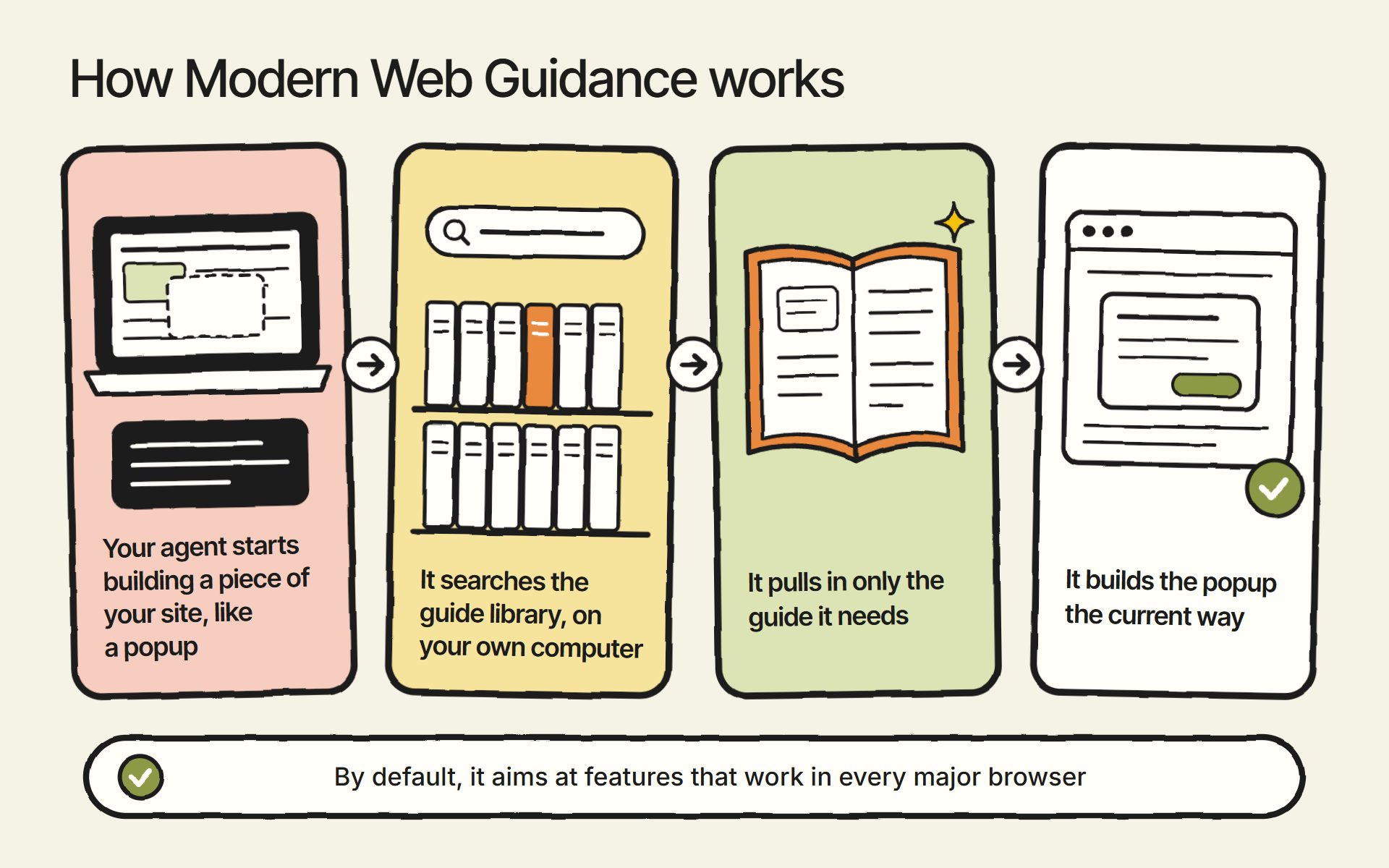
The guides also check whether visitors’ browsers support each feature. A new web feature is no use to you if half your visitors’ browsers can’t run it yet. To avoid that, the guidance uses data from Baseline, a project that tracks which web features work in all the major browsers.
By default, it aims at features Baseline calls “Widely available.” Google defines those as features that have worked across browsers for at least 30 months. When a guide does use a newer feature, it includes a fallback for browsers that don’t support it yet. I’d leave that default alone.
What Does Modern Web Guidance Change on Your Website?
The guidance changes how the agent builds everyday features like popups, forms and animations. These examples come from Google’s list of the things AI gets wrong most often in web development.
| What the AI tends to build | What a visitor runs into | What Modern Web Guidance steers it to |
|---|---|---|
| Popups and modal windows built by hand in JavaScript | Pressing Tab can move into the hidden page behind the popup, so keyboard and screen reader users lose their place | The popup and dialog features built into the browser |
| Smooth scrolling and scroll animations turned on for everyone | Large motion can cause dizziness, nausea or headaches for people with motion sensitivity | Checking the visitor’s “reduce motion” setting before animating |
| A custom script that shows errors on fields the visitor hasn’t touched, with format hints placed under the field | Errors appear before the visitor has done anything, and the phone’s keyboard covers the hint | The browser’s own validation, which only shows an error after the visitor has used the field, and a hint that stays visible above the field |
| Videos added to the page without a set size | The page jumps when the video loads, and people click the wrong thing | Setting the video’s size up front, so the page saves room for it |
| No Content Security Policy, a setting that tells the browser which scripts are allowed to run | If an attacker slips code into a page, it can run in your visitors’ browsers and steal their login sessions | A strict Content Security Policy, plus the browser’s built-in tool for stripping unsafe code out of content before it’s shown |
| Dark mode colors without telling the browser the site supports dark mode | Dark mode visitors see a white flash while the page loads, and scrollbars and form fields stay light | The browser’s built-in light and dark color settings |
On forms, Google’s own warning is that “a minor snag in a checkout form can have a major impact on a business’s bottom line.” On security, Google found that models didn’t add a Content Security Policy unless they were explicitly asked to.
Does Modern Web Guidance Actually Work?
Google’s own tests say it makes a big difference. Google gives an AI agent a starter site and a feature to build, runs the task with and without Modern Web Guidance, and checks the result in a real browser. In the list of top AI mistakes, Google reports that agents passed about 50% of its checks on their own and about 90% with Modern Web Guidance.
Those numbers move as Google runs new tests. In runs from November 2 to 8, 2026, Claude Code, Codex and Antigravity passed 52% to 60% of checks without the guidance and 82% to 96% with it. Google posts the latest results on a public test dashboard.
Keep in mind that these results come from Google testing its own guides, so they aren’t independent. Even with the guidance, the agents didn’t pass every check.
Google’s announcement also shares results from companies using it on real projects. One of them, note inc., ran a 180-run evaluation on its production code and saw its pass rate go from 61% to 94%.
Is Modern Web Guidance Free, and Who Maintains It?
Modern Web Guidance is free. It’s open source, so anyone can use and copy it, and Google doesn’t charge for it. You’ll still pay whatever your AI agent costs to run.
I think it’s super cool of Google to give this away. They could easily have kept it inside Antigravity, Google’s own coding agent, to pull more people over to it.
Google’s Chrome team started the project. With 1.0, people from Microsoft Edge and from Mozilla, the makers of Firefox, now share ownership with Chrome.
Experts in each area sign off on the guides before release. Google also says the guides that affect what visitors see were tested by accessibility experts who use assistive technology every day. That’s the part I like most.
Some developers worry that a Google project will push features that only work in Chrome. The Hacker News account philipwalton, which shares its name with the 1.0 announcement’s author, answered that directly: “the goal of this project is NOT to push Chrome-only APIs on users.” And by default, the guidance aims at features that work in every major browser, with a fallback when a guide uses something newer.
Which AI Coding Tools Work With It?
Google’s announcement lists these:
- Claude Code
- Codex (OpenAI’s coding agent)
- Cursor
- Antigravity
- GitHub Copilot
- WebStorm
- Kimi Code
- Grok Build
Google also says it belongs in your workflow regardless of which models or agents you use.
How Do You Install Modern Web Guidance?
Setup is simple. Whichever way you install it, Modern Web Guidance needs Node.js 22 or newer on your computer. Then there are two ways to do it:
- With one command, run from your website project’s folder:
npx modern-web-guidance@latest install. It asks you a few questions as it runs. Google’s 1.0 announcement walks through this route. - Through your agent’s own plugin commands, typed where you already work. The commands for each agent are in the README and on Google’s Get started page.
These are the plugin commands for the main agents:
- Claude Code: inside a session, type
/plugin marketplace add GoogleChrome/modern-web-guidance, then/plugin install modern-web-guidance@googlechrome, then/reload-plugins. Turning on AutoUpdate for the GoogleChrome marketplace in the/pluginmenu keeps it current. - Codex:
codex plugin marketplace add GoogleChrome/modern-web-guidance, thencodex plugin add modern-web-guidance@googlechrome. - Antigravity:
agy plugin install https://github.com/GoogleChrome/modern-web-guidance. - WebStorm, Cursor and the other tools: follow Google’s Get started page.
If you used the npx command, update it later with npx modern-web-guidance@latest update.
After that, there’s nothing to remember. The agent uses the guidance on its own whenever a task calls for it.
Can It Fix a Website You Already Have?
Modern Web Guidance can fix some outdated code on an existing site, but not all of it yet. Version 1.0 added a modernization workflow that scans existing code for outdated patterns it can safely upgrade. In your agent, type /modern-web-guidance Modernize the code in this directory.
Google is upfront that this is early: “In this first release, the modernization workflow uses static analysis to check for a limited set of patterns.” In plain terms, the scan looks for known patterns instead of reasoning about your code, so it will catch some outdated code and miss the rest. Google says smarter audits are planned.
Does It Slow Your AI Agent Down or Cost More?
Expect builds to take longer and cost more with Modern Web Guidance turned on. Search Engine Journal read Google’s test results and found that “in most of the recent suites listed, guided runs ran slower and burned more tokens.” For a website real customers use, that trade makes sense to me.
Does Google Collect Data From It?
Google collects some usage information by default, even though the guide search itself runs on your computer. According to the README, that includes:
- How many times it’s been installed
- Which agent is using it
- Which guides the agent pulled in
- The search phrases the agent wrote (Google’s example is “dark mode scrollbar color-scheme”)
The README says the prompts you type yourself aren’t collected. The search phrases your agent writes are. If you’d rather send nothing, set DISABLE_TELEMETRY=1 in your shell profile.
Does It Replace a Developer or an Accessibility Check?
Modern Web Guidance doesn’t replace a person checking your site. Google’s own test dashboard says its accessibility checks are “Not a full WCAG audit” (WCAG is the standard set of web accessibility guidelines) and that they “do not measure full WCAG compliance or replace manual and assistive-technology testing.”
Outside testing backs that up. Adrian Roselli, an accessibility consultant, tried the early preview in May 2026 and found that the output didn’t meet WCAG, even on Google’s own sample prompt.
Version 1.0 added the accessibility expert review I mentioned. I haven’t seen Roselli test 1.0 yet. Either way, the guidance makes better code more likely, and someone still has to check it.
Do You Still Need Your Own Skills or Rules Files?
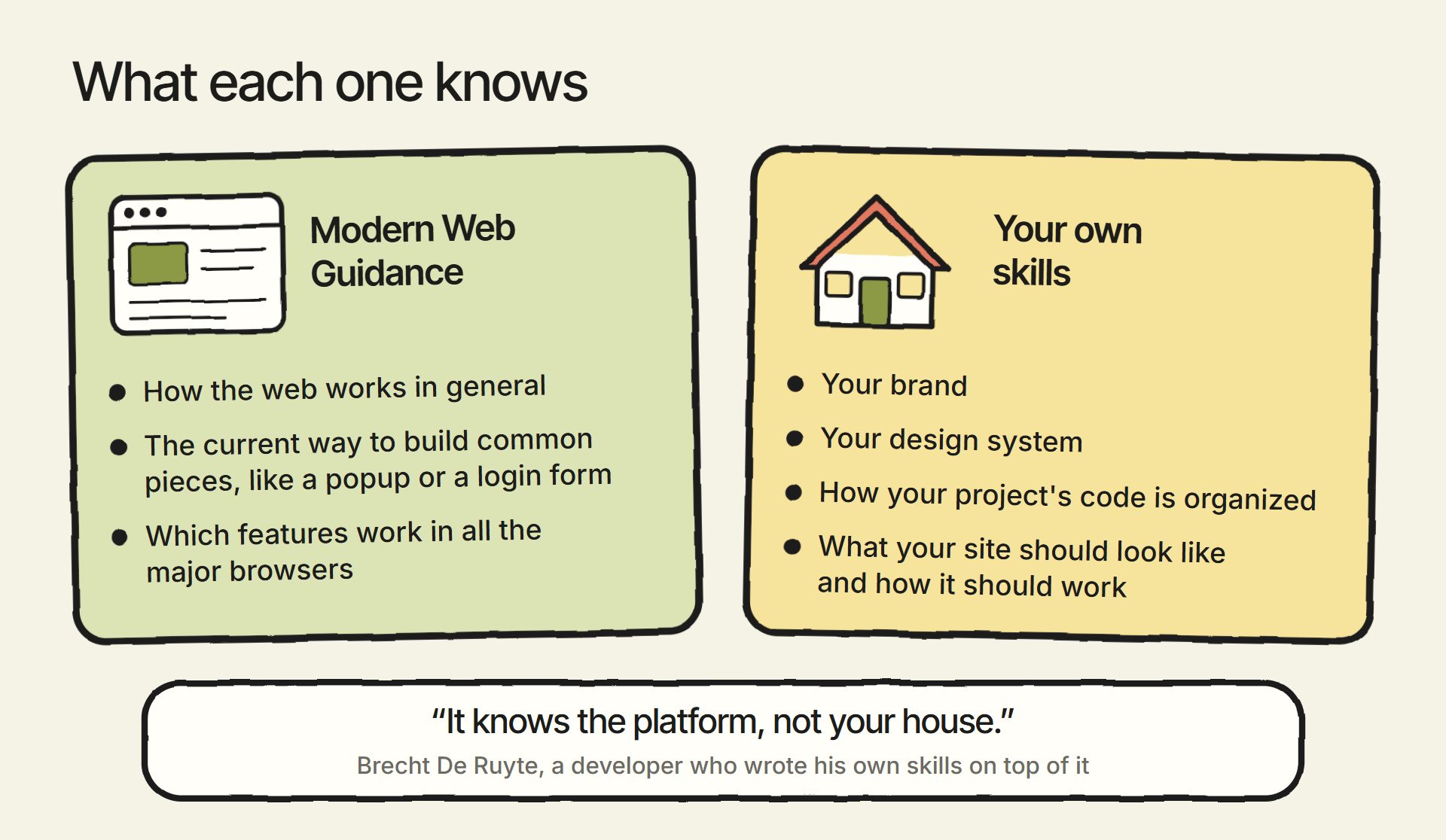
You still need your own skills for anything specific to your site. Brecht De Ruyte, a developer who installed it in Cursor and Antigravity and wrote his own skills for his project’s design on top of it, summed it up well: “It knows the platform, not your house.”
Modern Web Guidance knows how the web works in general. It doesn’t know your brand, your design system or how your project’s code is organized. The part of our skills that described general web standards is the part Google now maintains. What a specific site should look like and how it should work still belongs in your own skills.
I’ve written about how we write ours.
Does It Help Your Site Show Up in Google or AI Search?
Google hasn’t said Modern Web Guidance helps your site rank, so I wouldn’t install it expecting better rankings. It’s a tool for the quality of your site’s code, and it doesn’t write your content.
What it does produce is cleaner, more standard and more accessible HTML. That matters for people, and it matters for AI agents that visit and use websites, which read a page’s labels and headings much like a screen reader does.
Should You Still Build a New Website on WordPress?
This part is my own opinion: I wouldn’t build a new website on WordPress anymore. One of the biggest objections to custom websites built with AI has been that nobody keeps the code current with best practices. Modern Web Guidance answers a lot of that objection, and it does it for free, in whatever agent you use.
With that, you’re running out of reasons to depend on a platform like WordPress. Can anyone explain to me why they’d still build a new website on WordPress?
We’ve already explained why we stopped building WordPress sites. This month we moved tjrobertson.com itself off WordPress, to a site built in code with Astro, hosted on Cloudflare and kept in GitHub.
If you’re weighing the options for your own site, I’ve compared them in the best website platform for 2027. You can also see how we build a business website with Claude.
If you have questions about Modern Web Guidance or about building your website with AI, reach out through our contact page or email me at tj@tjrobertson.com.