
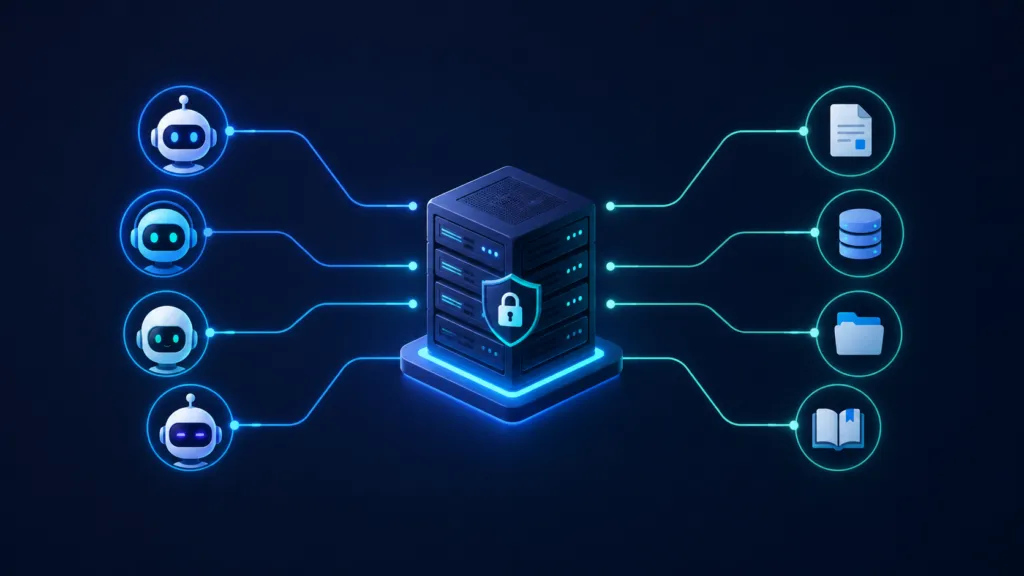
An internal MCP server is a single URL your team points any AI at to reach your company’s skills, knowledge base, and data. Your people authenticate with their email address, and the server decides what each of them can read and what they can change. At TJ Digital, our tech lead Kayser just built one of these for our own agency.
Every organization needs a strategy for putting AI into its processes. I think an MCP server is the best way to do it, and I want to explain why before your team spends another six months copying documents between tools.
Table of Contents
ToggleHow Does an MCP Server Actually Work?
An MCP server is an endpoint for AI agents. In practice it’s just a URL you hand to any AI, and that AI can then work with whatever sits behind it.
If that already lost you, ask Claude or ChatGPT to explain it like you’re five. The short version is that MCP gives an AI agent access and instructions in one place.
Anthropic created the standard, then donated the protocol to the Agentic AI Foundation under the Linux Foundation in December 2025. Anthropic, Block, and OpenAI co-founded that fund, with support from Google, Microsoft, AWS, Cloudflare, and Bloomberg.
There are now more than 10,000 active public MCP servers. ChatGPT, Gemini, Microsoft Copilot, Cursor, and Visual Studio Code have all adopted the protocol. You’re not betting your setup on one vendor.
At this point essentially all modern software already has an MCP server set up. If you want AI doing work inside your Gmail, Google Drive, Notion, or Slack, it’s connecting through one.
@tjrobertson52 Does my company need an internal MCP server? Here’s why we built one for our agency #MCP #AIForBusiness #SmallBusiness #AIAgents
♬ original sound – TJ Robertson – TJ Robertson
Why Does Your Organization Need Its Own MCP Server?
Your organization needs its own MCP server because AI needs a lot of context to work inside your company. That context has to live somewhere every AI can reach. As you start putting AI into your processes, you’ll find that agents need instructions, data, and institutional knowledge before they produce anything useful.
You’ll also want some team members to reach data that others shouldn’t see. Some people should be able to write to that data while others only read it. The MCP handles all of this for you.
Once it’s set up, each team member points their own AI at the server. They authenticate with their email address and immediately have access to everything you want them to have.
Moving that context out of individual AI platforms changes where each piece lives.
| What you’re storing | Where most companies keep it | Where it belongs |
| AI skills | Inside Claude or Codex | A GitHub repo served through MCP |
| Knowledge base | Project knowledge in one AI platform | A GitHub repo served through MCP |
| Structured data | Spreadsheets and exports | A SQL database connected to MCP |
| Access rules | Whatever the platform allows | Role-based permissions on the server |
| Updates | Manual, one copy per platform | One edit, live everywhere |
Four things change the day you make that move:
- No more expensive team plans or paying for API usage on every seat
- No vendor lock-in, because your team can use any AI they want
- No manually maintaining multiple versions of the same document
- One authoritative version of every skill and every file
What Should Live on Your MCP Server?
There are three types of context worth providing through an MCP server. Let me walk you through our implementation so you have a solid example.
Where Should You Store Your AI Skills?
Put all your skills into a GitHub repo. Most organizations keep them inside Claude or Codex, which makes it nearly impossible to use them across multiple platforms or to decide who gets to use and update each one.
Once a user authenticates with your MCP server, it gives them access to whatever skills they should have. The MCP can also send the AI instructions on how to use each skill.
How Do You Set Up a Shared Knowledge Base?
Move your knowledge base into a GitHub repo too. Most organizations have this sitting as project knowledge inside a single AI platform, which creates the same problem your skills have.
The MCP then provides instructions on how to find each piece of information and determines which users can read or write to the repo. We have our knowledge bases set up using Google’s Open Knowledge Format, which structures each document so an agent can read it without guessing.
Can an MCP Server Connect to a SQL Database?
Yes. Sometimes your data is better structured in something like a SQL database, and MCP servers connect to those the same way they connect to a file repo.
That’s the beauty of this structure, the simplicity. You have one internal MCP server, and it provides access and instructions for the skills, the knowledge base, and any databases.
How Do You Control Who Can Read and Write?
Access works through two steps, authentication and authorization. Authentication proves who someone is, usually through your existing corporate login or a code sent to their email address. Authorization decides what that person’s AI is allowed to do once it’s connected.
Each authenticated user gets assigned roles with specific permissions. You might give your finance team read and write access to the finance folder while everyone else gets read-only. You could allow only your sales team to call a customer data tool.
The server checks those permissions on every single call. If a user’s token doesn’t carry the right permission, the request gets rejected and logged.
How Do You Set Up an MCP Server Without Technical Knowledge?
You probably want someone with technical knowledge to help you set this up, but it’s fine if they’ve never built an MCP server before. AI can help with that part.
A few approaches work depending on your team:
- AI-assisted build. Prompt Claude or ChatGPT to generate the server code that wraps your internal systems, then have someone technical review and deploy it.
- No-code platforms. Tools like n8n now ship MCP community nodes you install by pasting a GitHub URL into the interface.
- Step-by-step guides. Anthropic publishes a build tutorial covering dependencies, tool definitions, and running the server.
- Outside help. Plenty of teams will build and host it for you if hands-off is what you want.
With 10,000 public servers already running, most of the patterns you’ll need have been built by someone. Your team mainly needs to decide what data and endpoints the agents should reach.
What Does an Internal MCP Server Look Like in Practice?
We built ours because we were hitting the exact problem I described above. We run AI search campaigns for small to medium-sized businesses, and we build a Brand Ambassador for every one of them. That’s about twelve documents per client, all of it needing to stay current.
Kayser set up our server so every skill and every knowledge base lives in a repo. Our team members can use whatever AI they prefer. They point at the server and they have the context.
We’re now starting to set this up for some of our clients. It pairs naturally with getting your website ready for AI agents, since both jobs come down to making your information legible to machines.
Is an MCP Server the Same Thing as an API?
No. An API exposes your system’s functions to any developer who reads the documentation and writes custom code for it.
An MCP server exposes tools and data to AI agents through one standardized interface, and it ships the instructions for using them alongside the access. Any MCP-capable AI can connect to the same server with almost no reconfiguration.
Do You Still Need an AI Team Plan?
You still pay for the AI models your team uses. What you stop paying for is a per-seat fee to share context that your own server already serves.
You also stop duplicating the same data transfers across tools. A centralized server lets you set usage limits at the protocol level, so allocation stops depending on the honor system.
What Should You Do Before Building an MCP Server?
Organize your knowledge first. A server is only as useful as what sits behind it, and most companies have their institutional knowledge scattered across inboxes, drives, and a few people’s heads.
Start collecting and structuring your company’s knowledge today. Put it somewhere with version history so every edit carries a date and an author. That work pays off whether you build the server this quarter or next year.
If you need help with this, let us know. We can help you build your knowledge base, and Kayser can set up your MCP server the same way he set up ours. If you have questions about any of this, reach out through our contact page.