
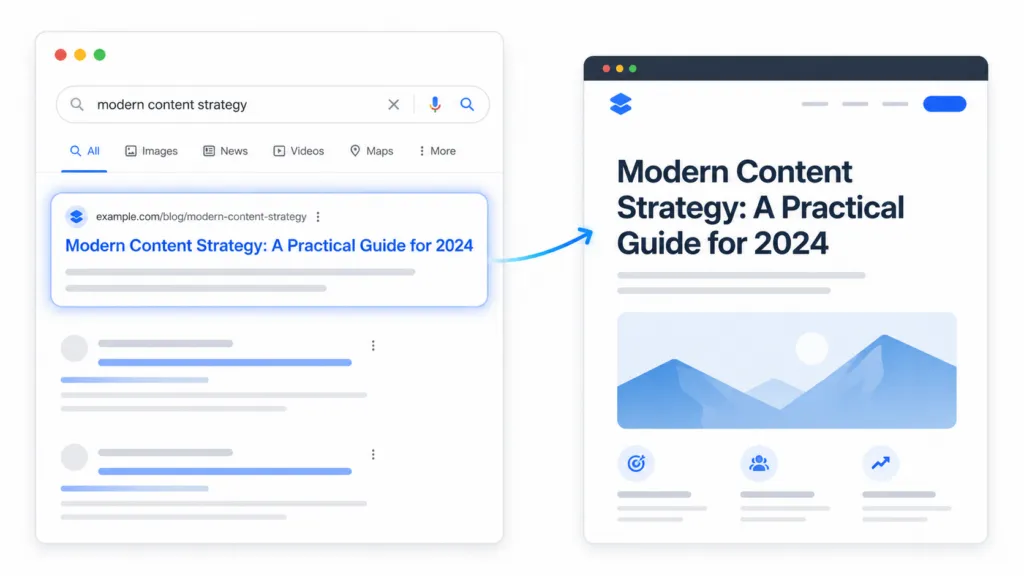
The most impactful ranking factor you can change today is also the simplest one. It’s your page title. At TJ Digital, we optimize titles in every client campaign, and it’s consistently the single fastest way to improve a page’s visibility in both Google and AI search.
The process is straightforward. Find the term people are actually searching for (Google Search Console is the best place to look), make sure your site has enough authority to compete for it, and put it near the front of your meta title and H1. That’s really all title optimization is.
Google’s own documentation calls title links “critical” for helping searchers understand what a result is about. They’re often the primary thing people use to decide whether to click. For AI search tools like ChatGPT, your title is one of the first things the model reads before it decides whether to look at your page at all.
Table of Contents
ToggleWhat Are the Two Titles on Every Page?
Every page on your website has two titles that matter for SEO.
The first is the meta title (technically the HTML <title> element). This is what shows up as the clickable blue link in Google search results. It’s your search result promise.
The second is the H1 tag. This is the visible headline at the top of the page. It’s your on-page promise to the visitor who just clicked.
These two titles should describe the same search intent. They don’t need to be identical word for word, but they should reinforce the same topic. If your meta title says one thing and your H1 says something different, you’re sending mixed signals to both Google and your visitors.
For example, a page about commercial solar panels might use:
| Element | Example |
| Meta title | Commercial Solar Panels Manchester: Installation and Costs |
| H1 | Commercial Solar Panel Installation in Manchester |
Both tell the same story. The meta title includes a few extra details for the search result. The H1 is slightly cleaner for the visitor.
@tjrobertson52 What keyword should I put in my page title? Google Search Console already told you. #SEO #SEOTips #AISearch #SearchConsole
♬ original sound – TJ Robertson – TJ Robertson
Where Should You Put the Keyword in Your Title?
As close to the beginning as possible. Google can truncate your title depending on the device width, so you want the most important words to show up no matter what.
This is a practical rule, not a secret ranking formula. Google’s SEO Starter Guide recommends putting the words people search for in prominent places like the title and main heading. Front-loading the subject makes it immediately clear what the page is about.
A title like “Commercial Solar Panels Manchester” is going to perform better than “Everything You Need to Know About Our Company’s Services for Commercial Solar Panels in Manchester.” The first one is clear. The second one buries the actual topic behind filler words.
That said, don’t sacrifice readability to force a keyword into the first position. If the sentence reads awkwardly with the keyword jammed up front, it’s better to write naturally.
Google’s AI systems understand synonyms and meaning. You don’t need pages for every long-tail variation.
Which Pages Actually Need Title Optimization?
Not every page needs to target a keyword.
Your About page, Contact page, and Privacy Policy exist for different reasons. They serve branded or functional purposes, and trying to stuff a commercial keyword into them usually makes them worse.
Title optimization matters for pages you want people to find through search. That includes service pages, blog posts, product pages, location pages, comparison guides, and any other content designed to attract non-branded traffic.
The question for each page is simple. What would someone type into Google (or ask ChatGPT) when they’re looking for the information on this page? Your title should answer that question.
How Do You Find the Right Keyword for Your Title?
Google Search Console is the best place to start. Most people reach for keyword research tools like Ahrefs first, but I don’t think they’re the best starting point.
If you don’t have your site connected to Search Console, do it today. It’s free and it takes about five minutes to set up.
Search Console shows you the exact queries people typed into Google before your site appeared in the results. The metric you want to focus on is impressions. Impressions count how many times your page showed up in search results for a given term, whether or not anyone clicked.
If your page is already getting impressions for a term, that means Google already sees a connection between your page and that search intent. You’re ranking somewhere, just not high enough to get clicks.
Optimizing your title for that term can change that.
Open Search Console, go to Performance, select the page you want to optimize, and look at its queries. Sort by impressions.
Look for terms with decent impressions but a low position. Those are your best opportunities.
The second best data source is your own intuition. You know your industry. You know what your customers call things.
Ask yourself what you would type into Google if you were looking for the content on this page. That instinct is worth more than most people give it credit for.
What I’d avoid is relying entirely on keyword research tools. Even if you look at hundreds of keywords, that’s still a tiny fraction of what people actually search for. And keyword tools can’t tell you whether your site has enough authority to rank for a given term.
How Do You Know If Your Site Can Rank for a Keyword?
Check whether you’re already getting impressions for it in Google Search Console. If you’re getting impressions for a term that isn’t even in your title yet, you can almost certainly get more traffic by adding it.
Google has already decided your page is relevant enough to show for that query. You just haven’t fully committed to it.
If you don’t have Search Console data for the term, try a quick test. Google it and look at what comes up.
Are there companies 10 times your size dominating every result? If so, that term is probably out of your league right now.
Company size itself isn’t a ranking factor. But if every top result comes from a site with far more content, more backlinks, and more topical depth than yours, you’re going to have a hard time competing head-on.
Google’s quality documentation specifically asks whether a page provides substantial value compared to other results. If you can’t beat them on a broad term, get more specific.
What Are Keyword Modifiers and When Should You Use Them?
A keyword modifier narrows a broad term toward a more specific intent. It’s how smaller businesses compete with larger ones for search traffic.
If you can’t rank for “accountant,” you might be able to rank for “accountant for ecommerce businesses.” If “CRM software” is too broad, “CRM software for real estate agents” might be winnable.
Common modifier types include:
| Modifier Type | Broad Keyword | More Specific Target |
| Location | accountant | accountant in Austin |
| Audience | CRM software | CRM software for real estate agents |
| Use case | project management tool | project management tool for architects |
| Year | tax guide | tax guide 2026 |
| Situation | employment lawyer | employment lawyer for wrongful termination |
The point of a modifier is to find an intent where your page can be the best answer available.
A small accounting firm probably can’t outrank the big national players for “accountant.” But they might be the single best result for “ecommerce accountant in Austin.”
One warning. Don’t create dozens of nearly identical pages with different city names or different modifiers swapped in. Google says its systems understand synonyms and semantic relationships.
You don’t need a separate page for every variation. Creating pages that only exist to target keyword permutations can trigger Google’s scaled-content-abuse policies.
As long as you’re confident people are searching for the main keyword, there’s a good chance AI is also searching for your specific variant. AI search tools use query fan-out, meaning they run multiple related searches to gather information before constructing an answer. A well-targeted, specific page can show up for queries you never explicitly optimized for.
Does Title Optimization Work for AI Search?
Yes. Google has stated that its AI features (AI Overviews and AI Mode) are grounded in the same core ranking systems as traditional search. If your page is indexed and your title clearly communicates relevance to a query, it’s eligible to be cited in an AI-generated answer.
AI search does add some nuance. AI systems care more about semantic relevance than exact-match keyword strings.
A page with a clear, specific title and useful content behind it is more likely to get cited than a page with a perfectly keyword-stuffed title and nothing of substance on the page.
I wrote a more detailed breakdown of how metadata affects AI search if you want to go deeper on this topic.
The practical takeaway is that everything in this article applies to both traditional Google and AI search. The fundamentals haven’t changed.
Be relevant, be specific, and make it easy for search systems to understand what your page is about. Your title is the most prominent place to do that.
What’s the Right Process for Optimizing a Page Title?
Here’s the workflow I’d recommend:
- Pick the page you want to optimize.
- Open Google Search Console and look at the queries generating impressions for that page.
- Identify the most relevant term with strong impressions but a low click-through rate.
- Google that term and check whether you can realistically compete.
- If the top results are all from much larger sites, add a modifier to narrow the keyword.
- Put your chosen keyword near the beginning of both the meta title and the H1.
- Make sure the two titles describe the same intent.
- Track the results in Search Console over the next few weeks.
The optimization itself takes minutes. The research behind it is what makes the difference.
Talk to TJ Digital About Your Page Titles
Reach out to TJ Digital for a look at your page titles. We’ll tell you exactly what we’d change and why.