
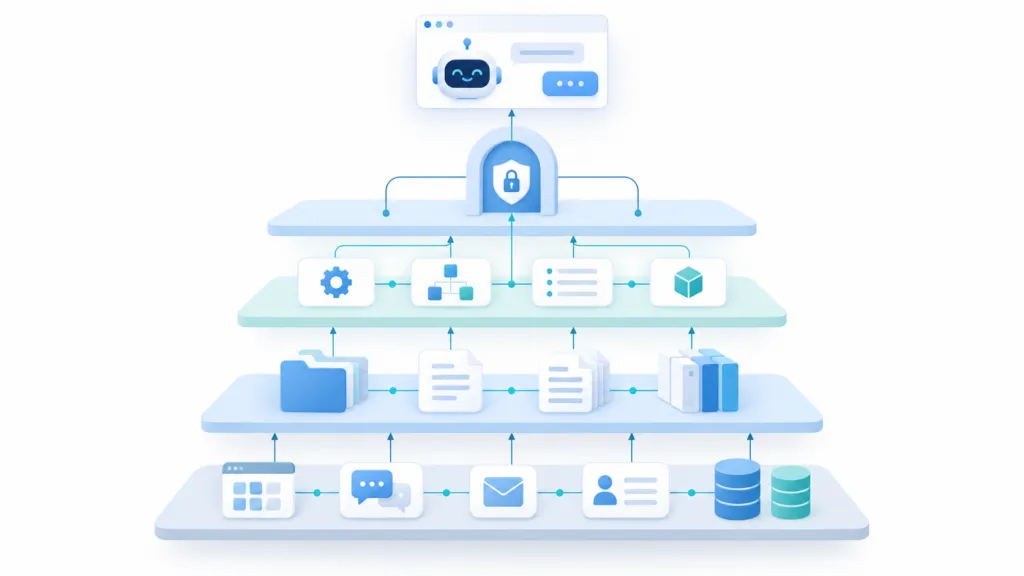
Structure your company data in four layers: the live systems you already use, a curated knowledge base of canonical documents, a skills repo that holds your instructions, and a gateway that controls how AI reaches all of it. Keep live data live. Compile durable knowledge into documents an AI can read. Package repeatable work as skills, and put one governed door in front of every system your AI needs to query or change.
I think we’re close to a world where AI can handle essentially all the work that gets done on a computer at your company. The capability is already here. The part that’s missing at most companies is the structure.
We’ve been building this at TJ Digital for our own agency. It’s the same principle behind the Brand Ambassador we build for every client, which is an AI project holding everything about their brand, voice, audience, services, and competitors. Structuring it properly pays off right away. In Google’s ADK guide, ten skills loaded as short metadata summaries used about 1,000 tokens of baseline context. Pasting all ten sets of full instructions into the system prompt would have used roughly 10,000.
Here’s how the whole thing fits together.
Table of Contents
ToggleThe Four Layers of an AI-Ready Company
Most companies try to solve this by dumping every email, Slack message, and CRM record into one giant vector database. That gets expensive, it goes stale fast, and the AI still can’t find anything. Four separate layers work better.
| Layer | What lives there | Examples |
| AI apps and agents | Whatever model your team is using that day | ChatGPT, Claude, coding agents, internal agents |
| Company gateway | Identity, policy, routing, audit, server discovery | One MCP endpoint your team connects to |
| Knowledge and skills | Durable facts and repeatable procedures | Company knowledge base, skills repo, decision log |
| Live systems | Current operational state | Gmail, Slack, Salesforce, Notion, your databases |
Each layer answers a different question. The knowledge base answers “what is true.” The skills repo answers “how do we do this.” The live systems answer “what is true right now.” Keeping them separate stops the same fact from being copied into five places and going wrong in four of them.
@tjrobertson52 How to structure company data for AI agents so AI can do all your computer work. Gateway, knowledge base, skills. #AIAgents #MCP #SmallBusinessAI #FutureOfWork #AI
♬ original sound – TJ Robertson – TJ Robertson
Do You Need a Vector Database for Your Company Data?
For most company data, no. A curated set of Markdown documents with good index files gets an AI to the right information faster than semantic search across thousands of chunks. It’s also much easier to keep accurate, because a person can read the whole file and see whether it’s still true.
What Is a Company MCP Gateway?
A company gateway is a single MCP endpoint that connects any AI model to your systems. Your team adds one line to their system instructions pointing at it. The gateway authenticates the user, then points them to your knowledge base, your skills repo, and any databases you have connected.
The big practical benefit is model freedom. The gateway sits between the model and your company, so your team can switch models whenever they want and keep the same access.
A gateway is an enterprise deployment pattern built on standard HTTP infrastructure. The Model Context Protocol itself defines hosts, clients, and servers. The July 2026 spec made this setup much easier to run by exposing the method and tool name in HTTP headers, so a gateway can route, authorize, and meter operations without reading the request body.
One rule matters more than the rest here. The gateway should preserve each person’s existing permissions instead of turning into an all-powerful service account. If someone can’t see a Salesforce record today, their AI shouldn’t see it either.
Which Data Should You Move and Which Should You Leave Alone?
If you already have functional data storage, there’s rarely a reason to move or duplicate it. AI can pull your emails from Gmail, your messages from Slack, and your tasks straight out of your task management system. Copying all of that into a knowledge base gives you a stale mirror and a permissions problem.
The problem runs the other direction too. For most tasks you don’t want AI sifting through millions of rows to answer a simple question. That’s what the knowledge base is for.
| Type of information | Where it lives | Why |
| Definitions, policies, processes, decisions | Company knowledge base | Stable enough to curate, cross-link, and verify |
| “How should the AI perform task X” | Skills repo | Loaded only when that task comes up |
| Today’s inbox, pipeline, or Slack thread | Source system through MCP | No stale copies, and permissions stay intact |
Here’s a simple test for any piece of information. Would this still be true in six months? “The deployment is broken right now” belongs in Slack. “We changed our deployment policy because of that incident” belongs in the knowledge base.
How to Set Up a Company Knowledge Base
Your knowledge base is a set of canonical documents holding the most important information about your company. It exists so AI doesn’t have to reconstruct your business from raw data every time someone asks a question.
What Is an LLM-Wiki?
An LLM-Wiki is a knowledge base written for a model to read, kept as plain Markdown files that the AI itself maintains. The term comes from Andrej Karpathy’s LLM-Wiki proposal, which had the model fold each new source into persistent concept pages instead of piling up isolated summaries.
We use Google’s Open Knowledge Format, which is well documented and vendor neutral. It’s a series of nested folders. Each folder has an index file describing the Markdown files inside it, and each file carries YAML front matter with metadata explaining what it holds.
A company knowledge base usually covers this ground, one folder per area:
- Organization (mission, operating model, terminology)
- Teams
- Products
- Processes
- Systems, with one file per tool you use
- Metrics
- Decisions
Each folder gets an index file, and each level gets a log file recording what changed and when.
The index files are the part people skip, and they’re the part that makes it work. An agent reads the index, sees a list of page titles with one-line descriptions, and opens only the two or three pages it actually needs. That beats telling it to read every file in the folder.
OKF requires only one front matter field, which is type. The useful additions for a company are description, sources, status, and stale_after. That last one gives any agent a machine-readable freshness deadline. There’s also a verified field recording who confirmed the document and whether that was a human or another process.
For this to stay the canonical source of truth, it has to be maintained. Everything has to be current and nothing should be duplicated. AI can handle that maintenance for you, updating affected pages and appending to the log every time new information comes in, with human review required on the pages where being wrong is expensive.
How to Organize Your Skills Repo
To maintain the knowledge base, or to do anything else really, the AI needs instructions. Instructions live in the skills repo, which is structured as its own LLM-Wiki.
Start with one master skill that holds your core instructions. It gives a high-level overview of the entire system with pointers to other important skills that provide specific information. Think of it as a router that sends the AI to the right place.
The same no-duplication rule applies here. If two skills would need to say the same thing, one of them should point to the other.
Three types of skills are worth writing before anything else:
- One skill per internal system. We have a comprehensive skill explaining how our Notion is set up and how we use it. Any time another skill mentions doing something in Notion, it points to that skill. You’ll want the same for your website, your CRM, and each database.
- One skill for handling incoming information. If someone hands the AI a transcript, it needs to know what to do with it. What gets added or updated in the knowledge base? When should it draft an email or create a task? One skill can cover all of that.
- One skill for using your skill catalog. You’ll eventually have one skill per process, and that can grow into hundreds or thousands. Arrange them in a searchable catalog and write a skill explaining how to search it.
The Agent Skills specification is a useful standard to follow. A skill is a directory whose only required file is SKILL.md. The front matter needs a name and a description, and that description should say both what the skill does and when to use it. The spec recommends keeping SKILL.md under 500 lines and pushing anything longer into reference files that load only when needed.
Where Do Decisions and Transcripts Get Logged?
Every decision and transcript needs to be logged somewhere, so I recommend a third repo for that, structured the same way. You want a paper trail you can refer back to.
All three repos can live on GitHub or AWS. Git is worth the small amount of setup, because every AI-generated change becomes a diff you can review, attribute, or roll back.
How Do You Keep AI From Filling Up Its Context Window?
Progressive disclosure at every layer is what keeps this manageable. The AI narrows the field before it loads anything, so a bigger context window is never the fix for a large knowledge base.
The sequence looks like this:
- The gateway fetches your core instruction skill.
- That skill points to the right skill catalog entry, knowledge base index, or system.
- Only the selected skill gets loaded.
- Only the relevant knowledge pages get opened.
- Live systems get queried only when current data is needed.
Descriptions stay in an always-visible context. Instructions sit behind skills. Knowledge sits behind indexes. Raw evidence and current state sit behind tools. That one arrangement solves context bloat, freshness, and traceability at the same time.
What About Security and Compliance?
This is where the comments usually start, and the concern is fair. Security, compliance, and review all matter, and all of it needs to be built into the system from the start.
Two things are worth flagging early. First, the gateway should treat read operations and high-impact write operations differently. Second, email and Slack content is untrusted input. Google’s own Gmail MCP server documentation warns about indirect prompt injection, where instructions hidden inside a message try to manipulate an agent that also has powerful tools. An agent should never turn text it read inside an email into a tool call on its own.
Where Should a Small Business Start?
You don’t need all of this on day one. Start with the knowledge base, because it’s the layer everything else depends on, and it keeps its value no matter which model wins.
Write your canonical documents first. Add the index files. Then write your master skill and the skill that explains how to process incoming information. Connect the tools you already use after that.
Once this is built, a team member sets up these connectors once. From then on, any request or transcript they send gets routed by the core instruction skill to exactly the information needed for that task, along with the access and instructions to act on it.
If you want help building this for your business, or you want an AI system that already knows your brand well enough to represent it, work with TJ Digital. Send me a note at TJ@TJRobertson.com and tell me what you’re trying to get your AI to do.