

Notion can be the AI hub for a lot of small and medium-sized businesses in 2026. An AI hub is the one place your AI tools work from. It holds what they need to know about your business, how you want each job done, and their connections to your other software.
As of Notion 3.8, which Notion announced to its customers on October 9, 2026, Notion can hold your company knowledge and your skills (the written instructions your AI follows for each job). Claude, ChatGPT and other AI tools can connect to your workspace to use both.
Notion’s own AI can connect to tools like HubSpot or Stripe, but Claude or ChatGPT can’t use those connections. You still connect your AI tool to each of those tools directly.
You can connect your AI tool on the Notion plan you already have. Below Notion’s Business plan, though, it can only search by keyword, so it finds a page only when the page contains the words it searched for.
At TJ Digital, our dev team spent the last three months building an AI hub of our own. When I read Notion’s email about 3.8, I forwarded it to my team and said, look, Notion’s building what we’ve been building.
This isn’t an ad, and nobody’s paying me to say it. I just think this is the tool a lot of businesses have been waiting for, because it makes it so much easier to put AI to work in your business.
What Does an AI Hub Need to Hold?
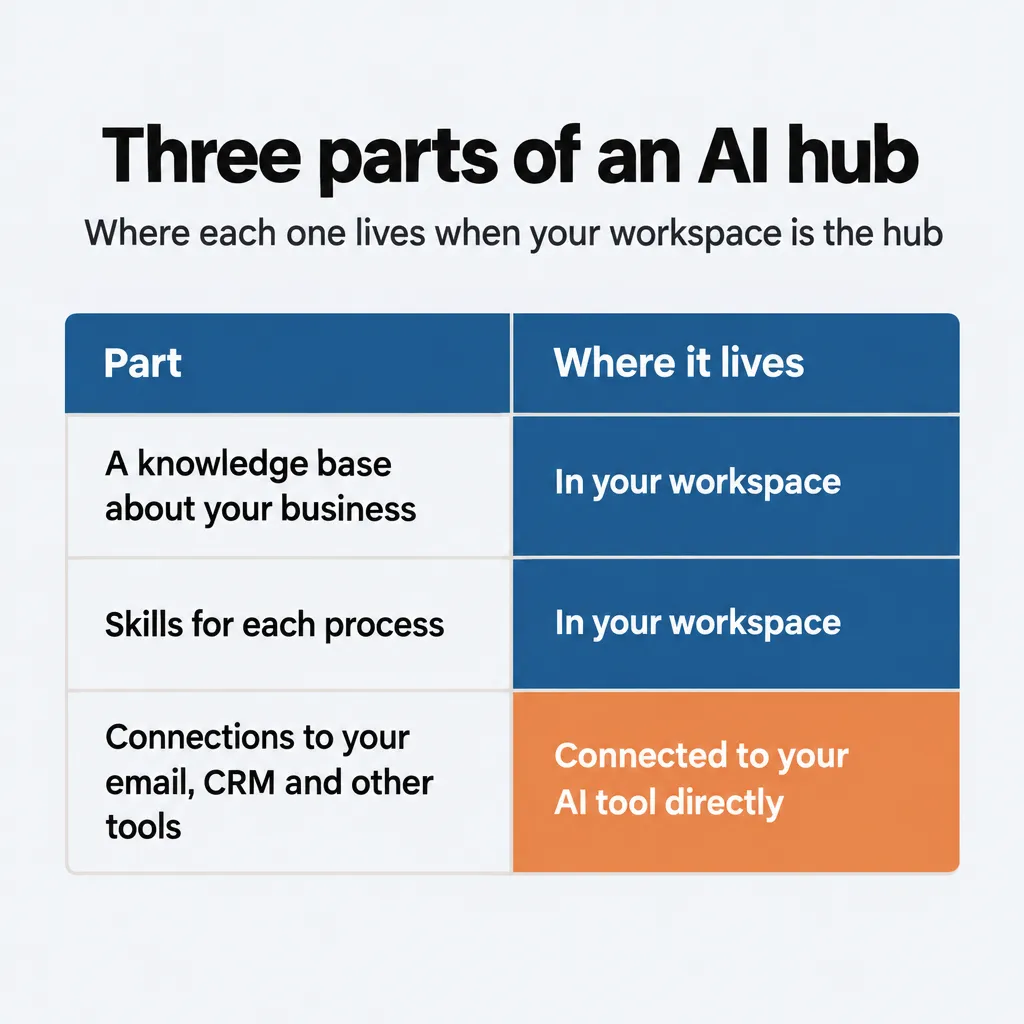
An AI hub needs to hold three things, because if you want AI doing effective work in your organization, it needs access to everything:
- Connections to your data and tools. The AI needs to reach your email, your CRM, your task manager and anything else where work happens, so it can look things up and take actions there. AI tools make those connections through MCP (Model Context Protocol), an open standard that Claude, ChatGPT and many other AI tools support.
- A knowledge base about your business. This is everything there is to know about your organization: what you sell, who you sell to, how you talk and how things get done.
- Skills for each process. A skill is a written set of instructions for one job, like drafting a proposal or onboarding a new client. The AI follows it every time it does that job, so the work comes out the way you want it.
For years, many of us were feeling our way around in the dark when it came to setting AI up in a business. Now people are finally starting to agree on the best way to do it, and it’s this three-part setup. I walked through the general method, with whatever tools you already use, in How to Run Your Business With AI.
Why Not Keep Your AI Knowledge Inside ChatGPT, Claude or Gemini?
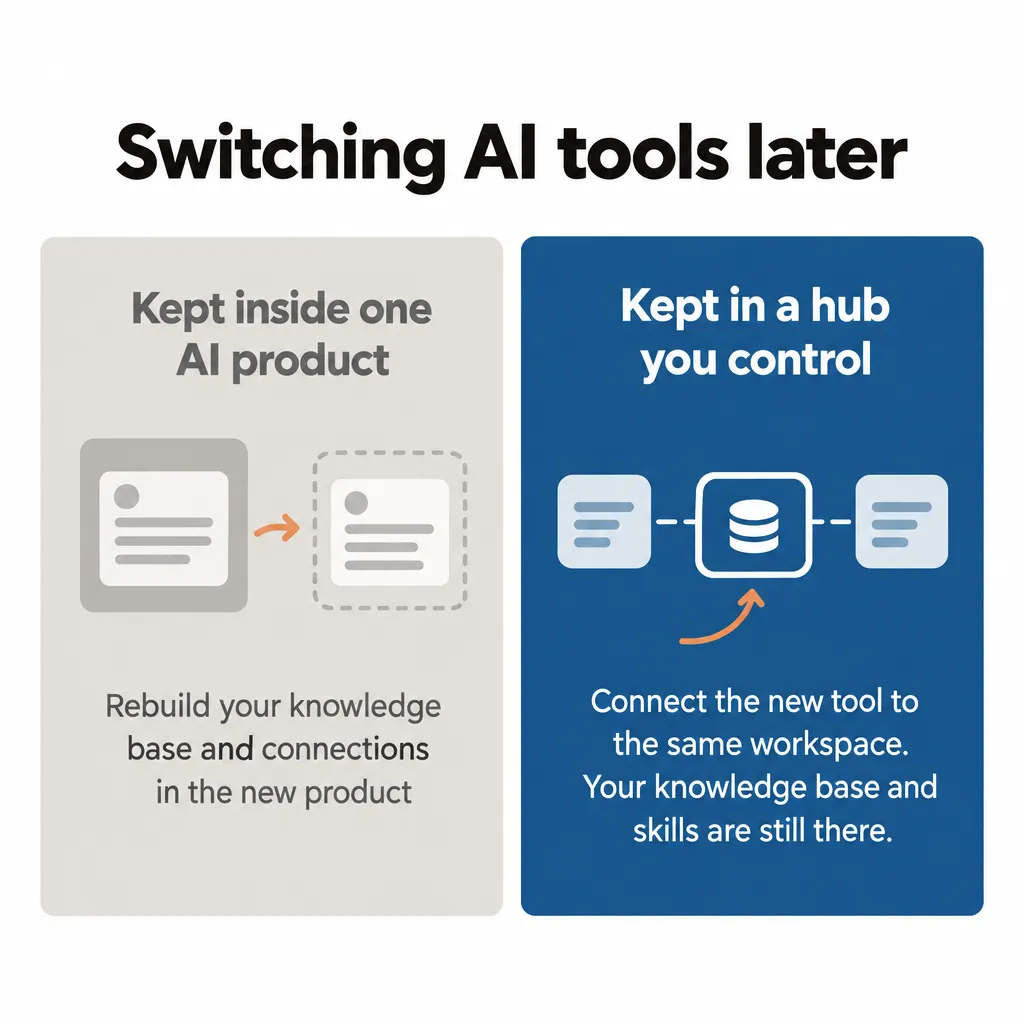
Keeping your company knowledge and skills inside ChatGPT, Claude or Gemini ties you to that one company, because switching to another model means setting them up again somewhere else. Each of these companies has built its own place for this:
- ChatGPT has company knowledge, which answers questions from the apps you connect, and skills. Both are on its Business and Enterprise plans.
- Claude has projects, which hold background knowledge, and skills, which Team and Enterprise owners can set up for everyone in the company.
- Gemini Enterprise connects to your Google and third-party data and has its own agents and skills.
Skills are the easiest part to move. Claude’s skills follow an open standard, so a skill you write for Claude isn’t locked to Claude. In ChatGPT, a workspace admin can download a skill, so your company can keep its own copy.
Your connections move fairly easily too, because they run on MCP. You’d add each one again in the new product and sign in. Your knowledge base is the part you’d rebuild, because each product stores it its own way.
What you need is a hub that you control, one that can connect to any of these AI models.
What Can Notion Do as an AI Hub?
As of Notion 3.8, five features let Notion work as an AI hub:
| Feature | What it does |
| Outside AI tools in your workspace | Claude and other AI tools that support MCP connect to Notion’s MCP server, which lets them search, read, create and update your Notion pages and databases |
| Skills library | Skills are written as Notion pages and kept in a skills database. Connected AI tools can read them like any other page |
| Synced databases | Data from GitHub, Jira and Salesforce, such as your Salesforce accounts and contacts, is copied into Notion databases and kept up to date automatically |
| Connections for Notion’s own AI | Notion Agent and Custom Agents (agents you set up in Notion for specific jobs) can connect to tools like HubSpot, Stripe and GitHub |
| Column permissions | Database owners choose which columns each person or agent can view or edit |
The first row is what makes Notion work as a hub. Once your AI tool is connected, it can read your knowledge base and follow your skills. If your tool can make changes, it can update your databases too. If you switch to a different AI tool later, you connect the new one to the same workspace, and everything is still there.
Notion clearly understands that it’s in the best position right now to be the hub businesses need to bring AI into their work. Its own setup page for agents calls Notion “a central hub you can all read from and write to.”
What Can’t Notion Do as an AI Hub?
Your outside AI tool can’t use the connections Notion’s own agents have to HubSpot, Stripe and other software. Each of those connections belongs to a single Notion agent or person.
A connected AI tool can read and update anything the person who connected it can open. If you can open your team’s compensation details, the AI you connect can open them too.
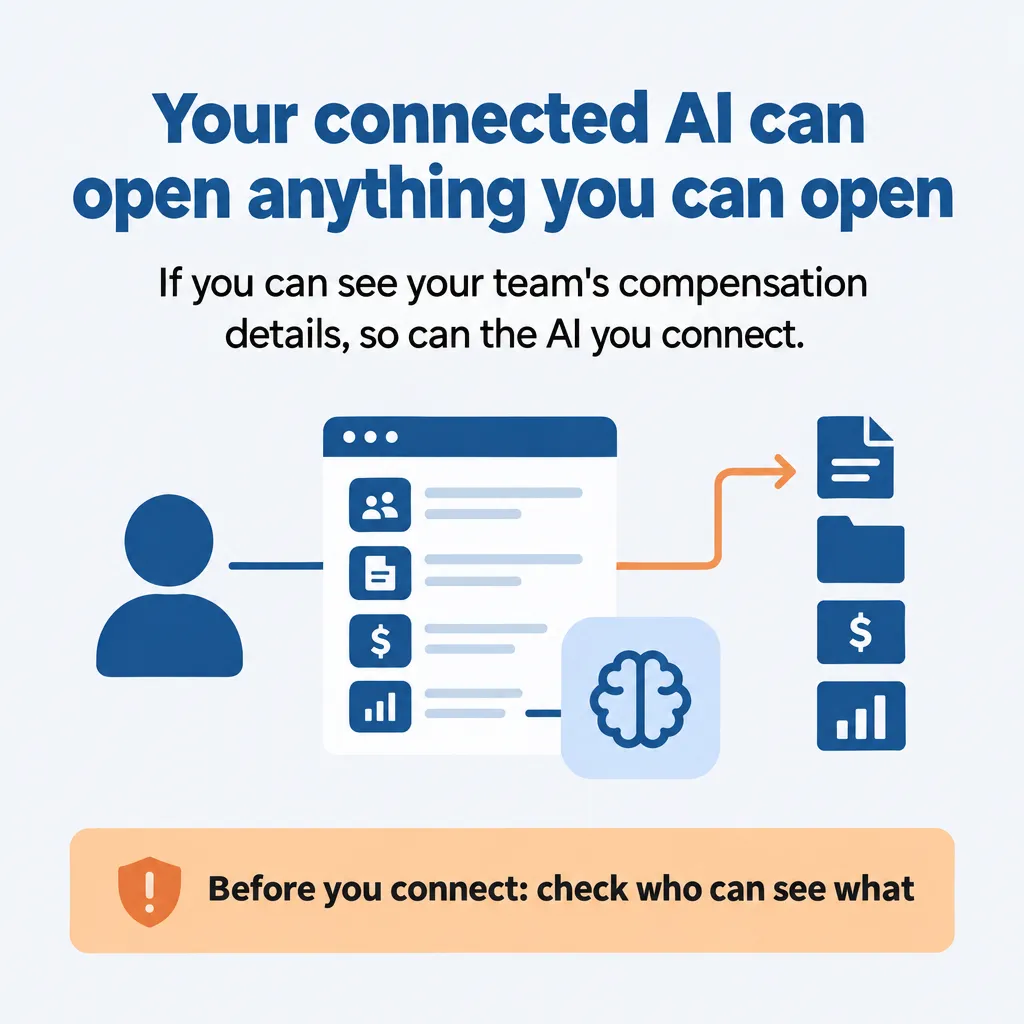
Synced data needs a second look. Notion’s sharing settings decide who can see the records it copies in from Salesforce or Jira. So someone who can’t open a record in Salesforce may still see it in Notion, and so can the AI they connect.
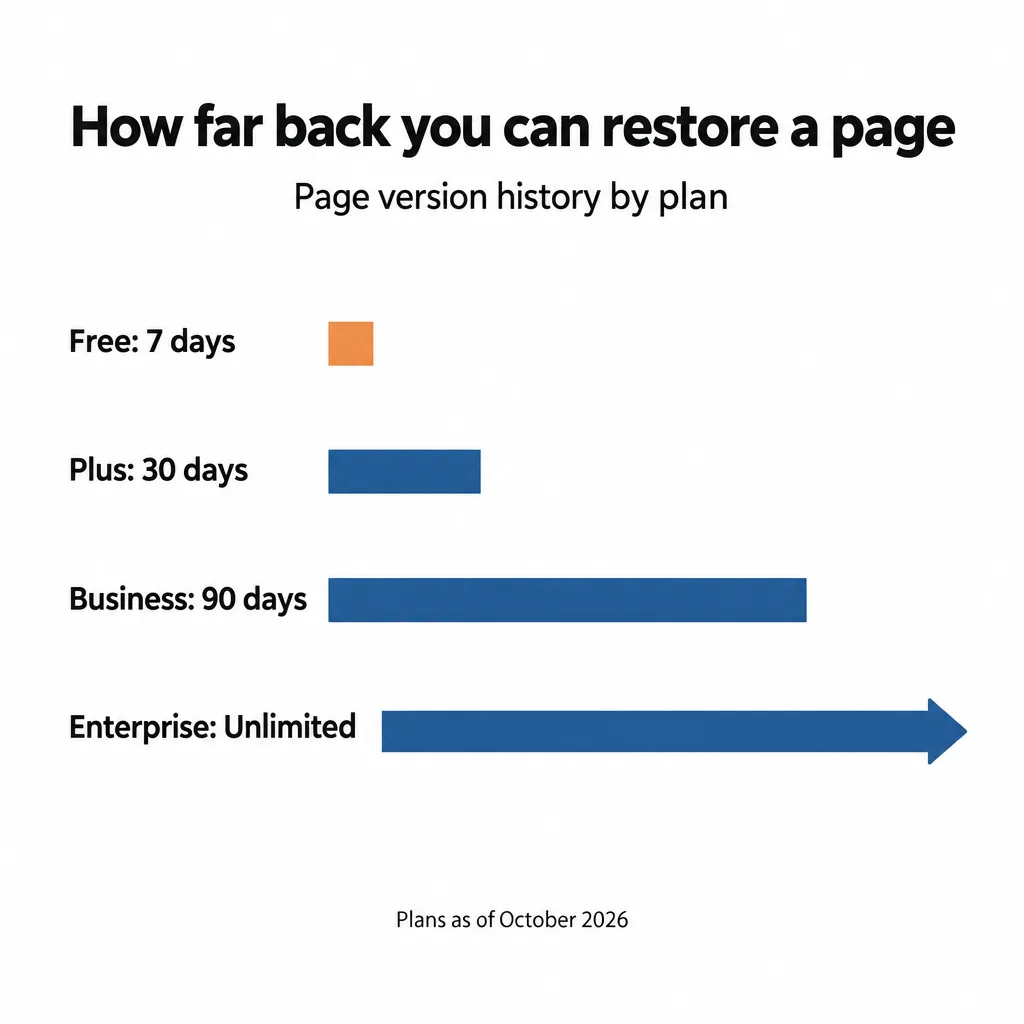
If a connected AI changes something it shouldn’t, you can restore an earlier version of the page from its version history. How far back that goes depends on your plan: 7 days on Free, 30 on Plus, 90 on Business, and unlimited on Enterprise.
The rest of the limits matter less to most small businesses:
- Synced databases only copy data into Notion. Data comes one way, from GitHub, Jira or Salesforce, and the synced fields can’t be edited in Notion. To change a value, you change it in the original tool.
- On most plans, nothing copies your Notion data outside Notion automatically. Notion backs your data up in its own cloud, but that isn’t a copy you hold. To get one, you export your workspace yourself as HTML, Markdown or CSV. For a whole workspace, Notion can take up to 30 hours to prepare the export. That export is also how you’d take your content with you if you ever left Notion. Notion says uploading it back into Notion won’t instantly recreate your workspace. I’d keep regular exports anyway, as I suggested in my post on AI memory and vendor lock-in.
- Notion’s MCP server has had outages. During an incident that ran from April 2 to April 7, 2026, AI tools connected to Notion had trouble looking things up in Notion databases. On August 5, new connections from Claude to Notion failed for about three hours. When all of your AI work runs through one hub, an outage there affects all of it.
- Copying your skills to GitHub takes setup. Notion offers a sample script that copies your skill files from Notion into a GitHub repository, for AI tools that load skills from GitHub. It runs on Notion’s Skills API, which lets other software load your skills. Your team sets the script up and runs it on its own GitHub account. By default, it checks Notion for changes once an hour. If your AI tools connect to Notion directly, they already read your skills there, so most small businesses can skip it.
How Much Does It Cost to Use Notion as Your AI Hub?
Notion’s Business plan is where most of the AI hub features start. Prices are per member per month, from Notion’s pricing page:
| Plan | Price | What it gives you for an AI hub |
| Free and Plus | Free: $0. Plus: $10 billed yearly, $12 billed monthly | Connect Claude, ChatGPT or another AI tool through Notion’s MCP server. Search is keyword only, with fewer search filters and a limited number of database lookups |
| Business | $20 billed yearly, $24 billed monthly | Adds AI search for connected AI tools, column permissions, GitHub and Jira syncs, connections for Notion’s own agents, and Custom Agents |
| Enterprise | Custom pricing | Adds Salesforce sync |
Custom Agents are an extra cost on Business and Enterprise, paid for with Notion credits at $10 a month for each 1,000 credits. Notion doesn’t say which plans include the skills library.
You also pay for your AI tool itself, such as a Claude or ChatGPT subscription. When Notion Agent uses GPT models, that use normally comes out of your Notion credits. If you already pay for ChatGPT Plus, Pro or Go, you can bill that use to your ChatGPT subscription instead, on Notion’s Business or Enterprise plan. This doesn’t apply to Custom Agents.
Should You Build Your Own AI Hub Instead?
I think a lot of businesses are still going to want to build their own AI hub, and it’s what we did at TJ Digital. Our hub holds a library of skills our team runs with Claude, a knowledge base for every client (we call it a Brand Ambassador), and a connector that gives Claude both. We still use Notion for our CRM and task management, and our AI connects to it there.
We keep our knowledge base outside Notion for two reasons, which I explained in how to structure an AI knowledge base. Notion gave us less control over how our documents are structured. And in our experience, an AI knowledge base runs slower in Notion. If either of those matters to you, building your own is worth considering.
I’m absolutely obsessed with the one our dev team built for us. But I have to be honest: if Notion 3.8 had existed when we started, I’m not so sure I would have had the motivation to build it.
If you build your own, an internal MCP server is how you’d connect every AI tool your team uses to it.
How Do You Set Up Notion as Your AI Hub?
You can set Notion up as your AI hub in four steps, starting with permissions:
- Check who can see what. Look at what the person connecting the AI can open in Notion, and remove their access to anything the AI shouldn’t see. On Business or Enterprise, column permissions can hide specific database columns from that person and their AI, unless they have full access to the database.
- Connect your AI tool to Notion’s MCP server. Notion’s help page lists the Claude desktop app, claude.ai, ChatGPT Pro and Cursor, and says any AI app that supports MCP can connect. In ChatGPT, your plan decides what that connection can do. On ChatGPT Pro it can only read, and connections that can make changes are in beta on Business, Enterprise and Edu. Start with one person’s own AI tool before you connect the whole team.
- Put your company knowledge in Notion pages and databases. Start with what the AI will need most often: what you sell, who you sell to, how you talk and how things get done.
- Write your first skills as pages in a skills database. Give each skill a description that says what it does and when to use it. Notion’s AI only uses a skill without being asked when the skill has a description. Only skills kept in a skills database have a description field. I wrote about how to build AI skills for your business if you’re starting from scratch.
Whatever you choose for your business, Notion or something you build yourself, what’s clear is that you need something like this. You need AI deeply and intelligently integrated into your business. For us, it’s changed how much knowledge work we get done, and how good that work is.
If you have questions about any of this, reach out through our contact page or email me at tj@tjrobertson.com.