
What Is the AI Socket Framework?

The AI Socket Framework is a way of writing AI skills so that one skill can work for any business. The skill holds only the part of a job that’s the same for everyone, and everything specific to your business stays in your own documents.
A socket is a marked spot in a skill where the AI reads in something from those documents, like the brand voice of the client it’s writing for.
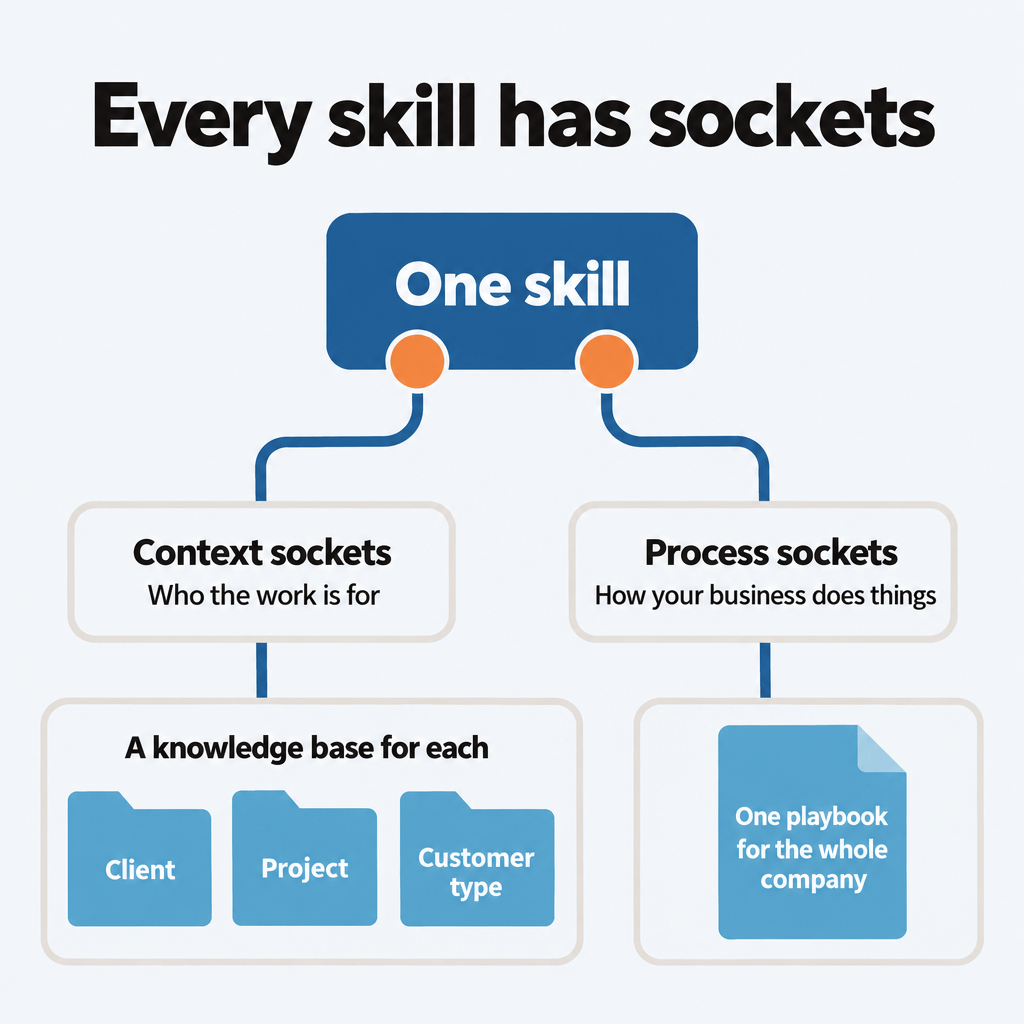
Every skill has sockets. Context sockets plug in who the work is for. Process sockets plug in how your business does things. A process socket, for example, might say who has to approve a draft before it goes out.
We’re building this at TJ Digital, where we run our agency on an AI system we call Tavi. Our skills already read each client’s own documents through context sockets, and our article skill has a process socket for what happens once a draft is done. That part is working really well, but the rest is still our plan, and nothing about it is final yet.
Table of Contents
Why Is It Hard to Share AI Skills Between Businesses?
It’s pretty easy to write a skill that works for your own business. But if you’ve ever tried to share one, you’ve probably found it isn’t much use to anyone else, because it’s full of your details. The skills that are easy to share are the generic ones, and generic skills tend to produce generic results. One Hacker News commenter described both sides of this:
> “All of my skills/subagents are highly tailored to my codebases and workflows, usually by asking Claude Code to write them and resuming the conversation any time I see some behavior I don’t like. All the skills I’ve seen on Github are way too generic to be of any use.” > > (throwup238 on Hacker News, January 2026)
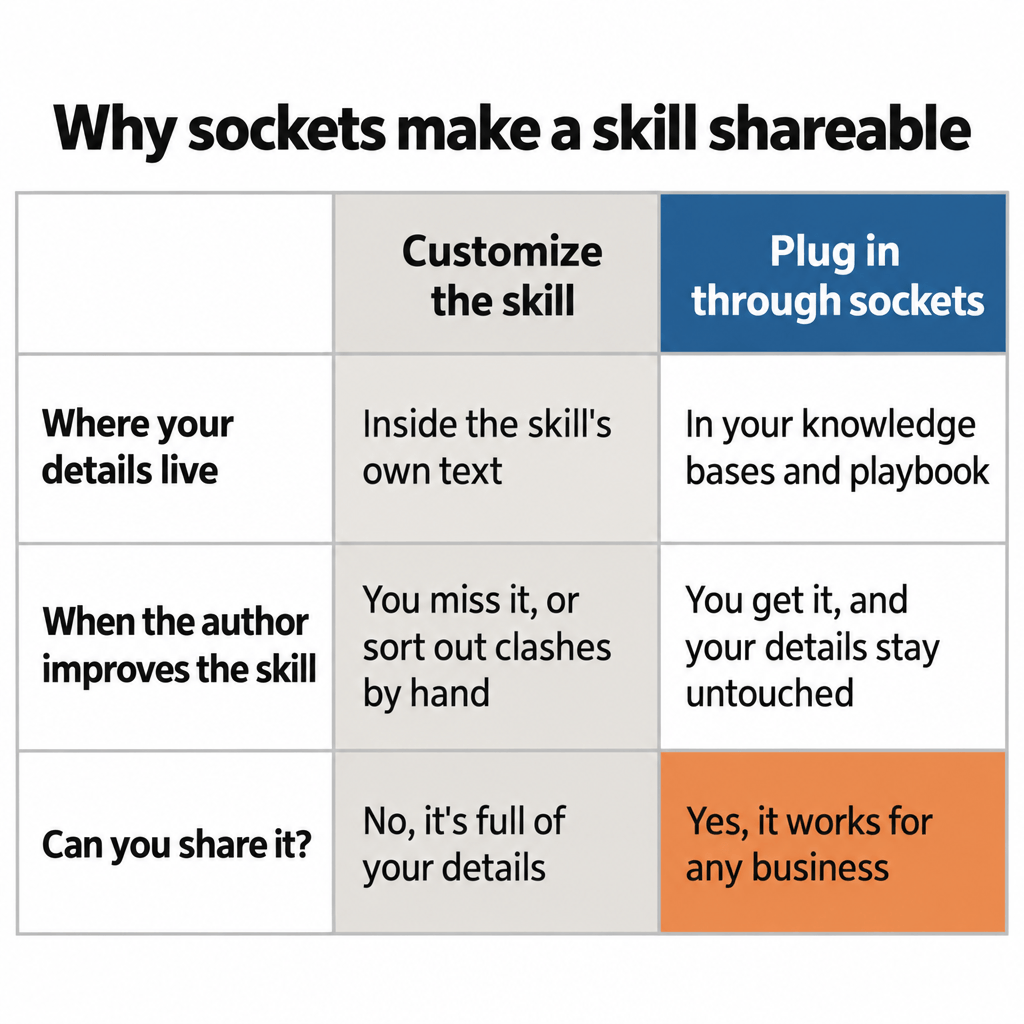
So you take a generic skill and customize it for your business. Once you do, it’s no longer shareable. You’re maintaining your own copy now, and you miss every update the author makes to the original.
People have tried to fix this with git, the tool developers use to track changes to files. You fork the skill, which gives you your own copy that can still take in the author’s later changes. The trouble is that your customizations sit in the same paragraphs the author keeps rewriting. Whenever the author changes a paragraph you’ve also changed, you end up with two versions of it, and someone has to sort them out by hand. And most business owners don’t use git.
What Is a Socket in an AI Skill?
In the skill itself, a socket is a line of plain text, so a skill with sockets is still an ordinary skill in the Agent Skills format. Anthropic published that format as an open standard in December 2025, and Claude, ChatGPT, GitHub Copilot, Cursor and Gemini CLI all support it.
Think of the skill as an app and your sockets as its settings. When the app updates, your settings survive. The one difference is that you write these settings in plain English.
Software has kept settings apart from code for decades. The Twelve-Factor App, a methodology for building software-as-a-service apps, calls for “strict separation of config from code.”
The skill keeps what’s the same for every business: which decisions the job involves, the order to make them in, and what good finished work looks like. As AI models get better, I expect skills to need fewer of those instructions, because the models will already know more about how to do each job.
What you plug into the sockets keeps its value, because no model has information about your business unless you give it. That’s also why we named the framework after sockets and not after skills.
What Are Context Sockets?
Context sockets plug in who the work is for. That can be a client, a project or a type of customer, and we call each of these a context. Each context gets its own knowledge base: a folder of information about that client, project or customer type.
| Kind of context | What it is | Made-up example |
| Client | One customer account | “This client wants every proposal to include a compliance section.” |
| Project | One engagement or initiative | “For the spring launch, use the new product name and the launch FAQ.” |
| Customer type | A kind of customer you serve again and again | “First-time buyers: explain terms, avoid jargon, lead with reassurance.” |
Customer types mean a business without named clients, like a shop, a clinic or a software product, can use context sockets too.
In our agency, each client has its own knowledge base, which we call a Brand Ambassador. That lets us use a single skill for writing articles without any client-specific guidance in it. The skill tells the AI to open the knowledge base for whichever client the article is for and read three documents that every client’s knowledge base has:
- A brand voice document, to understand how that client talks
- An internal pages document, to know where to add internal links
- A content guidelines document, to apply any rules the client has given us
When we improve the article skill, every client gets the improvement the next time it runs. When one client needs something different, we update the documents in that client’s knowledge base and leave the skill alone.
We used to call context sockets “skill hooks.” Our guide to using Claude skills for multiple clients walks through that setup.
What Are Process Sockets?
Process sockets plug in how your business does things. They matter more now that we want AI to do more than hand us a draft. We want it to take the next steps too: publishing to your website, getting approval, updating a task or sending a message. Those steps are different for every business, so they don’t belong in the skill.
In our agency, when the AI finishes drafting an article, the draft should go into a Google Doc, get attached to a Notion task and be assigned to an account manager for review. If all those steps were written into our article skill, the skill wouldn’t be much use to your company.
So the article skill has a process socket at that point. It’s one line that points to your business’s own process for that step, and a second line with a default to follow until you’ve defined one. In the format we’re planning, it looks like this:
## Step 4: Approval
{{socket: approval.content
  default: "Share the draft with the requester and wait for sign-off."}}
For us, the process behind that socket is the Google Doc, the Notion task and the account manager.
What Goes in the Playbook?
Your process sockets will all be filled in one document: the playbook. There’s one playbook for the whole company, so anyone can read how the business works from top to bottom in one place.
Each process socket belongs to a kind, and its name starts with that kind, like approval.content. Some examples of the kinds we’re working from:
- Approval: who signs off, and how
- Storage: where each kind of thing is kept
- Tools: which system does which job
- Roles: who does what
- Naming: how files and tasks are named
- Quality: what has to be true before work goes out
- Tone: how the business sounds
- Format: what an output looks like, such as meeting notes, a task or a weekly review
The playbook will have a section for each kind, with a heading for each socket under it. If a process works differently for a certain kind of meeting or input, that variation goes on its own line under the process, like “on sales calls, also log objections in the CRM.”
When a process changes, you update it once in the playbook, and every skill that uses that socket follows the new version.
How Do Sockets Let Businesses Share Skills?
Process socket names will come from one shared list, and every skill will refer to a socket by its name from that list. It will come with Tavi, the plugin we’re building to set all of this up.
If everyone’s skills use the same names, a skill someone else wrote plugs into your setup. It reads your playbook and your knowledge bases, and the author can keep improving it without touching your details. That’s what makes a shared library of skills possible: anyone building on the framework, us included, can share skills with each other.
The framework will also carry a version number, because once other businesses build on it, any change to its structure reaches their files. When a new version comes out, a migration skill will update your files to match it. And every new socket will ship with a default, so adding one won’t break anyone’s setup.
Do You Have to Set This Up by Hand?
If you’re already getting a little lost, don’t worry. You won’t have to build any of this by hand.
We’re packaging Tavi as a plugin, added from a marketplace, so any business can install it, whatever its processes or industry. It’s built on the AI Socket Framework we pioneered, and we’re starting with Claude, in Claude Code and Claude’s desktop app.
Tavi’s setup skill will interview you about how your business works and write your first playbook. If you don’t have a knowledge base for a client or project yet, or a skill needs a document you don’t have, Tavi will walk you through creating it wherever you keep that kind of information. The bigger goal is to help a business bring AI into how it already operates, and how to run your business with AI explains what that looks like for us.
What Does a Client’s Instructions File Look Like?
Besides documents like the brand voice, each client, project and customer type will have one instructions file in its knowledge base. It holds the changes a skill should make when it’s working for that client, project or customer type.
The top of the file names the client and says how to recognize work for them, such as emails from their domain or their account in your CRM. That’s how the AI matches a request or an email to the right client. Below that, the file has a section for each skill it changes, headed with the skill’s exact name. A made-up example:
## proposal-writer
Include a compliance section after the scope.
The file can also have an “Every skill” section for the few rules that apply to all work for that client.
When a skill runs, it will work out which client, project and customer type the work is for, read their instructions files and apply the sections with its own name. More than one context can apply at once, like a customer type and a specific client.
What Happens When a Socket Is Empty?
Every process socket has a default, so a skill works on day one even if your playbook is empty. With an empty approval socket, for example, the article skill would share the draft with whoever asked for it and wait for their sign-off.
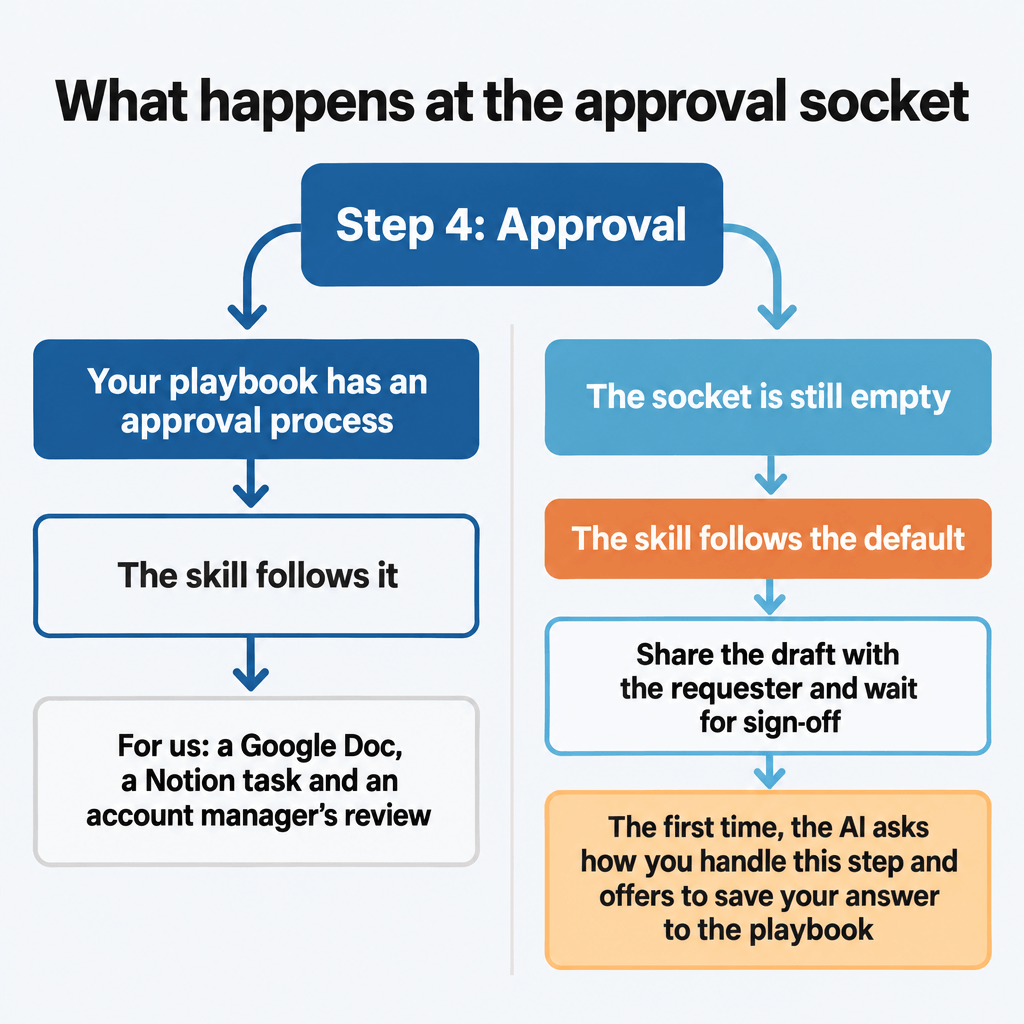
The first time a skill reaches an empty socket, the AI will ask you how your business handles that step. When you answer, it will offer to save your answer to the playbook, so the skill follows your process from then on. You don’t need a big setup project before any of this is useful.
Instructions you give in the middle of a job will be saved the same way. The AI will ask whether an instruction holds for every piece of work or only for this client, project or customer type. Then it will save the instruction to your playbook or to that context’s instructions file.
Where Do the Knowledge Bases and Playbook Live?
Your knowledge bases, playbook and skills will live in two folders. knowledge/ holds facts: what your business knows, including a knowledge base for each client, project and customer type. That’s why a client’s instructions file sits there, with the rest of that client’s information. system/ holds the instructions for how your AI works, including the playbook and your own skills.
The two are kept apart so that, later on, different people can be in charge of editing the facts and the instructions. (If your team already shares a knowledge base, how to manage a shared AI knowledge base for your team covers who edits what and who approves changes.)
| File | What it holds |
knowledge/clients/<client>/instructions.md | That client’s instructions file (projects and customer types work the same way) |
system/playbook.md | Your playbook |
system/START.md | A short summary of your setup that loads into every conversation |
system/guides/ | One guide for each system you connect, like your task manager or CRM |
The default home for these folders will be GitHub. Claude Code does the git work for you. A regular folder on your computer, synced with Google Drive, Dropbox or OneDrive, will work too, and so will storage you already use. Skills will never refer to where the folders are stored, so you can move them later without editing a single skill.
Which Instruction Wins When Two Disagree?
When two instructions disagree, the more specific one will win. From weakest to strongest:
- The skill’s own default
- Your playbook’s entry for that process socket
- The instructions for that type of customer
- The instructions for that client
- The instructions for that project
So if your playbook says one thing and a client’s instructions say another, the client’s instructions win, and a project for that client can override both. If two instructions at the same level disagree, the AI will ask you which one applies.
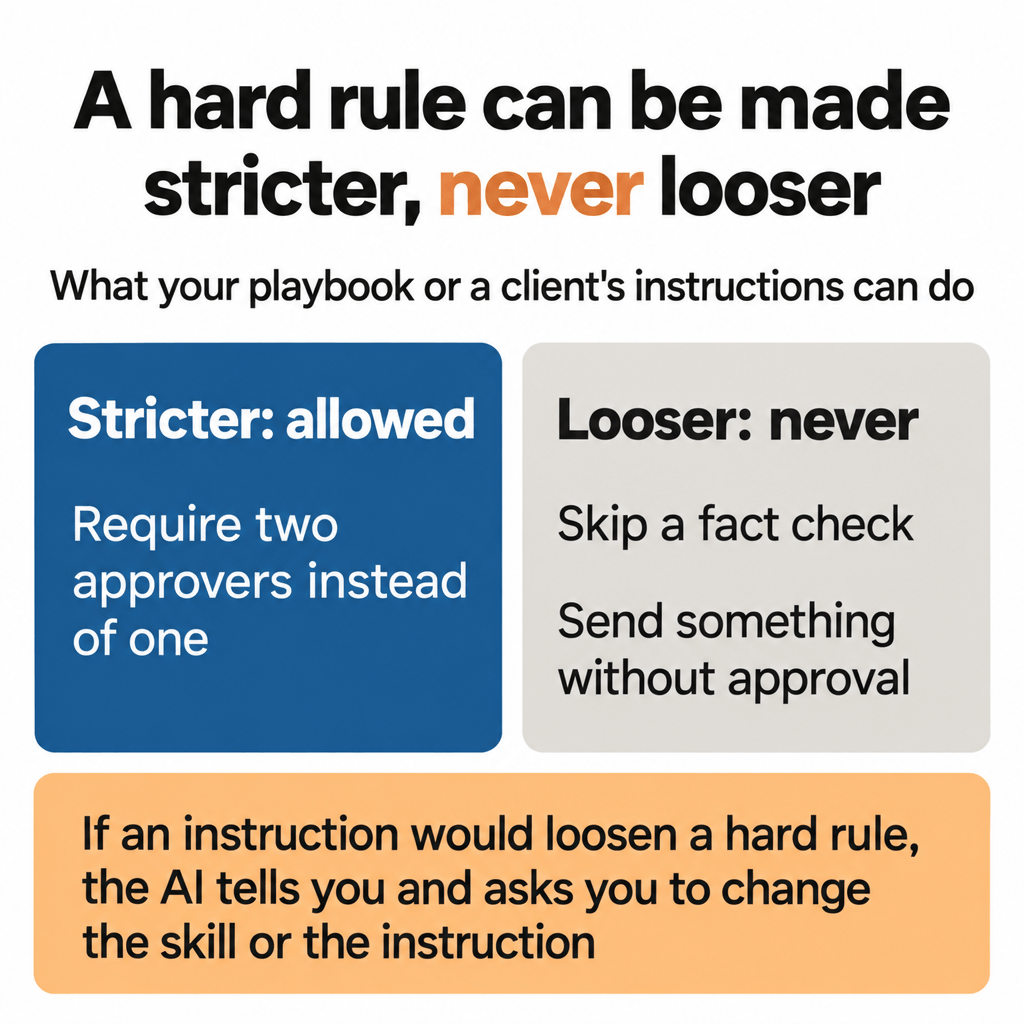
Some rules shouldn’t be overridden at all. A skill can mark these as hard rules, each on a line starting “Hard rule:”. They cover things like accuracy, safety, and anything that gets sent to a customer, published, paid for or deleted.
Your playbook or a client’s instructions can make a hard rule stricter, like requiring two approvers instead of one. They can never make it looser, like skipping a fact check or sending something without approval. If an instruction would loosen a hard rule, the AI will tell you what it would loosen and ask you to change the skill or the instruction instead.
The AI can still get a hard rule wrong, the same as any other instruction, so hard rules don’t replace a person checking the work. We have an account manager review all of our AI’s work before it reaches a client.
Does It Work With the Tools and Files You Already Have?
The framework will add to what your business already has without rearranging it. It will never move, rename or delete your files, and any change outside its own two folders will be proposed first for you to approve. Skills you’ve already written stay where they are.
A knowledge base you keep in Notion, Google Drive, Confluence or SharePoint stays there too. Your playbook will record where it lives, and a system guide will tell the AI how it’s organized.
Each system you connect, like a task manager, CRM or shared drive, will get a guide like that. It tells the AI what’s kept where, which IDs and fields matter, the conventions you follow, and the rules to read before changing anything.
When the AI can’t do part of a job, the fix is one of three things:
- Connect the system it can’t reach
- Write a guide for a system it can reach but doesn’t know how to use
- Add what it doesn’t understand to the knowledge base or a skill
How Does the AI Know About Your Setup in Every Conversation?
In every conversation, the AI needs to know where your playbook and knowledge bases are without you reminding it. That’s the job of a starting file, system/START.md. It will say what the business is, where the playbook and knowledge bases are, and what the hard rules are.
Because it loads into every conversation, the starting file will stay well under 200 lines. A longer file takes up room in every conversation, and Claude’s documentation says longer files also make Claude less likely to follow them.
The starting file loads on its own when Claude works from a folder on your computer, as it does in Claude Code and Claude’s desktop app. A plain chat doesn’t load it, but you can paste the starting text into a project’s instructions. Claude Code reads a file called CLAUDE.md at the start of every session. A CLAUDE.md file can pull in another file with a line that starts with @. So Tavi will add one line to your CLAUDE.md, @system/START.md, and the starting file will load with it.
For tools that read AGENTS.md, an open instructions format many coding agents use, Tavi will write the same starting text into a marked block in that file. Either way, Tavi will create a file only if it’s missing, edit only its own line or block, and show you the change for approval.
How Can You Start Using Sockets Now?
If you want to try Tavi, you can sign up for early access.
You can also start writing your own skills this way today. Keep the steps that are the same for everyone in the skill. For anything that changes by client or by business process, point to a separate document, and write a default for when that document doesn’t exist yet. If you’re new to writing skills, how to build AI skills for your business covers the basics.
If you have questions about any of this, reach out through our contact page or email me at [email protected].