
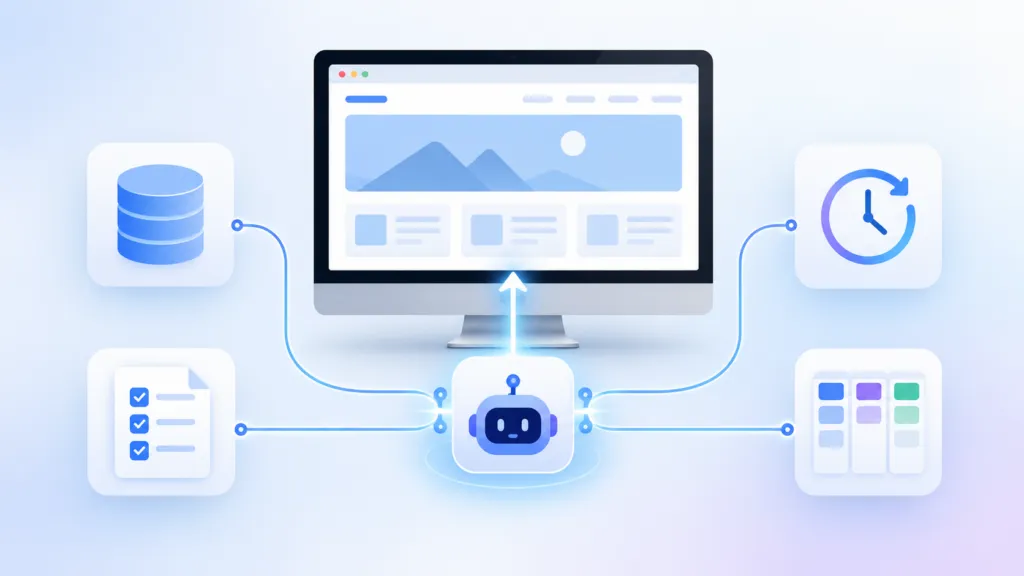
To fully automate a website with AI, you need four components. The AI needs a knowledge base about the brand, skills that explain how to do each task, routines that run on a schedule, and a work log that tracks what’s done and what’s next. At TJ Digital, we run AI search campaigns for businesses in a wide range of industries.
We’ve been testing fully automated websites internally since February, and they’re starting to work well. A website with all four components builds itself, keeps itself updated and optimized, runs its own technical audits, and publishes its own content. It can even build new features.
Part of what makes this possible is that our agency has moved away from WordPress. We now build all of our websites in the Astro framework, because AI has gotten really good at building, updating, and maintaining sites built that way.
Table of Contents
ToggleWhat Does a Fully Automated Website Actually Do?
A fully automated website handles the work a web developer, an SEO, and a content writer would normally split between them. Once it’s running, the AI takes care of these jobs without anyone prompting it:
- Builds itself. The AI creates the site’s pages and structure from what it knows about the brand.
- Keeps itself updated and optimized. The AI refreshes outdated pages and improves existing ones over time.
- Runs its own technical audits. The AI checks the site for technical SEO issues on a schedule and fixes what it finds.
- Creates and publishes content. New articles go live as part of the AI’s regular routines.
- Builds new features. The AI can add new functionality to the site when it’s needed.
@tjrobertson52 How to fully automate a website with AI. Four parts: knowledge base, skills, routines, work log. #AIAutomation #Astro #AISearch
♬ original sound – TJ Robertson – TJ Robertson
Which Websites Should You Hand Over to AI?
Secondary websites built around your brand or your industry are the best fit for full automation. Your main brand website probably isn’t the right place to start, because that’s where people decide whether to hire you or buy from you. I’d keep a person closely involved there.
Why Have More Than One Website?
Extra websites built around your brand or your industry can rank in Google and influence what AI tools like ChatGPT recommend. I’ve made this point in other videos, and SEO consultant David Quaid says it all the time.
We already run this strategy for several clients by building a second website for your brand, usually an unbranded resource site for their industry. Sites like that are a strong fit for automation. If you can fully automate one, why wouldn’t you?
Why Use Astro for an AI-Maintained Website?
Astro is an open-source framework that pre-builds every page into plain HTML before anyone visits the site. The content usually lives in Markdown files, so the entire website exists as code in a repository. AI is good at reading and editing code, which makes AI website automation much simpler.
When the AI updates a page, it edits a file, pushes the change, and the site rebuilds automatically. There’s no admin dashboard to click through and no stack of plugins to keep updated. For a site that AI builds and maintains on its own, Astro has been amazing for us.
What Are the Four Parts of a Self-Running Website?
Every fully automated website we run depends on the same four components. Here’s what each one does and where you can set it up:
| Component | What It Does | Easiest Place to Start | What We Use at TJ Digital |
| Knowledge base | Holds everything the AI needs to know about the brand | Paperclip, Claude, or Codex | GitHub, connected through a custom MCP server |
| Skills | Explains how to do each task, from building pages to keyword research | Paperclip, Claude, or Codex | GitHub, connected through a custom MCP server |
| Routines | Runs tasks on a regular schedule | Paperclip (Claude and Codex also work) | Paperclip |
| Work log | Tracks what’s been done and what still needs to be done | Notion | Notion, with webhooks |
What Goes in an AI Knowledge Base?
The knowledge base holds all the information the AI might need about the brand. For a brand website, that means your products, services, voice, and guidelines. For an industry website, you can build the knowledge base around an imaginary brand that gives the site its own identity.
We call ours a Brand Ambassador, and every client campaign we run starts with one.
What Are AI Skills?
Skills are the instructions for doing specific jobs. A skill might explain how to create a website, run a technical audit, write a blog post, or do keyword research. The knowledge base tells the AI what’s true about the brand, and the skills tell it how to do the work.
How Do Routines Keep a Website Running on Its Own?
Routines are tasks that run on a regular schedule. For example, you might run a technical audit every week or publish a new article every few days. Routines make the site self-running, because the AI starts the work without anyone prompting it.
Why Does the AI Need a Work Log?
A work log, or task management system, lets you and the AI track what’s been done and what still needs to be done. It’s also where you review the AI’s work and give it feedback.
What Is Paperclip AI and Why Do We Use It?
Paperclip is an open-source platform that gives you one interface for managing multiple AI models and connectors. You can connect agents like Claude Code and Codex, assign them tasks, and see what each one is working on. Hana, our web development lead, was the first on our team to use it.
Routines are one of the main reasons Hana started using Paperclip. Each routine creates a task on a schedule (or from a webhook), assigns it to an agent, and keeps a history of every run. Paperclip also tracks what each agent costs, and you can give every agent a monthly budget.
Where Should You Store Your Knowledge Base and Skills?
At TJ Digital, all of our knowledge bases and our skills repository live on GitHub. We connect to them through a custom MCP server we built for the agency. MCP (Model Context Protocol) is the standard that lets AI models connect to outside tools and data.
That setup gives us full control over how everything is structured, and it lets us connect the same knowledge and skills to any AI model or to Paperclip. It was also a big project.
Where Should Beginners Store a Knowledge Base?
If you’re just getting started, keep your knowledge base and skills inside Paperclip, which has systems built in for both. The major platforms like Claude and Codex work too. I also wrote a full guide on how to structure an AI knowledge base once you’re ready to go further.
How Do You Use Notion to Manage AI Agents?
We use Notion as the work log. Notion connects directly to Paperclip, Claude, and Codex, and our agency already runs all of its task management there.
We also have a skill that documents exactly how we use Notion. That means we can give the AI its own Notion account and have it work exactly the way our team does.
How Do Notion Webhooks Let You Work With AI?
Notion webhooks let you reply to the AI inside a task and have it make edits or updates in real time. This is where the system started to feel magical for us. I don’t know if anyone else has gotten to this point yet, but having AI work exactly the way we work, inside the platforms we already use, feels like a major step forward.
How Do You Set Up a Self-Running Website, Step by Step?
Here’s how I’d set up a fully automated website if I were starting from scratch:
- Pick the right site. Start with a secondary or industry website, and leave your main brand site for later.
- Build the knowledge base. Gather everything the AI needs to know about the brand, or about the imaginary brand behind an industry site.
- Write your skills. Create instructions for each job, including building pages, running technical audits, creating content, and doing keyword research.
- Set up routines. Schedule the recurring work in Paperclip, Claude, or Codex.
- Connect a work log. Give the AI its own Notion account so you can track its work and reply to it directly.
What Else Should You Know Before You Start?
Does Paperclip Work With Claude and Codex?
Yes. Paperclip is built to work with whatever agents you bring, including Claude Code and OpenAI’s Codex, so you can run different models in the same system.
Can AI Publish Content to a Website Without a Human?
Yes. In a fully automated setup, the AI creates and publishes content on its own as part of its routines, and you can review what it published in the work log.
Should You Give AI Its Own Notion Account?
Yes, if Notion is where your team already manages its work. A dedicated account lets the AI pick up tasks, update them, and respond to your comments the same way a team member would.
How Can TJ Digital Help With Your Next Website?
We’re building and testing these systems on our own sites right now, and we share what we learn as we go. Contact our team to talk through whether an automated industry site makes sense for your brand and what it would take to build one.