Why AI Can't Answer Your Business Emails
By TJ Robertson, Founder and Lead Strategist at TJ Digital
AI email tools write drafts you can’t send because answering a business email takes knowing your business. The AI can read the email and write a polished reply. What it doesn’t know is who on your team should handle the request, what comes next in your process, and whether this is something you’d say yes to at all.
The fix is to give the AI what it’s missing. That means connecting it to the tools your business runs on, and writing down your business knowledge and your processes where it can read them.
I run TJ Digital, an agency that helps businesses show up in Google and in AI tools like ChatGPT. We’ve built a system like this for ourselves called Tavi, and it runs mostly inside Claude. Tavi now drafts replies to all of my email, and most of the time I send them as written.
Isn’t Answering Email a Simple Task for AI?
Answering a business email looks like a simple job for AI, but most of the work is deciding what the reply should say. The writing part really is simple: understand what the email is asking, then string some words together to form a response. AI is very good at that part.
The deciding is harder, because email is where many, if not most, of the big decisions in a business get made. A customer asks whether you can take on a rush job. A vendor wants you to approve a change. Someone asks for work that wasn’t part of the original agreement.
Every one of those replies commits your business to something or turns it down.
What Does AI Need to Know to Answer Your Email Well?
If you’ve tried to hand all of your email to AI, you’ve probably found that it needs to know nearly everything about you and your business before it can start to do this well. In particular, it needs:
- The role of every person in your business, so it knows when to bring someone else in or hand the work to them.
- All of your processes, so it can say what the next step is.
- Access to your data, so it can pull in the answer to a question, like a price, a date or where a project stands.
- A full understanding of your business and how it makes money, so it knows what you say yes to and what you say no to.
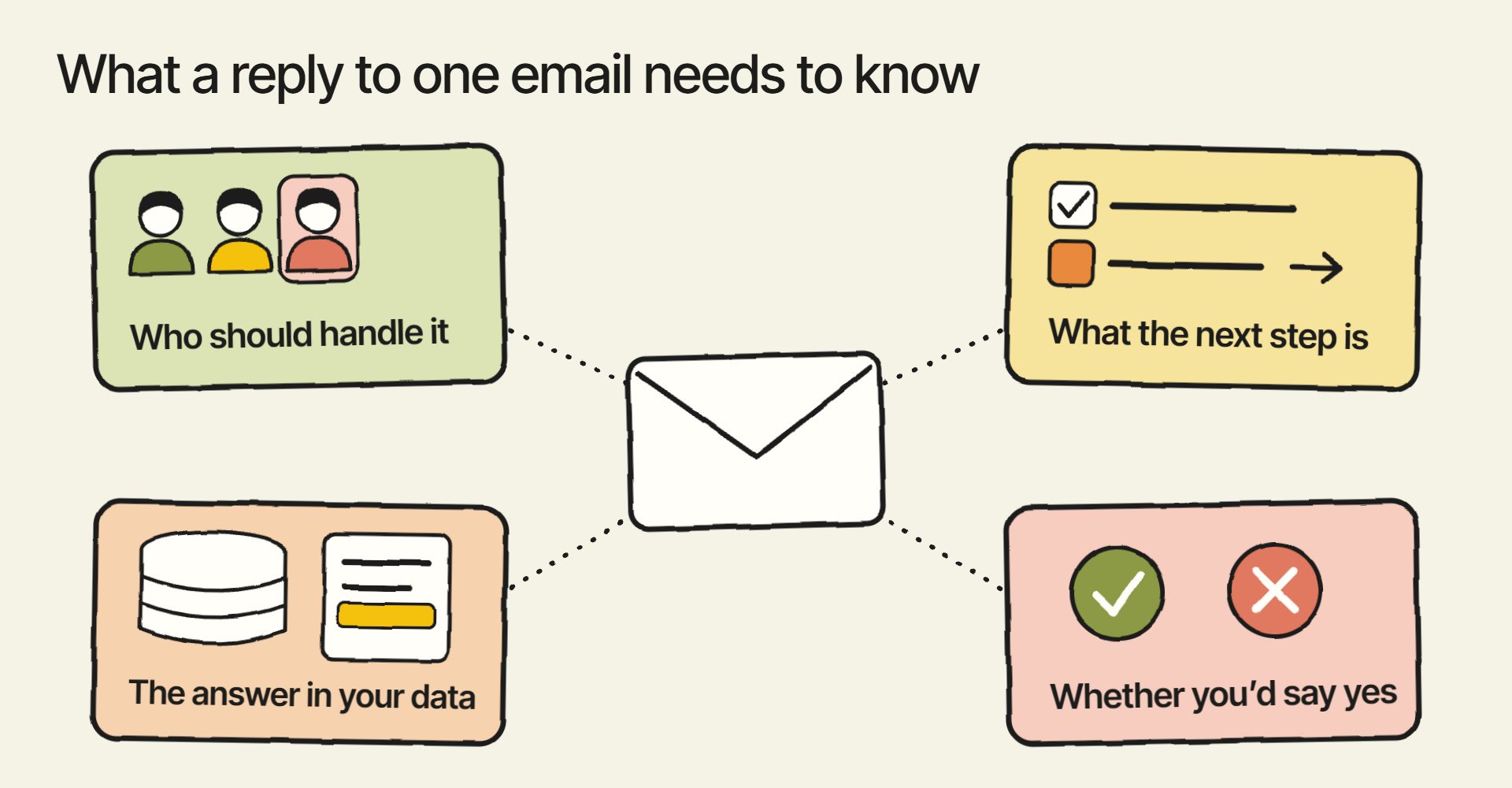
Knowing what you say yes and no to decides a lot of replies. Whether to take something on depends on what you sell, what you don’t, and what’s worth your time. None of that is in the email, and in a lot of businesses nobody has written it down.
If you’ve been assuming the AI just isn’t smart enough yet, check what it knows about your business first. In my experience, that missing information is why the drafts come out wrong.
What Is Google’s AI Inbox, and Does It Fix This?
AI Inbox is a newer view in Gmail, still labeled beta, that shows suggested to-dos and topics to catch up on from your email. I tried it, and for me it was completely useless.
Its suggestions would have committed me to a bunch of work I should hand over to another team member or just say no to. AI Inbox isn’t connected to Tavi, so it doesn’t know who on my team handles what or what we turn down.
Whether AI Inbox drafts replies for you isn’t clear. Google said in May 2026 that it “generates personalized draft replies,” but Gmail’s help page for AI Inbox doesn’t mention drafting.
Can You Connect Gmail’s AI to Your Own Tools and Information?
Gmail’s AI can connect to a short list of outside tools that Google names. Google’s help page for Gemini in Google Workspace lists seven: Asana, Atlassian (Jira and Confluence), HubSpot, Mailchimp, Monday.com, QuickBooks and Salesforce.
On a work account, your Workspace admin has to turn those connections on. Google also says they only support reading, so the AI can look things up in those apps but can’t create or change anything there.
To connect AI to your own systems, you use MCP (Model Context Protocol), an open standard for connecting AI apps to other software. Its own documentation compares it to “a USB-C port for AI applications.” With an MCP server of your own, you can connect AI to systems no vendor built a connection for, like your own database or project tracker. I’ve written about why a business would build its own MCP server.
When I tried AI Inbox, I didn’t see any way to connect our own MCP server. Google’s pages don’t describe a way to add one to Gmail’s AI either.
What Should You Set Up Instead of an AI Email Tool?
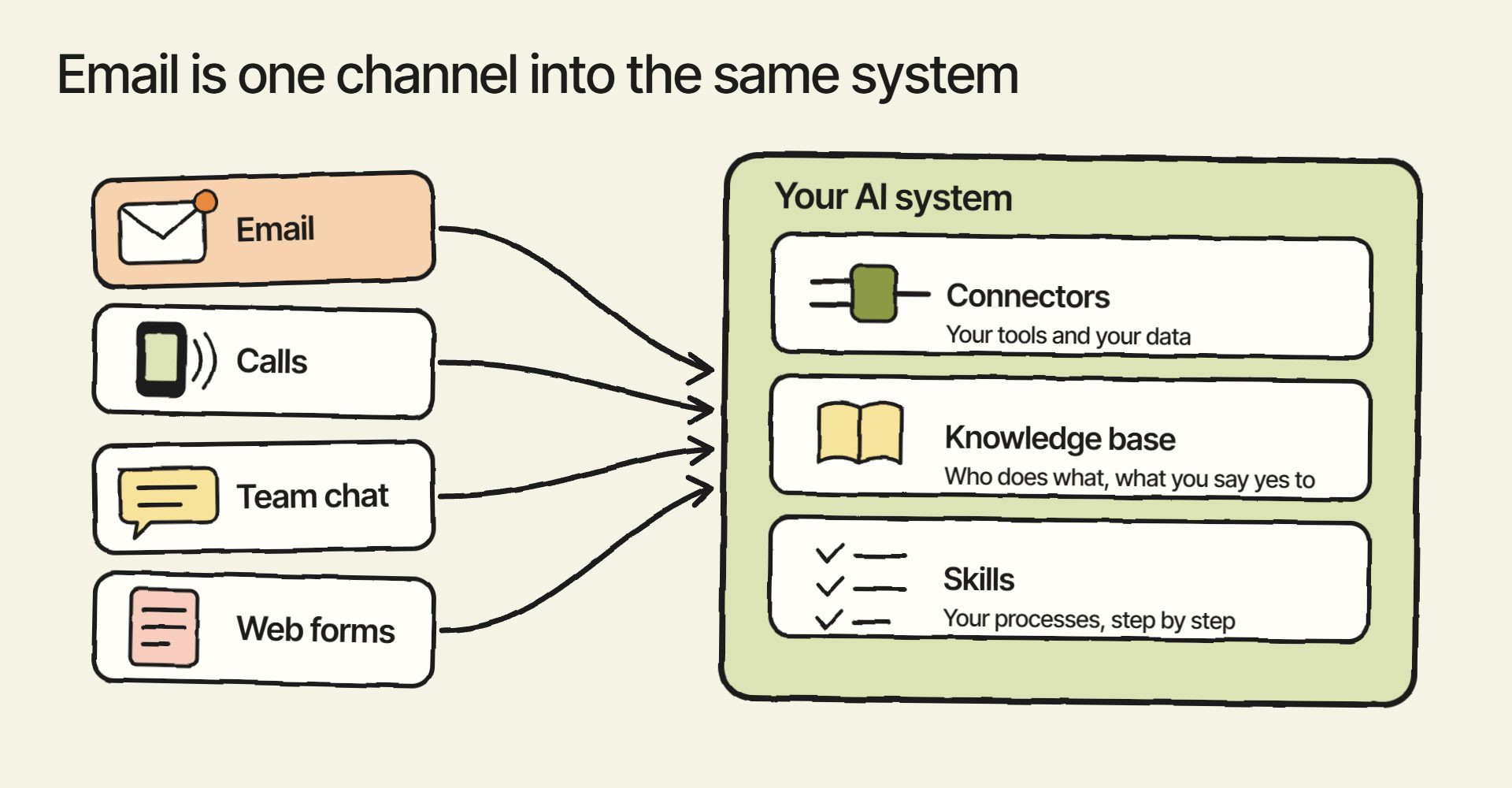
What fixes this is setting up AI with access to your tools, your business knowledge and your processes. That takes three things:
- Connectors to your email and the tools your team works in, like your task manager, CRM and files. These give the AI your data and let it hand work off. Claude’s Gmail connector can search and read your email and draft replies. I’ve written about how to connect Gmail and your other tools to Claude.
- A knowledge base that says who does what, what you sell, and what you say yes and no to. I’ve covered how to build an AI knowledge base separately.
- Skills, which are your processes written as instructions the AI follows, so it knows the next step. Here’s how to build AI skills for your business.
Most businesses think of email as one of the first things to automate with AI. The truth is, email is a channel: it’s one of the ways work reaches your business. By the time you’ve set all of this up for email, the same system can do far more than answer it.
In my experience, once AI is set up this way, it’s hard to find a task on a computer you can’t hand over to it. I’ve explained the whole setup in what an AI operating system for business is.
Does AI-Drafted Email Still Need a Person to Check It?
I’d still have a person read every AI-drafted email before it goes out. I read every draft Tavi writes before I send it.
Claude’s Gmail connector asks for your approval before it sends, replies to or forwards an email, unless you’ve turned on a setting that lets it act on its own. If you’re weighing how much to let AI do on its own, I’ve written about whether it’s safe to let AI agents run without supervision.
Want to Build Your Own Version of Tavi?
We’ve just built the first version of a free plugin that walks you through creating your own version of Tavi. If you’d like to beta test it or be notified when it’s released, sign up at tavi-ai.com/early-access.
If you have questions about any of this, reach out through our contact page or email me at tj@tjrobertson.com.